
Post
Is Tor a VPN? Browser Coverage, Trust and Why Combining Them Needs Care
Tor and VPNs use different designs. Understand browser scope, account identity and why the Tor Project cautions against unsupported combinations.
In this article

Cover: AI-generated editorial illustration of an everyday device setting; not a product screenshot or evidence of testing.
Tor is not a commercial VPN. It is a network and software ecosystem that routes communications through relays, most commonly accessed using Tor Browser. A VPN typically creates a tunnel to a configured gateway. The two systems have different designs, coverage and operating assumptions, even though both can change the network path seen by a destination.
The distinction is useful before installing anything. Someone who wants to use Tor Browser’s privacy design has a different task from someone who needs an approved connection to a workplace network. Adding a VPN subscription does not automatically reproduce Tor, and opening Tor Browser does not automatically route every application on the computer through Tor.
Separate the browser from the network
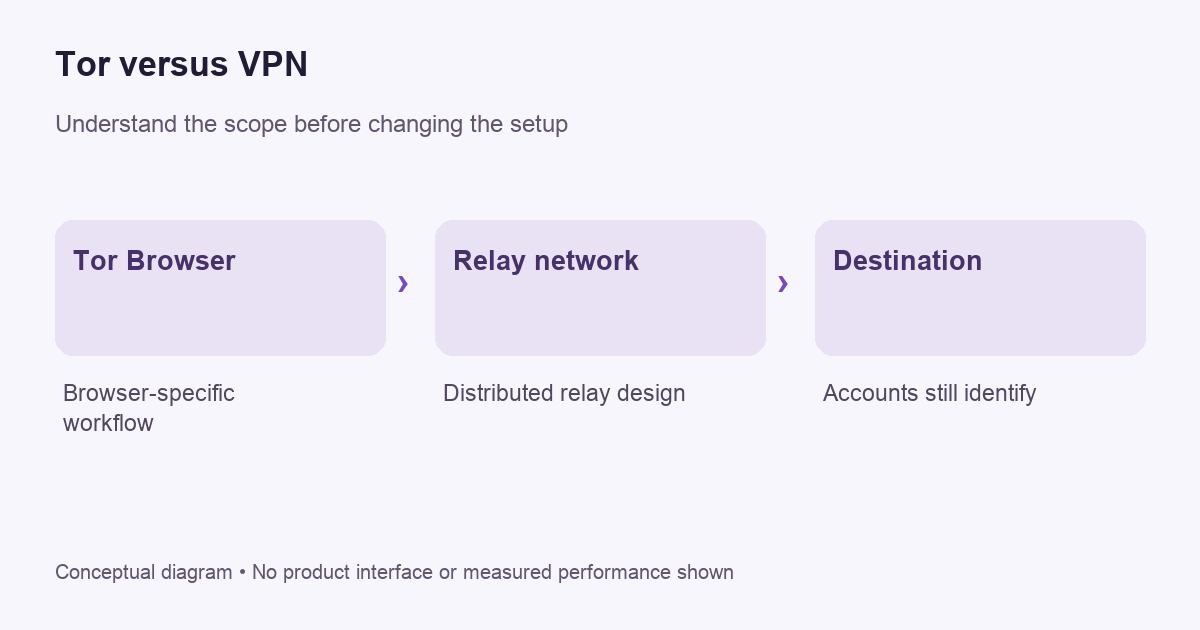
The Tor Project’s introduction explains that the term can refer to several components, including the relay network and the software used to access it. Tor Browser is the common user-facing route into that system. It is a browser with privacy-related design choices, not merely an ordinary browser with a different homepage.
That distinction matters for coverage. If you open a separate mail application or another browser, do not assume it follows Tor Browser’s path. Follow the Tor Project’s documentation for the intended workflow. A privacy-sensitive setup should be based on supported behavior rather than on a general belief that installing one program transforms the entire device.
How the VPN comparison helps
A personal VPN commonly routes configured traffic through a provider gateway, placing the operator in an important trust position. Our VPN explanation describes that boundary. Tor’s distributed relay design is a different architecture. Counting servers alone is not a meaningful way to decide which system fits a particular goal.
Also distinguish Tor from a provider’s multi-hop marketing. A two-gateway commercial route can still be operated within one provider’s system. That is not automatically the same arrangement as Tor. See our Double VPN guide for why an extra hop needs to be evaluated against a defined observation or trust problem.
Tor versus a VPN: compare visibility, not a security score
A useful comparison asks which observer can see which part of a connection. Tor’s first relay can see the source connection without learning the final destination from that role alone. For an ordinary public website, the exit relay handles the last step out of the network. The Tor Project explains that HTTPS limits what that exit can read: it can still know the destination, but HTTPS protects the content in transit to the site.
This corrects two common mistakes in older comparisons. It is inaccurate to say that every request becomes readable merely because it passes through an exit, and it is equally inaccurate to say that adding more use makes a person impossible to identify. The network route, end-to-end encryption and information supplied to a website are separate parts of the decision.
| Layer | Useful question | What not to assume |
|---|---|---|
| Network route | Which relay or gateway handles the connection? | One successful connection proves anonymity against every observer. |
| HTTPS | Is the browser using an authenticated encrypted connection to the intended website? | A changed exit address replaces website encryption. |
| Account activity | What identity have you deliberately supplied to that website? | A new route erases an existing account or submitted details. |
| Application coverage | Which application is configured to use the selected network? | Opening Tor Browser changes every other application’s route. |
A new circuit is different from a new browsing identity
Tor Browser’s New Tor Circuit for this Site reloads that site over a new circuit. Other tabs for the same site also use it, but this action does not clear private information or unlink prior activity. New Identity is broader: it closes open tabs and windows, clears private session information and uses new circuits. The project warns that activity and downloads stop when it is used.
For example, trying another circuit may help when one site’s connection is failing. It does not mean that an account you have already signed into forgets the previous visit. Choose the control for the actual task rather than treating both labels as interchangeable buttons for universal anonymity. Neither is a reason to add an unsupported VPN combination.
What does NordVPN’s Onion Over VPN feature change?
NordVPN describes a specialty-server route that sends traffic through its VPN service before the Tor network. Its guide says the feature can be used without opening a separate Tor Browser. That is the provider’s description of a network path; it does not establish that an ordinary browser acquires Tor Browser’s fingerprinting controls, identity management or supported configuration.
There is also a practical availability qualification. NordVPN’s current server-category guidance says Onion Over VPN requires OpenVPN. If the category remains absent, the provider attributes this to instability or limited Tor-node capacity. Do not buy a long subscription on the assumption that an old screenshot proves a particular server category is available today. Confirm the current app, protocol and service status first.
| Question | What the documentation establishes | What remains a separate issue |
|---|---|---|
| Where does traffic go? | The provider describes VPN service followed by the Tor network. | This is not proof of anonymity against every observer. |
| Why is the category missing? | Protocol choice and current capacity or instability can affect availability. | A subscription does not guarantee the category will appear on demand. |
| Which browser should I use? | A network route and a browser’s privacy design are different components. | Do not assume an ordinary browser reproduces Tor Browser’s protections. |
The Tor Project’s own guidance still generally discourages combining a VPN with Tor unless the user has the expertise to configure the arrangement without compromising privacy. A provider’s convenience feature is not evidence that this caution has disappeared. If a sensitive task depends on the configuration, a generic affiliate tutorial is not enough to validate it.
For an unrelated consumer VPN requirement, the NordVPN store and current offer details can help assess the subscription separately. Neither the presence of a deal nor the word “Onion” establishes that adding another operator addresses your particular risk. Keep the browser, route, account activity and purchase decision distinct.
Do not assume the combination is stronger
The Tor Project’s guidance on VPN combinations cautions that an incorrect arrangement can reduce anonymity or disrupt protections. It generally discourages the combination for people without the expertise to configure it appropriately. That advice deserves more weight than a generic sales claim that adding another service must improve every privacy property.
Before considering a combination, write down the reason for it. Which observer are you trying to limit? What does each operator learn? Which connections use which route? If you cannot answer those questions, a more complicated configuration may be harder to assess than a supported standalone workflow. Complexity is not evidence of stronger protection.
Accounts still identify the account holder
A service can recognize the account you sign into regardless of whether the request arrives through Tor or a VPN exit. A changed route does not delete information you voluntarily submit. Treat logins, recovery email addresses, uploaded documents and payment details as separate sources of identity rather than expecting a network tool to erase them.
For ordinary readers, a useful exercise is to name what a website already knows. Are you signed in? Did you provide a phone number? Does a document contain your name? Those questions often explain recognition more directly than the route. Our IP address guide explains why an address change is only one observation.
Keep the supported browser configuration
Use the official Tor Project’s current installation and safety guidance. Avoid adding extensions, changing advanced preferences or applying a random “speed fix” without understanding the effect on the browser’s design. A familiar-looking browser interface does not mean that every ordinary customization is appropriate for the same privacy goal.
Get downloads from the official source and keep the software updated. Do not trust an advertisement offering a supposedly special edition merely because its name contains Tor. If a guide asks you to disable protections, compare it against the project’s own documentation before taking action. Accountable primary instructions are more useful than an unexplained checklist copied across websites.
Evaluate connectivity without overclaiming
Start with harmless browsing and use the project’s documented connection checks. A page loading successfully shows that the tested request worked. It does not prove anonymity against every observer, and a single blocked website does not prove the entire setup has failed. Separate a network connection problem from a destination’s decision to restrict traffic.
If you need help, prepare a redacted report with the operating system, browser version and exact error. Leave out sensitive browsing targets and personal account information unless the official support process genuinely needs them. Do not post private logs publicly just to make a troubleshooting request look more complete.
Performance is a practical constraint
Assess the experience against the actual task rather than expecting every privacy tool to behave like a direct connection. Interactive calls, large transfers and ordinary reading place different demands on a connection. VPNBlade has not performed comparative speed tests for this article and does not assign an invented performance score.
If a workflow does not fit, do not immediately weaken protections to force it. Reconsider whether that workflow belongs in the selected tool and consult current project guidance. The answer may be to use a different supported arrangement for a different task, rather than to treat one configuration as a universal solution.
Decide whether you need a VPN separately
A VPN purchase should follow a specific need outside the assumption that it automatically makes Tor better. Read when a VPN helps and our buying checklist before adding a recurring subscription. Check device support, provider accountability, initial payment and renewal conditions.
Tor Browser itself is not a reason to insert a VPN sales card into every step. This guide deliberately links to the relevant buying material without suggesting that a paid provider is required to use Tor. Choose the tool and configuration for the task, follow its official documentation, and keep the limits of your conclusions explicit.
Does private browsing mean Tor?
No. A normal browser’s private window is a separate feature with its own documented limits. Do not assume that opening an incognito window creates a Tor connection or a VPN tunnel. Check the actual software you are using and the route it establishes. Similar-looking browser windows can represent very different networking arrangements, and appearance alone cannot tell you which protections apply.
Do you need a paid VPN for Tor Browser?
A paid VPN is not a prerequisite for Tor Browser. The Tor Project generally discourages combining the two unless the user has the expertise to configure them without undermining privacy. Evaluate a specific requirement before adding another account, application and network operator. A generic claim of “double protection” is not a configuration plan.
Keep the browser, network and similarly named apps distinct
There is also a separate project named Tor VPN. Its official documentation describes routing other applications through the Tor network. At this review, the project labels that software beta and says it is for testing, may leak information and should not be relied on for sensitive use. That warning concerns Tor VPN beta; it should not be misrepresented as a statement that Tor Browser itself is a beta application.
The name does not turn Tor VPN into a conventional commercial VPN subscription. Likewise, buying a commercial provider’s Tor-related feature does not establish that an ordinary browser has acquired Tor Browser’s protections. Identify the actual software and connection arrangement rather than treating every product containing “Tor” as interchangeable.
Do not add an extension as a supposed security upgrade
Tor Browser’s extension guidance strongly discourages additional plugins and add-ons. It explains that they can change the browser fingerprint, weaken privacy or introduce new problems. Its default NoScript component is different from an extension added because an unrelated VPN tutorial recommends it. Follow the browser’s supported controls rather than trying to reproduce a normal customized Firefox setup.
Questions an extra layer must answer
| Question | What to establish |
|---|---|
| Which application needs the route? | Tor Browser activity, another app or a separate workplace task |
| Which software actually creates that route? | The exact supported browser, client and configuration |
| What problem should the addition solve? | A defined requirement rather than a promise of universal anonymity |
| What does it change? | Operator trust, account information, maintenance and recovery requirements |
For example, someone may need an employer’s VPN for an approved internal application while using Tor Browser for an unrelated personal task. That does not establish that stacking both connections is automatically beneficial or permitted. Clarify the device policy and intended routes before changing them. This is a hypothetical decision example, not a test of any combined configuration.
The privacy comparison helps assess a separate consumer VPN requirement, while the remote-access guide explains organizational access. Neither a coupon nor a changed public IP proves complete anonymity. Avoid purchasing a long plan solely because an old article presents Tor as unsafe without a paid partner.
YOUR EXPERIENCE MATTERS
Was this article useful?
Genuine reader helpfulness ratings. These do not measure VPN performance or verify a purchase. Only moderated submissions count. Ratings may reflect earlier versions of this information.