
Post
What Is Double VPN? How Multi-Hop Works and When to Use It
Double VPN uses two gateways. Compare its trust model, performance trade-offs and provider-specific limits before choosing multi-hop.
VPNBLADE · PLAN SHORTLIST
Compare current VPN plans
Selected plan offers, not performance rankings. We may earn a commission through affiliate links. Monthly equivalents require the full payment shown.

NordVPN
Apps across major device platformsNordVPN Basic — 27-month introductory offer
USD 94.23 upfront · First 27 months, paid upfront
Get NordVPN deal Offer details & coupon conditions →Renewal & refund conditions
USD 139.08 every year after the initial 27-month term at the current renewal price.
30-day money-back guarantee; provider eligibility, payment-channel and refund terms apply.

Proton VPN
Compare free access and paid upgradesProton VPN Plus — 24-month introductory offer
USD 83.76 upfront · First 24 months, paid upfront
Get Proton VPN deal Offer details & coupon conditions →Renewal & refund conditions
USD 83.88 every 12 months after the initial 24-month term; renewal prices are subject to the provider’s terms.
30-day money-back guarantee; purchase-channel and provider eligibility conditions apply.
In this article

Double VPN routes a connection through two VPN gateways rather than one. It is often called multi-hop VPN, although implementations and terminology vary. The destination generally sees the final gateway’s public address. The extra hop can separate some observations across gateways, but it also adds routing complexity and can affect performance. It does not make a person untraceable.
The useful question is not whether two sounds safer than one. It is which party you are trying to limit, what each gateway can observe, and whether the provider’s implementation changes that exposure. For ordinary browsing, a well-configured single-hop connection can be a simpler starting point. Multi-hop deserves a specific reason rather than automatic selection because it sounds advanced.
Quick steps
- Read the provider’s explanation of entry and exit roles.
- Confirm the exact plan, app and protocol support.
- Compare against a single-hop baseline.
- Use the extra hop only when it addresses a defined need.
Start with the single-hop route
In a normal personal VPN setup, the device establishes an encrypted tunnel to a provider gateway. Traffic routed through that tunnel exits toward its destination from the provider’s infrastructure. The local access network carries the gateway connection, while the destination sees the exit route. HTTPS can still protect website content beyond the VPN tunnel.
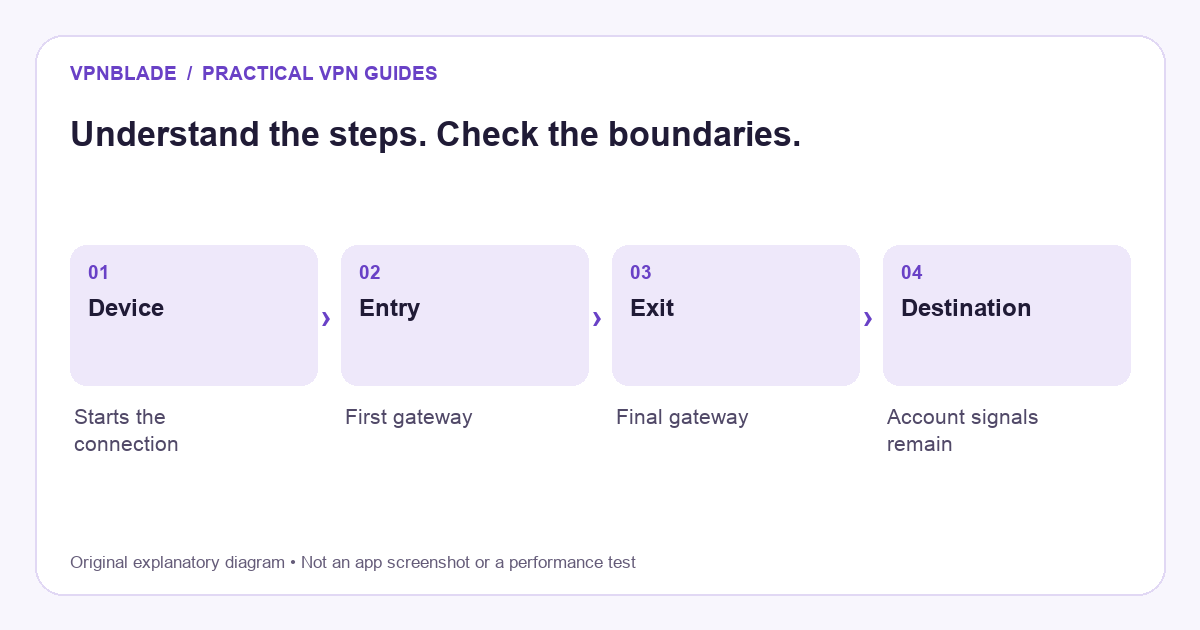
Double VPN adds another provider gateway to that path. The first and final gateways have different positions in the chain, so they can have different direct observations. That is an architectural distinction, not a guarantee that the overall provider cannot relate activity across its own systems. Our basic VPN explanation describes the underlying tunnel before introducing the extra layer.
VPNBLADE · PLAN SHORTLIST
A current plan to consider
Selected plan offers, not performance rankings. We may earn a commission through affiliate links. Monthly equivalents require the full payment shown.
NordVPN
Apps across major device platformsNordVPN Basic — 27-month introductory offer
USD 94.23 upfront · First 27 months, paid upfront
Get NordVPN deal Offer details & coupon conditions →Renewal & refund conditions
USD 139.08 every year after the initial 27-month term at the current renewal price.
30-day money-back guarantee; provider eligibility, payment-channel and refund terms apply.
What two gateways can change
The entry gateway receives the connection from the user’s access network. The exit gateway handles the connection onward to the destination. In a design intended to separate those roles, the entry and exit do not each have the same direct view of the complete path. The details depend on how the service handles tunneling, routing, authentication, and operational records.
Be cautious with a phrase such as “encrypted twice.” It does not, by itself, explain the entire threat model. A route can involve nested tunnels or other arrangements, and marketing descriptions can simplify technical details. Read the provider’s current documentation for the actual implementation rather than assuming every product labelled multi-hop uses exactly the same design.
Provider implementations are not interchangeable
NordVPN’s Double VPN documentation describes routing through two servers and notes that feature availability can depend on the app and protocol. Proton’s Secure Core documentation describes a particular multi-hop design and its selection controls. Those are provider statements about their own products, not independent performance findings by VPNBlade.
Do not assume a mode is included in every plan, available on every operating system, or compatible with every protocol. Check the exact app and subscription you intend to use. A feature appearing in a desktop screenshot does not establish that a router configuration or television app can reproduce it. This is a compatibility question before it is a buying decision.
Think in terms of a specific threat model
An extra gateway may be relevant when you are concerned about observation at an exit location or want the roles of entry and exit infrastructure separated. Whether that helps depends on the adversary, the provider’s design, and its operational practices. Simply placing gateways in two countries does not automatically create two independent organisations or two independent trust systems.
If the same company operates both ends, the overall provider remains important. Ownership, logging practices, account information, and legal obligations do not disappear because traffic crosses another server. A multi-hop feature can address part of a network-observation problem without solving endpoint compromise or account identification. Keep the claimed benefit proportionate to the evidence available.
Understand the performance trade-off
Another gateway can add distance, processing, and congestion points. The effect depends on your location, the chosen route, server load, protocol, and destination. It is not sound to promise a fixed percentage slowdown or claim that every multi-hop route is unusably slow. Measure the tasks you care about under repeatable conditions if performance matters to your decision.
Latency is particularly relevant to interactive work such as calls and games. A route that is acceptable for reading may feel different during a live conversation. Begin with a nearby single-hop baseline, then compare the multi-hop option on the same device and network. Change one factor at a time so that you can attribute the result to the routing choice rather than background activity.
Double VPN is not the same as Tor
Tor is a distinct network with its own relay design and use cases. A commercial two-gateway route does not automatically provide access to onion services or reproduce Tor’s trust model. Conversely, choosing a Tor-related VPN mode is not simply another name for Double VPN. The controls and implications differ.
It is also different from installing two unrelated VPN apps and hoping they combine neatly. Overlapping device-wide clients can conflict over routing and permissions. A provider-supported multi-hop mode is designed as a product feature; an improvised chain may not behave the way you expect. Do not assume the second green connection indicator proves that both applications are carrying the intended traffic.
It does not replace HTTPS or endpoint security
The final VPN gateway is still not the website itself. HTTPS remains important for protecting the application connection to the destination. A browser certificate warning is not made harmless by adding another VPN hop. Similarly, phishing, malicious software, and unsafe account recovery processes operate outside the narrow promise of routing traffic through two gateways.
A signed-in website can still recognise your account, and a mobile app can still use location permissions. Cookies and other identifiers do not automatically disappear. If your main goal is to understand a changed location result, read what a VPN changes about your IP address rather than treating multi-hop as a universal identity reset.
How to evaluate a multi-hop feature
First confirm that the exact plan and app support it. Then read the provider’s explanation of the entry and exit roles. Check whether the mode limits available locations or protocols and whether it changes other controls you rely on. Keep the ordinary single-hop configuration available so you can compare behaviour and recover a working setup.
Use non-sensitive tasks for the initial evaluation. Record the selected route, connection status, and any application compatibility changes. Do not infer the provider’s internal privacy practices from a speed test or public-address checker. Those tools show only particular external observations. A credible assessment combines implementation documentation with a clear statement of what your own check can and cannot establish.
When a single hop may be the better choice
If your goal is routine privacy on an untrusted access network and the normal tunnel meets your requirements, another gateway may add little practical value relative to its complexity. Simpler settings can also make it easier to understand reconnection, local-device access, and troubleshooting. Advanced features are useful when they solve a defined problem, not because every connection must use every available control.
Our VPN comparison checklist starts with those requirements. The current plan cards below let you inspect commercial terms for providers documenting multi-hop features, but do not prove feature eligibility on every listed plan. Confirm the mode you need in the provider’s current documentation before paying, and distinguish the advertised subscription from any performance claim.
Live plan records · Monthly equivalents require the full initial payment. Prices in different currencies are not directly comparable. Confirm tax, eligibility and renewal terms at checkout.
Proton VPN Plus — 24-month introductory offer
USD 3.49/month equivalent
USD 83.76 upfront
First 24 months, paid upfront
Next bill: USD 83.88 every 12 months after the initial 24-month term; renewal prices are subject to the provider’s terms.
Recorded code: VPNINTRO449349
Source checked 2026-10-25 · Research record; no performance endorsement.
See offer & full terms ↗NordVPN Basic — 27-month introductory offer
USD 3.49/month equivalent
USD 94.23 upfront
First 27 months, paid upfront
Next bill: USD 139.08 every year after the initial 27-month term at the current renewal price.
Source checked 2026-10-25 · Research record; no performance endorsement.
See offer & full terms ↗Sources and editorial method
Written by VPNBlade Editorial from the primary documentation below, checked 25 October 2026. Practical checklists are editorial guidance, not a claim of hands-on product testing. Menus and product behaviour can change; follow the documentation for your current app and device.
- NordVPN: Double VPN documentation — Provider-described two-gateway feature; app and protocol eligibility varies.
- Proton VPN: Secure Core documentation — Provider-specific multi-hop selection and supported application controls.
- Cloudflare: what is HTTPS? — HTTPS protects the browser-to-site connection using TLS, separate from a VPN tunnel.
Read our editorial standards · Explore the VPNBlade Blog
Sources & verification
- NordVPN: Double VPN documentation ↗Primary technical or platform documentation · Checked 2026-10-25
Provider-described two-gateway feature; app and protocol eligibility varies.
- Proton VPN: Secure Core documentation ↗Primary technical or platform documentation · Checked 2026-10-25
Provider-specific multi-hop selection and supported application controls.
- Cloudflare: what is HTTPS? ↗Primary technical or platform documentation · Checked 2026-10-25
HTTPS protects the browser-to-site connection using TLS, separate from a VPN tunnel.
YOUR EXPERIENCE MATTERS
Was this article useful?
Genuine reader helpfulness ratings. These do not measure VPN performance or verify a purchase. Only moderated submissions count. Ratings may reflect earlier versions of this information.
VPNBLADE · PLAN SHORTLIST
Ready to choose a plan?
Selected plan offers, not performance rankings. We may earn a commission through affiliate links. Monthly equivalents require the full payment shown.
NordVPN
Apps across major device platformsNordVPN Basic — 27-month introductory offer
USD 94.23 upfront · First 27 months, paid upfront
Get NordVPN deal Offer details & coupon conditions →Renewal & refund conditions
USD 139.08 every year after the initial 27-month term at the current renewal price.
30-day money-back guarantee; provider eligibility, payment-channel and refund terms apply.
Proton VPN
Compare free access and paid upgradesProton VPN Plus — 24-month introductory offer
USD 83.76 upfront · First 24 months, paid upfront
Get Proton VPN deal Offer details & coupon conditions →Renewal & refund conditions
USD 83.88 every 12 months after the initial 24-month term; renewal prices are subject to the provider’s terms.
30-day money-back guarantee; purchase-channel and provider eligibility conditions apply.