
Post
Is iCloud Private Relay a VPN? Coverage, Routing and Buying Checks
Compare iCloud Private Relay with a VPN by traffic coverage, relay design and routing. Check what your Apple device needs before buying another plan.
VPNBLADE · PLAN SHORTLIST
Compare current VPN plans
Selected plan offers, not performance rankings. We may earn a commission through affiliate links. Monthly equivalents require the full payment shown.

ExpressVPN
Check your exact device setupExpressVPN Basic — 28-month introductory offer
USD 83.72 upfront · First 28 months, paid upfront
Get ExpressVPN deal Offer details & coupon conditions →Renewal & refund conditions
USD 99.95 annually after the initial 28-month term.
30-day money-back guarantee for new users; provider terms and purchase-channel conditions apply.

Proton VPN
Compare free access and paid upgradesProton VPN Plus — 24-month introductory offer
USD 83.76 upfront · First 24 months, paid upfront
Get Proton VPN deal Offer details & coupon conditions →Renewal & refund conditions
USD 83.88 every 12 months after the initial 24-month term; renewal prices are subject to the provider’s terms.
30-day money-back guarantee; purchase-channel and provider eligibility conditions apply.
In this article

Cover: AI-generated editorial illustration of an everyday device setting; not a product screenshot or evidence of testing.
iCloud Private Relay is not a general replacement for a device-wide VPN. It is an iCloud+ privacy feature with a defined traffic scope and a two-relay design. A VPN’s coverage depends on its configuration and platform. The useful comparison starts with which connections you want to protect, rather than which product name sounds more private.
For someone who mainly wants more private Safari browsing on an Apple device, Private Relay may already address part of the need. Someone who needs a particular app’s traffic routed through a chosen VPN gateway has a different requirement. Write down the task before buying another subscription or changing a working setup.
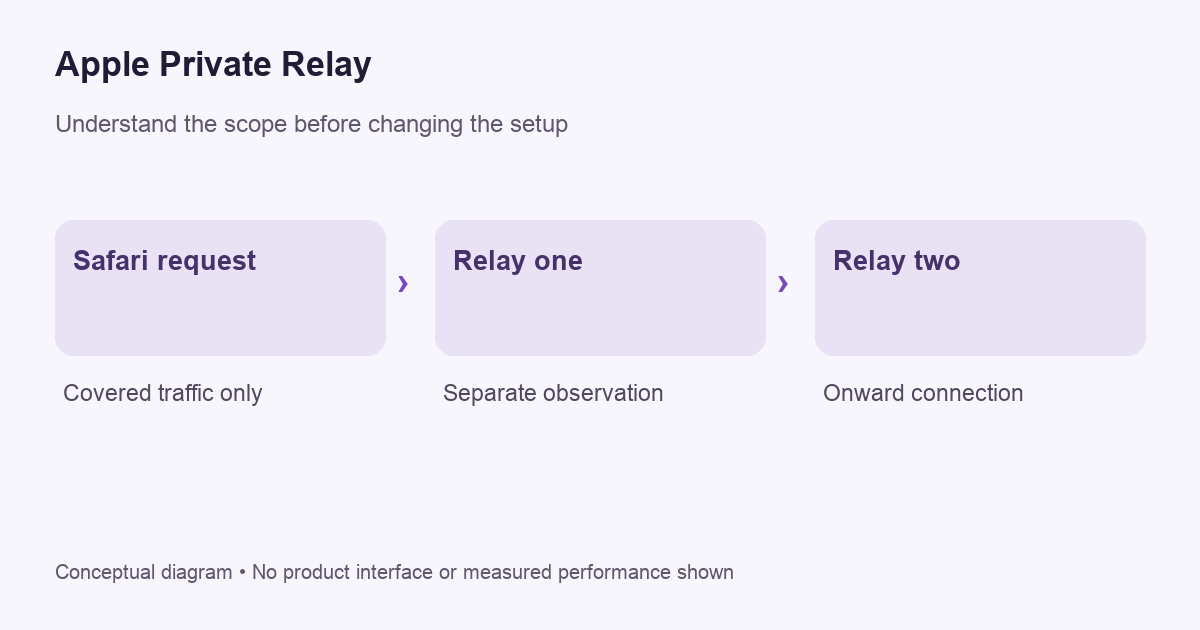
Understand the scope of Private Relay
Apple’s support overview presents Private Relay as an iCloud+ feature that helps protect Safari browsing. Apple’s developer documentation specifies Safari web browsing, DNS resolution queries and insecure HTTP app traffic. That scope should not be paraphrased as a promise to tunnel every connection made by every installed application.
Private Relay uses separate relay operators to divide information about the connection. Apple describes a first relay that can see the original IP address and a second relay that connects onward using a temporary address. Its stated design goal is that one party cannot see both the user identity information and the browsing destination. That is an architectural description, rather than a claim by VPNBlade to have audited its implementation.
The service is also not available in every country or region. Availability matters before you rely on a setting while traveling. Check Apple’s current guidance for the device and location involved. An enabled preference and an available service are related questions, but they are not identical observations.
Compare the job, not just the changed IP address
Both services can affect the address a website sees for covered traffic. A changed address does not make their scope or controls identical. A checking website opened in Safari can describe that browser request; it does not establish what happened to a video-conferencing app or a background sync client.
Our VPN IP address explanation separates public addresses from account identity and device location. Use the same discipline here. A signed-in service still knows the account you used. An app with location permission can obtain signals other than the network address. Neither a relay nor a tunnel should be treated as a universal identity reset.
| Your requirement | Question to verify |
|---|---|
| More private Safari browsing | Is Private Relay available and active for this network and device? |
| A particular desktop app uses a chosen gateway | Does the VPN cover that app on this operating system? |
| Workplace remote access | Which configuration does the organization approve? |
| A consistent country-selection option | Does the chosen service actually provide that control? |
The table is a decision checklist, not a performance ranking. It avoids comparing a service against a promise it never made. Start by establishing the desired coverage; only then compare convenience, price and restrictions.
VPNBLADE · PLAN SHORTLIST
A current plan to consider
Selected plan offers, not performance rankings. We may earn a commission through affiliate links. Monthly equivalents require the full payment shown.
ExpressVPN
Check your exact device setupExpressVPN Basic — 28-month introductory offer
USD 83.72 upfront · First 28 months, paid upfront
Get ExpressVPN deal Offer details & coupon conditions →Renewal & refund conditions
USD 99.95 annually after the initial 28-month term.
30-day money-back guarantee for new users; provider terms and purchase-channel conditions apply.
Private Relay and a VPN can interact
Apple’s VPN privacy notice says an active VPN configuration determines routing for connections that would otherwise be protected by Private Relay. It also explains that some traffic can fall outside an active VPN configuration, including essential system traffic. Installing a VPN is therefore not sufficient evidence that two complete privacy layers are always being applied to every request.
If you use both services, document the intended result instead of assuming the combination must be stronger. Which application are you checking? Which route should it use? Does the provider describe the interaction on your current operating-system version? If the documentation does not resolve the question, ask support before relying on the arrangement for an important task.
A practical setup review for an iPhone or Mac
Begin by checking your current subscription and device settings using Apple’s linked instructions. Confirm that the setting applies to the network you are using. Then identify any installed VPN apps or managed profiles that may control routing. Record what is active before changing anything; otherwise it can become difficult to tell which service caused a different result.
- Choose one ordinary browsing task and name the browser involved.
- Check whether Private Relay is available and enabled for that context.
- Note any active VPN configuration or device-management profile.
- Open a fresh request and observe the result without treating it as a complete device audit.
- If a site fails, identify whether the symptom affects one site, one browser or all connectivity.
- Restore the previous setting if an optional change does not help.
On a managed device, involve the administrator before removing profiles or changing routing controls. A profile may contain workplace access settings beyond a personal VPN. Our iPhone removal guide explains why disconnecting, removing a configuration and canceling a subscription are separate actions.
What if a website asks for extra verification?
Apple notes that some sites may require additional steps to sign in or access content without the original IP address. Do not automatically interpret an extra verification prompt as evidence that the entire connection has failed. Check the service’s official help and confirm that you are on the correct site before entering account information.
If you change a privacy setting to diagnose one site, record the scope and restore it when the diagnosis is complete. Avoid disabling several features at once. That can make a page work while leaving you unable to identify which change mattered. A narrow, reversible test produces a more useful answer than an unexplained collection of toggles.
When a separate VPN deserves consideration
Consider a VPN when you have a specific supported routing requirement outside Private Relay’s scope. Examples include an approved remote-access arrangement or a personal app workflow that needs the provider’s documented controls. Verify those requirements against the exact iPhone, Mac or Apple TV application rather than assuming one subscription provides identical features everywhere.
Our Apple-device VPN guide and iOS comparison guide organize those checks. They should be used alongside provider documentation. A feature list is an invitation to verify compatibility, not evidence that VPNBlade measured the product’s performance on every device.
Compare subscriptions without buying duplicate coverage blindly
Check what you already pay for, what traffic it covers and what remains missing. If the missing requirement is unclear, another recurring bill may not solve the problem. Review initial cost, renewal amount, cancellation route and refund conditions separately from the technical choice. Deleting an application does not automatically cancel its subscription.
The Proton VPN and ExpressVPN store pages provide dated pricing records for readers evaluating a separate service. Confirm Apple-device support with the provider before paying. The following live offers are contextual billing information, not a claim that either service reproduces Private Relay’s architecture or guarantees anonymity.
Live plan records · Monthly equivalents require the full initial payment. Prices in different currencies are not directly comparable. Confirm tax, eligibility and renewal terms at checkout.
Proton VPN Plus — 24-month introductory offer
USD 3.49/month equivalent
USD 83.76 upfront
First 24 months, paid upfront
Next bill: USD 83.88 every 12 months after the initial 24-month term; renewal prices are subject to the provider’s terms.
Recorded code: VPNINTRO449349
Source checked 2026-10-25 · Research record; no performance endorsement.
See offer & full terms ↗ExpressVPN Basic — 28-month introductory offer
USD 2.99/month equivalent
USD 83.72 upfront
First 28 months, paid upfront
Next bill: USD 99.95 annually after the initial 28-month term.
Source checked 2026-10-25 · Research record; no performance endorsement.
See offer & full terms ↗Sources and editorial method
Written by VPNBlade Editorial from the primary documentation below, checked 26 October 2026. Practical checklists are editorial guidance, not a claim of hands-on product testing. Menus and product behaviour can change; follow the documentation for your current app and device.
- support.apple.com — 102602 — Documented scope, supported configuration and limitations discussed in the linked article section.
- developer.apple.com — prepare your network for icloud private relay — Documented scope, supported configuration and limitations discussed in the linked article section.
- www.apple.com — vpns — Documented scope, supported configuration and limitations discussed in the linked article section.
Read our editorial standards · Explore the VPNBlade Blog
Sources & verification
- support.apple.com — 102602 ↗Primary platform, project or provider documentation · Checked 2026-10-26
Documented scope, supported configuration and limitations discussed in the linked article section.
- developer.apple.com — prepare your network for icloud private relay ↗Primary platform, project or provider documentation · Checked 2026-10-26
Documented scope, supported configuration and limitations discussed in the linked article section.
- www.apple.com — vpns ↗Primary platform, project or provider documentation · Checked 2026-10-26
Documented scope, supported configuration and limitations discussed in the linked article section.
YOUR EXPERIENCE MATTERS
Was this article useful?
Genuine reader helpfulness ratings. These do not measure VPN performance or verify a purchase. Only moderated submissions count. Ratings may reflect earlier versions of this information.
VPNBLADE · PLAN SHORTLIST
Ready to choose a plan?
Selected plan offers, not performance rankings. We may earn a commission through affiliate links. Monthly equivalents require the full payment shown.
ExpressVPN
Check your exact device setupExpressVPN Basic — 28-month introductory offer
USD 83.72 upfront · First 28 months, paid upfront
Get ExpressVPN deal Offer details & coupon conditions →Renewal & refund conditions
USD 99.95 annually after the initial 28-month term.
30-day money-back guarantee for new users; provider terms and purchase-channel conditions apply.
Proton VPN
Compare free access and paid upgradesProton VPN Plus — 24-month introductory offer
USD 83.76 upfront · First 24 months, paid upfront
Get Proton VPN deal Offer details & coupon conditions →Renewal & refund conditions
USD 83.88 every 12 months after the initial 24-month term; renewal prices are subject to the provider’s terms.
30-day money-back guarantee; purchase-channel and provider eligibility conditions apply.