
Post
Remote-access VPN setup: accounts, routes and safe verification
Prepare an authorized remote-access VPN with the right profile, identity, MFA, resource permissions, verification and removal process.
VPNBLADE · PLAN SHORTLIST
Compare current VPN plans
Selected plan offers, not performance rankings. We may earn a commission through affiliate links. Monthly equivalents require the full payment shown.

ExpressVPN
Check your exact device setupExpressVPN Basic — 28-month introductory offer
USD 83.72 upfront · First 28 months, paid upfront
Get ExpressVPN deal Offer details & coupon conditions →Renewal & refund conditions
USD 99.95 annually after the initial 28-month term.
30-day money-back guarantee for new users; provider terms and purchase-channel conditions apply.

NordVPN
Apps across major device platformsNordVPN Basic — 27-month introductory offer
USD 94.23 upfront · First 27 months, paid upfront
Get NordVPN deal Offer details & coupon conditions →Renewal & refund conditions
USD 139.08 every year after the initial 27-month term at the current renewal price.
30-day money-back guarantee; provider eligibility, payment-channel and refund terms apply.

Surfshark
Households with multiple devicesSurfshark One — 27-month introductory offer
USD 67.23 upfront · First 27 months, paid upfront
Get Surfshark deal Offer details & coupon conditions →Renewal & refund conditions
Automatic renewal after the introductory term at the then-applicable rate. Confirm the chosen bundle’s next invoice and billing interval before purchase; no numeric renewal amount was verified.
30-day money-back guarantee; purchase-channel and provider eligibility conditions apply.

PureVPN
Published subscription offerPureVPN Standard — 27-month prepaid offer
USD 58.20 upfront · First 27 months, paid upfront
Get PureVPN deal Offer details & coupon conditions →Renewal & refund conditions
Checkout displays USD 2.15/month after 27 months. This is the provider’s renewal-rate label, not a verified future invoice. The next charge amount and billing interval were not separately established; confirm both before paying.
31-day money-back guarantee advertised; provider eligibility and refund terms apply.

VeePN
Published subscription offerVeePN Basic — 28-month introductory offer
USD 55.72 upfront · First 28 months, paid upfront
Get VeePN deal Offer details & coupon conditions →Renewal & refund conditions
Card/PayPal checkout quotes automatic renewal at USD 59.76 every 12 months after the initial 28-month period. Future renewal prices can change.
Thirty-day refund window for the original purchase, subject to terms. Rebilling and previously refunded accounts are excluded; plan extensions or added licenses can waive eligibility.
In this article

A remote-access VPN connects an authorized device to a network that provides the required gateway, identity checks and access rules. Installing a consumer VPN app does not create a company connection or grant access to private files. Before configuring anything, identify who owns the network and which resources the account is permitted to reach.
This guide explains the planning and verification workflow for an approved setup. It does not provide a generic server address, shared credentials or a way around workplace controls. VPNBlade has not deployed the example architecture for your organization; use its administrator’s current documentation for implementation details.
Distinguish remote access from a personal internet exit
A personal subscription commonly provides an internet exit controlled by the VPN company. A work remote-access connection has a different purpose: reaching specified resources behind an organization’s access boundary. The same word VPN can describe both, but the account, gateway and route policy are not interchangeable.
Write down the actual requirement. A person may need an internal web application, a managed file service or an approved desktop environment. The organization may already provide an application-specific access service rather than a traditional full-network tunnel. Ask which supported route applies instead of buying a consumer plan because it uses a familiar term.
Choosing a business VPN: define the access problem before comparing products
A business owner may mean several different things by VPN. An employee might need a private application, a team might need a managed internet exit, or a traveller might want a personal connection on an untrusted network. Those requirements can involve different products and administration. Do not assume that buying several consumer subscriptions creates an organization-owned remote-access service.
| Requirement | Selection question | What a generic promotion does not establish |
|---|---|---|
| Access to private company resources | Which identity, device and resource policy permits the connection? | A public exit location does not create permission to reach the company network. |
| Managed team internet exit | Who administers users, gateways and any dedicated egress address? | A dedicated address alone does not define the full access policy. |
| A personal connection while travelling | Does the organization permit the service, and what task does it cover? | Consumer app installation does not replace the employer’s approved work-access route. |
Compare administrative controls, not only a server count
Ask who can invite users, approve devices, restrict resource access and remove an entitlement when a project ends. The person who pays the invoice does not necessarily need permission to change network policy. Require a clear handover and recovery process so the deployment can be maintained if the original administrator is unavailable.
Tailscale’s current documentation distinguishes admin-console roles from policies controlling which resources users and devices can reach. Its grants and ACL material explains access-control mechanisms; it does not mean every newly created network is already configured for your company’s intended restrictions. Review the actual policy and test a small permitted task before expanding access.
Proton’s business documentation provides another example: organizational administrator and user roles, plus eligible dedicated-server and gateway arrangements. These are business-product capabilities with their own plan requirements. A consumer Proton VPN offer elsewhere on VPNBlade should not be read as a quote for that managed business deployment. Verify the precise product, licenses and gateway costs with its current business documentation.
Use a short procurement and exit checklist
- Scope: name the resources, users and devices that must connect.
- Ownership: identify who controls identity, policy, updates and support.
- Evidence: ask which documented feature meets each requirement and test it in the approved environment.
- Total cost: include seats, gateways, support and implementation work instead of comparing a consumer monthly equivalent.
- Removal: establish how to revoke a person, device or temporary project without borrowing somebody else’s account.
An encrypted tunnel is one component of the design; it cannot promise that company data will never leak or that endpoints and accounts need no other protection. For general purchase-record questions, use our VPN comparison checklist, then apply the organization-specific requirements above. The setup steps below begin after the responsible owner has chosen and approved the route.
VPNBLADE · PLAN SHORTLIST
A current plan to consider
Selected plan offers, not performance rankings. We may earn a commission through affiliate links. Monthly equivalents require the full payment shown.
ExpressVPN
Check your exact device setupExpressVPN Basic — 28-month introductory offer
USD 83.72 upfront · First 28 months, paid upfront
Get ExpressVPN deal Offer details & coupon conditions →Renewal & refund conditions
USD 99.95 annually after the initial 28-month term.
30-day money-back guarantee for new users; provider terms and purchase-channel conditions apply.
NordVPN
Apps across major device platformsNordVPN Basic — 27-month introductory offer
USD 94.23 upfront · First 27 months, paid upfront
Get NordVPN deal Offer details & coupon conditions →Renewal & refund conditions
USD 139.08 every year after the initial 27-month term at the current renewal price.
30-day money-back guarantee; provider eligibility, payment-channel and refund terms apply.
Surfshark
Households with multiple devicesSurfshark One — 27-month introductory offer
USD 67.23 upfront · First 27 months, paid upfront
Get Surfshark deal Offer details & coupon conditions →Renewal & refund conditions
Automatic renewal after the introductory term at the then-applicable rate. Confirm the chosen bundle’s next invoice and billing interval before purchase; no numeric renewal amount was verified.
30-day money-back guarantee; purchase-channel and provider eligibility conditions apply.
PureVPN
Published subscription offerPureVPN Standard — 27-month prepaid offer
USD 58.20 upfront · First 27 months, paid upfront
Get PureVPN deal Offer details & coupon conditions →Renewal & refund conditions
Checkout displays USD 2.15/month after 27 months. This is the provider’s renewal-rate label, not a verified future invoice. The next charge amount and billing interval were not separately established; confirm both before paying.
31-day money-back guarantee advertised; provider eligibility and refund terms apply.
VeePN
Published subscription offerVeePN Basic — 28-month introductory offer
USD 55.72 upfront · First 28 months, paid upfront
Get VeePN deal Offer details & coupon conditions →Renewal & refund conditions
Card/PayPal checkout quotes automatic renewal at USD 59.76 every 12 months after the initial 28-month period. Future renewal prices can change.
Thirty-day refund window for the original purchase, subject to terms. Rebilling and previously refunded accounts are excluded; plan extensions or added licenses can waive eligibility.
Get the approved configuration from its owner
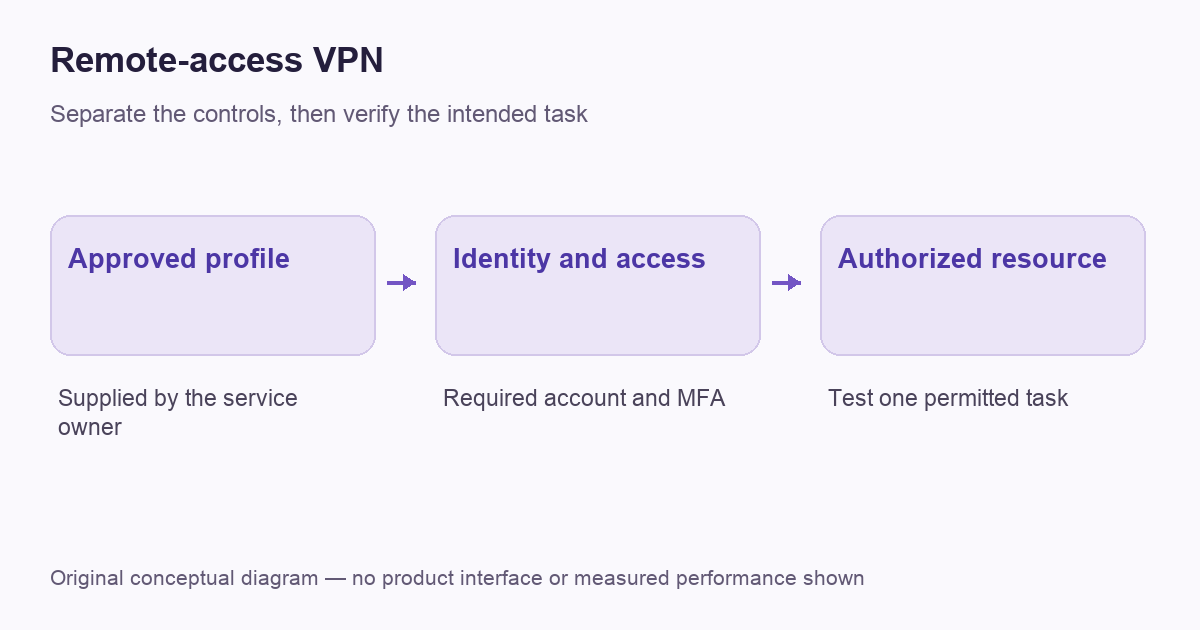
Obtain the supported client or profile, gateway information, authentication requirements and help contact through the organization’s normal channel. Microsoft’s connection guide distinguishes a VPN profile from the service information needed to configure it. An arbitrary public server name will not substitute for the correct endpoint.
Confirm the device and operating-system requirements before changing settings. A managed computer may receive a profile automatically, while a personal device may be ineligible or require enrollment. Do not remove management software or install a second profile to get around that decision. Resolve eligibility and configuration ownership before troubleshooting the connection itself.
Plan identity and authentication
Use the account assigned for the remote-access task and the organization’s required verification method. A successful password entry is not the whole security design. CISA’s MFA guidance specifically includes remote access and privileged access when recommending stronger authentication.
Know how to recover access if a phone or security key is unavailable. Save the legitimate support channel rather than a copy of someone else’s credentials. Avoid placing passwords, one-time codes or identity certificates in a troubleshooting screenshot. The aim is an individually accountable connection with an established recovery process, not a shared shortcut that becomes difficult to revoke later.
Define the resources and routes
Ask which private resources should work after connection and which ordinary internet traffic should remain outside it. A split-route deployment can be intentional. A public-IP test that looks unchanged does not necessarily mean the private application is unreachable or the tunnel failed. Conversely, a changed public exit does not prove access to every internal resource.
Our split-tunneling guide explains the coverage distinction. For a managed network, treat the route list as an administrator-controlled part of the setup. Do not add broad routes or change DNS servers merely to make one resource appear. Report the intended resource and observed failure so its owner can assess the correct layer.
Prepare the endpoint and gateway as separate responsibilities
The endpoint needs a supported client and the required device configuration. The gateway needs its own maintenance, access policy and monitoring. A user completing a local setup wizard cannot verify all gateway security properties from the laptop. Keep the responsibilities explicit, particularly when a third party manages the service.
CISA’s remote-access software guide addresses authorized tools, misuse and organizational controls. Its recommendations are a reason to maintain a documented deployment, not a promise that any product becomes secure once a VPN label is attached. For your own organization, identify who reviews updates, handles account changes and investigates unusual connections.
Test a small approved task first
After the profile connects, open the specific resource the administrator has supplied for verification. Use an ordinary, non-destructive action such as viewing the authorized landing page. Note the connection state, time and exact error if it fails. A failed application sign-in may belong to that application’s permissions rather than the VPN.
Then distinguish name resolution, network reachability and resource authorization. You do not need to probe unrelated hosts to make that distinction. Use the documented test and provide a concise report: the approved URL or resource name, the client build, access network and visible result. Our general troubleshooting guide can help organize the observations without replacing the administrator’s procedure.
Check the everyday recovery path
A useful deployment works beyond the first successful login. Establish what users should do after a network transition, expired credentials or a lost authentication device. Identify whether reconnecting is automatic, whether manual action is required and which failures should go straight to support. Keep the instructions specific to the approved client.
Do not improvise a less protected connection when the required route is unavailable. If a business-critical task must continue during an outage, the organization should define its fallback. Recording that decision ahead of time is more useful than expecting each employee to invent a workaround while under pressure.
Review access when people and tasks change
Remote access should follow the actual role and resource need. Adding a device, changing a job or finishing a temporary project can change the required permissions. Include the account owner and responsible administrator in that lifecycle instead of treating a saved profile as a permanent entitlement.
Disconnecting a client is not always the same as revoking its account or removing a device credential. The owner should know which control ends the relevant access. Keep a record of what was issued and which supported process removes it. This is particularly important when the connection was provided for a short engagement.
A worked example: a temporary project account
Consider a contractor who needs one approved project application for a limited period. The setup record should name that resource, the issued account, the required client and the planned end of access. It should not grow into an undocumented permission to browse unrelated private systems simply because a tunnel can connect.
Before the engagement ends, the account owner and administrator should know which process revokes the relevant identity or device credential. Removing a shortcut from the contractor’s laptop may not end the remote entitlement. Likewise, a connection failure on the final day should not be solved by borrowing another person’s account. This is a planning example rather than a description of a VPNBlade customer deployment. It shows why profile setup, resource authorization and access removal need to be described together, even when the local client is simple to install.
A practical handover checklist
| Item | Who confirms it? | What should be recorded? |
|---|---|---|
| Approved client and endpoint | Network owner or administrator | Supported installation source and profile |
| Identity and MFA | Account owner and administrator | Normal sign-in and recovery channel |
| Permitted resources | Resource owner | Small authorized verification task |
| Maintenance and removal | Service owner | Update, incident and revocation responsibilities |
A well-described remote-access setup answers those questions before introducing extra products. If you also need a separate personal VPN for travel, evaluate it through our travel guide. That consumer purchasing decision does not provide the organization-owned endpoint or permissions discussed here.
Cover: AI-generated editorial illustration, not a product screenshot or evidence of testing. The inline diagram is original conceptual guidance.
YOUR EXPERIENCE MATTERS
Was this article useful?
Genuine reader helpfulness ratings. These do not measure VPN performance or verify a purchase. Only moderated submissions count. Ratings may reflect earlier versions of this information.
VPNBLADE · PLAN SHORTLIST
Ready to choose a plan?
Selected plan offers, not performance rankings. We may earn a commission through affiliate links. Monthly equivalents require the full payment shown.
ExpressVPN
Check your exact device setupExpressVPN Basic — 28-month introductory offer
USD 83.72 upfront · First 28 months, paid upfront
Get ExpressVPN deal Offer details & coupon conditions →Renewal & refund conditions
USD 99.95 annually after the initial 28-month term.
30-day money-back guarantee for new users; provider terms and purchase-channel conditions apply.
NordVPN
Apps across major device platformsNordVPN Basic — 27-month introductory offer
USD 94.23 upfront · First 27 months, paid upfront
Get NordVPN deal Offer details & coupon conditions →Renewal & refund conditions
USD 139.08 every year after the initial 27-month term at the current renewal price.
30-day money-back guarantee; provider eligibility, payment-channel and refund terms apply.
Surfshark
Households with multiple devicesSurfshark One — 27-month introductory offer
USD 67.23 upfront · First 27 months, paid upfront
Get Surfshark deal Offer details & coupon conditions →Renewal & refund conditions
Automatic renewal after the introductory term at the then-applicable rate. Confirm the chosen bundle’s next invoice and billing interval before purchase; no numeric renewal amount was verified.
30-day money-back guarantee; purchase-channel and provider eligibility conditions apply.
PureVPN
Published subscription offerPureVPN Standard — 27-month prepaid offer
USD 58.20 upfront · First 27 months, paid upfront
Get PureVPN deal Offer details & coupon conditions →Renewal & refund conditions
Checkout displays USD 2.15/month after 27 months. This is the provider’s renewal-rate label, not a verified future invoice. The next charge amount and billing interval were not separately established; confirm both before paying.
31-day money-back guarantee advertised; provider eligibility and refund terms apply.
VeePN
Published subscription offerVeePN Basic — 28-month introductory offer
USD 55.72 upfront · First 28 months, paid upfront
Get VeePN deal Offer details & coupon conditions →Renewal & refund conditions
Card/PayPal checkout quotes automatic renewal at USD 59.76 every 12 months after the initial 28-month period. Future renewal prices can change.
Thirty-day refund window for the original purchase, subject to terms. Rebilling and previously refunded accounts are excluded; plan extensions or added licenses can waive eligibility.