
Post
How Does a VPN Work? Tunnels, Encryption and Trust Explained
Understand VPN tunnels, gateways, routing and trust. Learn how VPNs differ from HTTPS and what they cannot fix on your device or accounts.
VPNBLADE · PLAN SHORTLIST
Compare current VPN plans
Selected plan offers, not performance rankings. We may earn a commission through affiliate links. Monthly equivalents require the full payment shown.

Proton VPN
Compare free access and paid upgradesProton VPN Plus — 24-month introductory offer
USD 83.76 upfront · First 24 months, paid upfront
Get Proton VPN deal Offer details & coupon conditions →Renewal & refund conditions
USD 83.88 every 12 months after the initial 24-month term; renewal prices are subject to the provider’s terms.
30-day money-back guarantee; purchase-channel and provider eligibility conditions apply.

Mullvad
Published subscription offerMullvad — 10% accepted-cryptocurrency discount
EUR 4.50 upfront · One month of account time, calculated from the EUR 5 list rate
Get Mullvad deal Offer details & coupon conditions →Renewal & refund conditions
The discount depends on using an accepted cryptocurrency; future terms must be checked when topping up.
14-day refund policy applies with payment-specific conditions; cash is excluded.
In this article

A VPN works by establishing an encrypted tunnel between a device and a VPN gateway, then routing selected network traffic through it. For a typical personal full-tunnel connection, websites see the gateway’s exit address rather than the usual public address of the user’s internet connection. The tunnel protects one part of the route; it does not make every endpoint or application trustworthy.
That distinction explains many apparently contradictory VPN claims. A service can reduce what a local Wi-Fi operator sees while still requiring trust in the VPN provider. It can change a website’s view of your public IP while leaving a signed-in account recognisable. Understanding where the tunnel starts and ends is more useful than memorising a slogan about being invisible online.
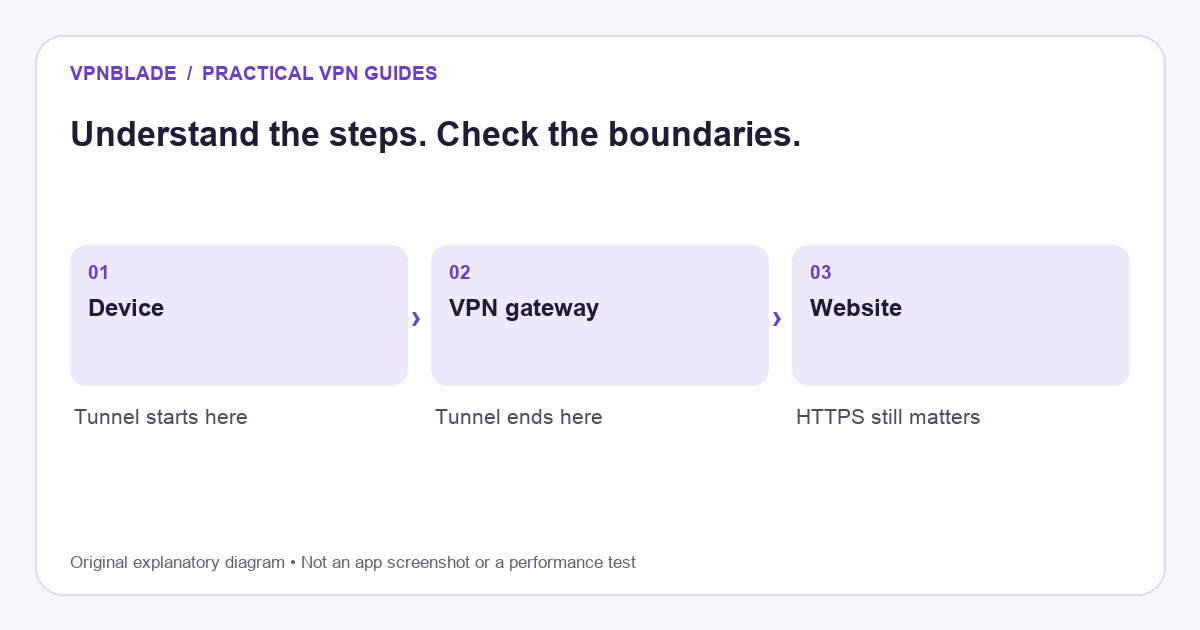
Quick steps
- The client establishes an encrypted gateway connection.
- Routing rules choose which traffic enters the tunnel.
- The gateway forwards traffic toward the destination.
- HTTPS and endpoint security remain separate protections.
The ordinary internet path
Without a personal VPN, an application sends traffic through the device’s network connection and internet provider toward a destination. The connection can pass through several networks. HTTPS protects the content of a website connection using TLS, but the network still has information needed to route traffic, along with observable characteristics such as timing and transferred volume.
It would be wrong to describe all non-VPN browsing as unencrypted. Much of the modern web uses HTTPS. A VPN adds a different layer around routed traffic rather than creating the only encryption on the internet. Cloudflare’s HTTPS explanation distinguishes the browser-to-website protection from the separate device-to-gateway tunnel discussed here.
VPNBLADE · PLAN SHORTLIST
A current plan to consider
Selected plan offers, not performance rankings. We may earn a commission through affiliate links. Monthly equivalents require the full payment shown.
Proton VPN
Compare free access and paid upgradesProton VPN Plus — 24-month introductory offer
USD 83.76 upfront · First 24 months, paid upfront
Get Proton VPN deal Offer details & coupon conditions →Renewal & refund conditions
USD 83.88 every 12 months after the initial 24-month term; renewal prices are subject to the provider’s terms.
30-day money-back guarantee; purchase-channel and provider eligibility conditions apply.
What the VPN client does
A VPN client establishes the tunnel, authenticates as required, and arranges routing on the device. Depending on the implementation, it can create a virtual network interface and apply rules controlling which traffic enters it. The app’s user interface is only part of the system; the underlying service may remain active when the window is closed.
A protocol defines important aspects of the tunnel. WireGuard is one example, using public-key relationships between peers and carrying IP packets over UDP. OpenVPN and other protocols have different designs and configuration requirements. A protocol name alone does not tell you how a commercial provider manages accounts, logging, payment records, or server operations.
What the gateway does
The gateway receives tunnel traffic and forwards it toward the relevant destination according to its configuration. For a personal internet VPN, that exit route is why websites generally observe a provider-associated address. For a corporate VPN, the gateway may instead grant approved access to internal applications or networks. These are related technologies with different purposes.
The gateway is not the final website. Traffic can continue across other networks after it leaves the VPN infrastructure. HTTPS can protect the application connection across that onward route, while unencrypted application traffic has different risks. A consumer VPN cannot turn an insecure destination into a trustworthy one or supply permission to access a company system you are not authorised to use.
Where trust moves
A properly configured tunnel limits the local access network’s view of the traffic inside it, but introduces the VPN operator as another important party. That operator controls infrastructure and may hold account or payment information. Privacy claims therefore require more than a successful connection indicator. Policies, technical design, ownership, and credible independent evidence all matter.
“No logs” is not a complete description by itself. A claim may concern browsing activity while other operational or account records still exist. Read what the provider actually says and what any independent assessment covers. An audit of one system on one date is not proof that every future product and operation behaves identically. Avoid replacing one vague trust assumption with another.
Full tunneling and split tunneling
A full-tunnel arrangement aims to route the relevant device traffic through the VPN. Split tunneling deliberately handles selected applications or destinations differently. That can preserve a local workflow or reduce routing complexity for particular services, but excluded traffic does not receive the same route. A browser extension can also have a narrower scope than a device-wide client.
Router-based VPNs begin the tunnel at the router rather than following a device everywhere. A phone using cellular data will not automatically inherit the home router’s connection. Running a device VPN through a router tunnel can create another layer that requires careful interpretation. Our router setup guide explains these boundaries before you change household routing.
IP addresses and location are related but different
A destination generally sees the public exit address for traffic using the VPN route. It may use that address to estimate a location. But a phone can provide GPS information, and an account can have a stored address, country, or payment history. Changing the route does not automatically remove those other signals.
There are also local device addresses and multiple public address families to consider. A number shown in network settings is not necessarily the one a website sees. IPv4 and IPv6 may need separate checks. Read does a VPN change your IP address? for a practical interpretation of public-address comparisons without turning one checker result into a complete privacy assessment.
DNS is part of the connection story
Applications often need to resolve names before reaching a destination. VPN products can route those requests through different resolvers or apply filtering features. Browser-level encrypted DNS and custom network settings can add another layer. The exact interaction depends on the app, platform, and configuration rather than a universal rule that every DNS setting works the same way.
When troubleshooting, record any custom DNS choices and compare them with the provider’s guidance. A name-resolution failure can make the internet appear unavailable even when a tunnel is established. Changing several resolvers and protocols simultaneously obscures the cause. Use the troubleshooting guide to isolate the problem while keeping the intended protection clear.
A kill switch controls failure behaviour
A kill switch is intended to limit traffic outside the expected tunnel under specified conditions. Some products apply it when a connected tunnel drops; others offer persistent blocking while the VPN is off. The implementation and platform matter. An intentionally blocked connection after pressing Disconnect can therefore be expected behaviour rather than a damaged internet service.
Read the current documentation for your app and test ordinary reconnection events with non-sensitive activity. A laptop waking from sleep and a phone switching networks are useful everyday scenarios. The important result is whether the system behaves as you intend, not whether a setting has a reassuring name. Keep a note of any changes made during troubleshooting so they can be restored.
Why performance can change
A VPN changes the route and adds processing. Distance to the gateway, onward distance to the destination, congestion, server capacity, protocol, and device capabilities can all affect the result. Latency and throughput are different measurements: a route can deliver adequate downloads while feeling less responsive in a live call or game.
A single speed-test screenshot cannot establish a stable provider ranking. Compare repeatable tasks on the same device and network if performance matters. Avoid attributing background downloads, weak Wi-Fi, or mobile radio changes automatically to the VPN. VPNBlade’s source-based articles do not substitute advertised speed claims for measured results or pretend that documentation research is a laboratory test.
What a VPN does not solve
A VPN does not remove malware already on a device, stop a person entering credentials into a phishing site, or erase the identity used to sign into an account. It is not a replacement for software updates, strong authentication, or careful permission choices. A security bundle may add other protections, but those should be assessed as separate functions rather than assumed from the VPN label.
Whether the tool is useful depends on your goal. Our guide to deciding whether you need a VPN weighs that question, while the setup guide turns a decision into practical installation and verification steps. If you choose a subscription, compare the complete first payment and renewal terms in the live cards below rather than treating a low monthly equivalent as a technical guarantee.
Live plan records · Monthly equivalents require the full initial payment. Prices in different currencies are not directly comparable. Confirm tax, eligibility and renewal terms at checkout.
Proton VPN Plus — 24-month introductory offer
USD 3.49/month equivalent
USD 83.76 upfront
First 24 months, paid upfront
Next bill: USD 83.88 every 12 months after the initial 24-month term; renewal prices are subject to the provider’s terms.
Recorded code: VPNINTRO449349
Source checked 2026-10-25 · Research record; no performance endorsement.
See offer & full terms ↗Mullvad — 10% accepted-cryptocurrency discount
EUR 4.50/month equivalent
EUR 4.50 upfront
One month of account time, calculated from the EUR 5 list rate
Next bill: The discount depends on using an accepted cryptocurrency; future terms must be checked when topping up.
Source checked 2026-10-24 · Research record; no performance endorsement.
See offer & full terms ↗Sources and editorial method
Written by VPNBlade Editorial from the primary documentation below, checked 25 October 2026. Practical checklists are editorial guidance, not a claim of hands-on product testing. Menus and product behaviour can change; follow the documentation for your current app and device.
- WireGuard: conceptual overview — VPN interfaces, peer keys and IP-packet encapsulation; product account handling is a separate layer.
- Cloudflare: what is HTTPS? — HTTPS protects the browser-to-site connection using TLS, separate from a VPN tunnel.
- OpenWrt: OpenVPN client — A supported router-client setup includes configuration, network and routing tasks.
Read our editorial standards · Explore the VPNBlade Blog
Sources & verification
- WireGuard: conceptual overview ↗Primary technical or platform documentation · Checked 2026-10-25
VPN interfaces, peer keys and IP-packet encapsulation; product account handling is a separate layer.
- Cloudflare: what is HTTPS? ↗Primary technical or platform documentation · Checked 2026-10-25
HTTPS protects the browser-to-site connection using TLS, separate from a VPN tunnel.
- OpenWrt: OpenVPN client ↗Primary technical or platform documentation · Checked 2026-10-25
A supported router-client setup includes configuration, network and routing tasks.
YOUR EXPERIENCE MATTERS
Was this article useful?
Genuine reader helpfulness ratings. These do not measure VPN performance or verify a purchase. Only moderated submissions count. Ratings may reflect earlier versions of this information.
VPNBLADE · PLAN SHORTLIST
Ready to choose a plan?
Selected plan offers, not performance rankings. We may earn a commission through affiliate links. Monthly equivalents require the full payment shown.
Proton VPN
Compare free access and paid upgradesProton VPN Plus — 24-month introductory offer
USD 83.76 upfront · First 24 months, paid upfront
Get Proton VPN deal Offer details & coupon conditions →Renewal & refund conditions
USD 83.88 every 12 months after the initial 24-month term; renewal prices are subject to the provider’s terms.
30-day money-back guarantee; purchase-channel and provider eligibility conditions apply.
Mullvad
Published subscription offerMullvad — 10% accepted-cryptocurrency discount
EUR 4.50 upfront · One month of account time, calculated from the EUR 5 list rate
Get Mullvad deal Offer details & coupon conditions →Renewal & refund conditions
The discount depends on using an accepted cryptocurrency; future terms must be checked when topping up.
14-day refund policy applies with payment-specific conditions; cash is excluded.