
Post
Cloudflare WARP Explained: DNS-Only Mode, Traffic Tunneling and Limits
Understand Cloudflare WARP modes, encrypted DNS versus traffic tunneling, approximate location and documented limitations before changing your setup.
VPNBLADE · PLAN SHORTLIST
Compare current VPN plans
Selected plan offers, not performance rankings. We may earn a commission through affiliate links. Monthly equivalents require the full payment shown.

ExpressVPN
Check your exact device setupExpressVPN Basic — 28-month introductory offer
USD 83.72 upfront · First 28 months, paid upfront
Get ExpressVPN deal Offer details & coupon conditions →Renewal & refund conditions
USD 99.95 annually after the initial 28-month term.
30-day money-back guarantee for new users; provider terms and purchase-channel conditions apply.

NordVPN
Apps across major device platformsNordVPN Basic — 27-month introductory offer
USD 94.23 upfront · First 27 months, paid upfront
Get NordVPN deal Offer details & coupon conditions →Renewal & refund conditions
USD 139.08 every year after the initial 27-month term at the current renewal price.
30-day money-back guarantee; provider eligibility, payment-channel and refund terms apply.

Surfshark
Households with multiple devicesSurfshark One — 27-month introductory offer
USD 67.23 upfront · First 27 months, paid upfront
Get Surfshark deal Offer details & coupon conditions →Renewal & refund conditions
Automatic renewal after the introductory term at the then-applicable rate. Confirm the chosen bundle’s next invoice and billing interval before purchase; no numeric renewal amount was verified.
30-day money-back guarantee; purchase-channel and provider eligibility conditions apply.
In this article

Cover: AI-generated editorial illustration of an everyday device setting; not a product screenshot or evidence of testing.
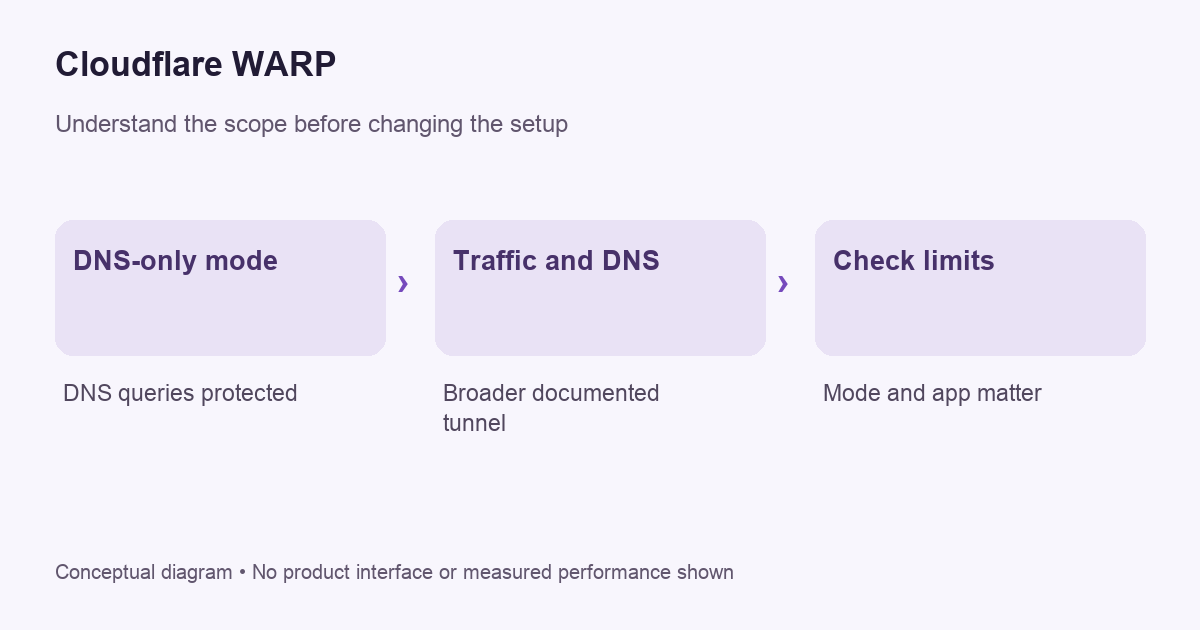
Cloudflare WARP is a client with different connection modes. Its DNS-only mode encrypts DNS queries without tunneling device traffic, while its Traffic and DNS mode sends covered traffic through Cloudflare’s network. Check the active mode before deciding what protection or routing behavior to expect. The app’s name alone does not tell you which mode is running.
WARP should also not be treated as a promise of a freely chosen country for every website. Start with the need you are trying to meet: encrypted DNS, a supported traffic tunnel or an organization-managed connection are different requirements. A product that fits one can be inappropriate for another.
Check the current mode names
Cloudflare’s current mode documentation distinguishes DNS only from Traffic and DNS, and notes older names used for them. This matters when following a tutorial written before the interface changed. Match the behavior described by the documentation rather than relying solely on a screenshot’s older label.
In DNS-only mode, the protected object is the name-resolution query. That does not by itself establish that website content or every application connection travels through a tunnel. In Traffic and DNS mode, the scope is broader. Keep that distinction attached to any statement that the app is “on.”
Why a DNS setting is not the whole connection
A device resolves names and communicates with destinations as related but distinct parts of networking. Changing the resolver can affect the first task without routing all destination traffic through the same service. Our VPN and intermediary comparison explains why one changed setting should not be described as universal traffic coverage.
A useful practical check is to record the exact mode before making a test request. If the result differs from an expectation, confirm that the expectation belongs to that mode. Do not diagnose a missing tunnel as a failure when you selected a DNS-only service in the first place.
VPNBLADE · PLAN SHORTLIST
A current plan to consider
Selected plan offers, not performance rankings. We may earn a commission through affiliate links. Monthly equivalents require the full payment shown.
ExpressVPN
Check your exact device setupExpressVPN Basic — 28-month introductory offer
USD 83.72 upfront · First 28 months, paid upfront
Get ExpressVPN deal Offer details & coupon conditions →Renewal & refund conditions
USD 99.95 annually after the initial 28-month term.
30-day money-back guarantee for new users; provider terms and purchase-channel conditions apply.
Understand what the address result means
Cloudflare’s WARP FAQ describes replacing the original public address with one representing an approximate location, and documents important traffic limitations. Read those limitations for your workflow rather than assuming one browser address check covers live calls, games and every other application.
Our IP-address guide explains the same observation problem more generally. A result from a checking website describes that request. It is not a complete audit of the device, and it does not erase account identity or information submitted to a service.
Do not turn routing into a country-selection promise
If you require a specific supported exit location, check whether the product actually offers that control. Do not infer it from a changed address or a network map. A service can use a different route while retaining an approximate regional association. That can be entirely consistent with its design.
Likewise, a working connection does not guarantee a streaming service will accept it or offer a certain catalogue. Service eligibility and account rules remain separate questions. Read our streaming buying guide before choosing any network tool for a viewing requirement.
A clean setup review
- Identify whether this is a personal installation or an organization-managed client.
- Read the official instructions for the installed operating system.
- Record the active mode and the task it is meant to support.
- Establish ordinary connectivity before diagnosing an optional routing change.
- Make a harmless fresh request and compare the result with the documented scope.
- Keep the documented recovery and support route available.
On a managed device, do not remove enrollment or alter organization policy to imitate a personal tutorial. The same product family can participate in a workplace access arrangement with requirements that a consumer article cannot infer. Ask the administrator which configuration is approved.
Investigate speed complaints by task
Cloudflare’s FAQ acknowledges performance trade-offs and explains that routing need not always select the physically nearest data center. Treat a map distance as one clue rather than a complete prediction of the network path. VPNBlade has not run throughput or latency benchmarks for this article.
Describe what feels slow. Is it a first page lookup, a large download, a voice call or a particular service? Repeat the same harmless task under comparable conditions and change one setting at a time. A peak download result alone may not answer an interactive latency complaint.
Keep overlapping network tools understandable
If another VPN, proxy or security application is installed, check the documented interaction before running everything together. A connected indicator in two interfaces does not prove the traffic follows two intended layers. It can instead leave you unsure which component owns the route and which settings affect the result.
Record the supported baseline and make reversible changes individually. If the behavior becomes unclear, return to that baseline and use our troubleshooting workflow. A redacted report with the client version, operating system, mode and exact symptom is more useful than a general claim that WARP and another VPN “do not work.”
Privacy still depends on the operator and the task
Using a tunnel changes the network party you depend on; it does not remove that dependency. Read the service’s privacy documentation and distinguish personal from managed deployments. A device or account controlled by an organization can involve administrative visibility that a consumer marketing description does not resolve.
Read our guide to when a VPN helps before treating encryption as the whole privacy decision. Consider what you send, where you sign in and which device you use. A route change cannot undo information you disclose through the application itself.
When to compare a separate VPN
Consider another service only after identifying a missing requirement, such as a particular supported application feature or location control. Our comparison checklist helps establish that fit. The existence of another subscription does not automatically mean the combination improves your current setup.
The deals directory contains dated plan records if you decide to evaluate alternatives. It is a billing reference, not evidence that WARP requires a paid companion VPN. This guide avoids inserting unrelated offer cards into the setup steps because a subscription purchase is not necessary to understand the documented modes.
Does the app name prove the active mode?
No. Inspect the selected mode and its current documentation. A saved preference, an old tutorial and a familiar icon are not substitutes for confirming what is active now. If you change the mode for diagnosis, note the previous state and the reason. Restore it when the check is complete unless you deliberately choose a different supported configuration.
Sources and editorial method
Written by VPNBlade Editorial from the primary documentation below, checked 26 October 2026. Practical checklists are editorial guidance, not a claim of hands-on product testing. Menus and product behaviour can change; follow the documentation for your current app and device.
- developers.cloudflare.com — warp modes — Documented scope, supported configuration and limitations discussed in the linked article section.
- developers.cloudflare.com — known issues and faq — Documented scope, supported configuration and limitations discussed in the linked article section.
Read our editorial standards · Explore the VPNBlade Blog
Sources & verification
- developers.cloudflare.com — warp modes ↗Primary platform, project or provider documentation · Checked 2026-10-26
Documented scope, supported configuration and limitations discussed in the linked article section.
- developers.cloudflare.com — known issues and faq ↗Primary platform, project or provider documentation · Checked 2026-10-26
Documented scope, supported configuration and limitations discussed in the linked article section.
YOUR EXPERIENCE MATTERS
Was this article useful?
Genuine reader helpfulness ratings. These do not measure VPN performance or verify a purchase. Only moderated submissions count. Ratings may reflect earlier versions of this information.
VPNBLADE · PLAN SHORTLIST
Ready to choose a plan?
Selected plan offers, not performance rankings. We may earn a commission through affiliate links. Monthly equivalents require the full payment shown.
ExpressVPN
Check your exact device setupExpressVPN Basic — 28-month introductory offer
USD 83.72 upfront · First 28 months, paid upfront
Get ExpressVPN deal Offer details & coupon conditions →Renewal & refund conditions
USD 99.95 annually after the initial 28-month term.
30-day money-back guarantee for new users; provider terms and purchase-channel conditions apply.
NordVPN
Apps across major device platformsNordVPN Basic — 27-month introductory offer
USD 94.23 upfront · First 27 months, paid upfront
Get NordVPN deal Offer details & coupon conditions →Renewal & refund conditions
USD 139.08 every year after the initial 27-month term at the current renewal price.
30-day money-back guarantee; provider eligibility, payment-channel and refund terms apply.
Surfshark
Households with multiple devicesSurfshark One — 27-month introductory offer
USD 67.23 upfront · First 27 months, paid upfront
Get Surfshark deal Offer details & coupon conditions →Renewal & refund conditions
Automatic renewal after the introductory term at the then-applicable rate. Confirm the chosen bundle’s next invoice and billing interval before purchase; no numeric renewal amount was verified.
30-day money-back guarantee; purchase-channel and provider eligibility conditions apply.