
Post
How to Remove a VPN from iPhone: Apps, Profiles and Subscriptions
Disconnect, delete a personal VPN configuration or remove an iPhone app safely. Handle managed profiles and subscription cancellation as separate tasks.
VPNBLADE · PLAN SHORTLIST
Compare current VPN plans
Selected plan offers, not performance rankings. We may earn a commission through affiliate links. Monthly equivalents require the full payment shown.

Surfshark
Households with multiple devicesSurfshark One — 27-month introductory offer
USD 67.23 upfront · First 27 months, paid upfront
Get Surfshark deal Offer details & coupon conditions →Renewal & refund conditions
Automatic renewal after the introductory term at the then-applicable rate. Confirm the chosen bundle’s next invoice and billing interval before purchase; no numeric renewal amount was verified.
30-day money-back guarantee; purchase-channel and provider eligibility conditions apply.

Proton VPN
Compare free access and paid upgradesProton VPN Plus — 24-month introductory offer
USD 83.76 upfront · First 24 months, paid upfront
Get Proton VPN deal Offer details & coupon conditions →Renewal & refund conditions
USD 83.88 every 12 months after the initial 24-month term; renewal prices are subject to the provider’s terms.
30-day money-back guarantee; purchase-channel and provider eligibility conditions apply.
In this article
Removing a VPN from iPhone can mean disconnecting it, deleting its saved configuration, uninstalling its app, or cancelling a subscription. These actions have different effects. For a personal VPN you no longer use, identify the app and configuration first, disconnect it, then follow the appropriate removal path. Handle recurring billing separately through the purchase channel.
Do not remove an employer or school management profile simply because it contains VPN settings. Such a profile can control more than networking, and removal may affect associated accounts, applications, or data. This guide separates a normal personal-app cleanup from a managed-device change, so you can decide which task you actually need to perform.
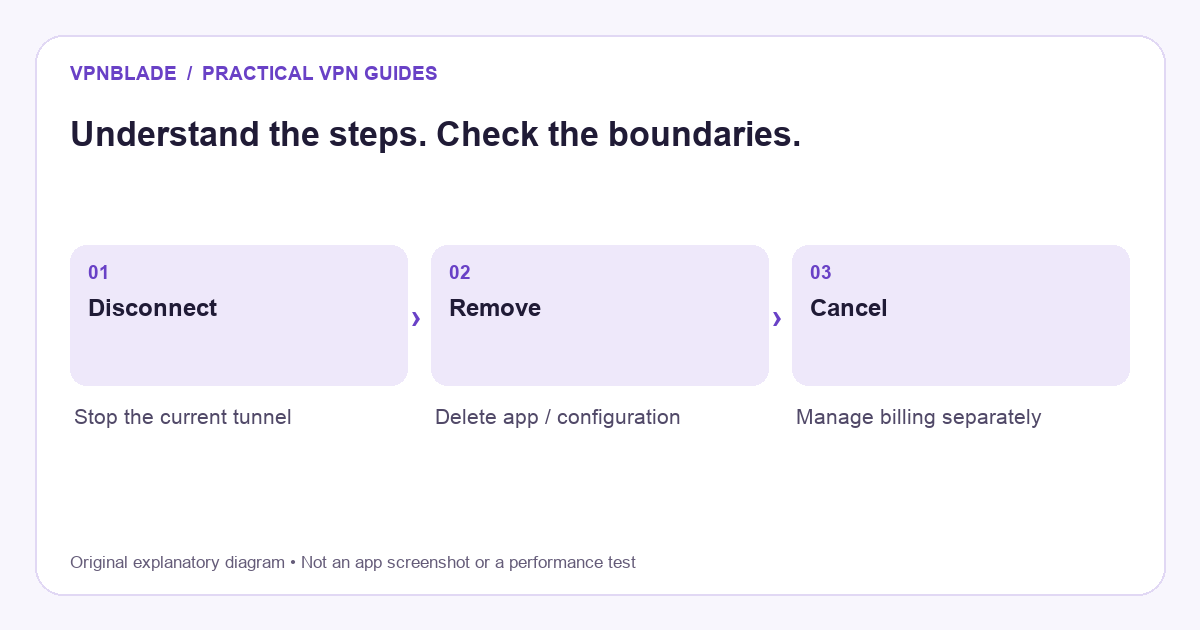
Quick steps
- Identify the app and configuration you own.
- Disconnect if you only need a pause.
- Remove only the intended personal app or configuration.
- Cancel recurring billing through the original purchase channel.
Identify the active VPN before deleting anything
Open the application that you believe provides the VPN and check its status. Then inspect the named system configuration. iPhone can show entries installed by personal applications and profiles supplied by an organisation. A security or filtering product may also use networking controls without being the commercial VPN service you had in mind.
Record the app name and the account used to purchase it. If you are removing the VPN because a website fails, first establish whether a simple disconnect changes the problem. Uninstalling software is a larger step than a temporary pause, and it can remove information useful for troubleshooting. Our VPN not working guide helps you isolate a connection problem before deciding to abandon the service.
VPNBLADE · PLAN SHORTLIST
A current plan to consider
Selected plan offers, not performance rankings. We may earn a commission through affiliate links. Monthly equivalents require the full payment shown.
Surfshark
Households with multiple devicesSurfshark One — 27-month introductory offer
USD 67.23 upfront · First 27 months, paid upfront
Get Surfshark deal Offer details & coupon conditions →Renewal & refund conditions
Automatic renewal after the introductory term at the then-applicable rate. Confirm the chosen bundle’s next invoice and billing interval before purchase; no numeric renewal amount was verified.
30-day money-back guarantee; purchase-channel and provider eligibility conditions apply.
Disconnect when you only need a temporary pause
Open the provider app and choose Disconnect. Wait for its status to update, then test an ordinary non-sensitive browsing task. Closing the app is not necessarily equivalent to stopping its tunnel. If it reconnects immediately, inspect the provider’s automatic connection rules and the related system configuration. The repeated connection can be intentional behaviour rather than a faulty button.
A temporary pause may be enough when you are testing a local service or comparing routes. If you want to use another server instead, changing the location is less disruptive than removing the app. The iPhone VPN switching guide explains how to distinguish changing gateways from changing providers. Keep your intended protection restored after the comparison.
Review installed configurations in Settings
Apple’s relevant management screen is Settings, General, VPN and Device Management. What appears there depends on the applications and profiles installed on the device. Select only the configuration whose identity and purpose you understand. A personal provider may offer a way to delete its configuration, while other entries may be controlled through the app or an administrator.
Apple’s profile instructions explain that deleting a configuration profile removes the settings, applications, and data associated with that profile. That is why a profile should not be treated as a disposable shortcut for removing one unwanted connection. Read its contents and management context before deciding whether removal is appropriate.
Remove a personal app through the normal iPhone controls
If you have decided to stop using the provider, use the normal app deletion controls for your iOS version. Make sure you are deleting the app, rather than merely removing its icon from the Home Screen. The interface and wording can change between releases, so follow the current on-device prompts. Do not install a separate “VPN remover” application for a routine uninstall.
After deletion, revisit the VPN configuration list and check whether a personal entry remains. Use the provider’s support instructions if it does. Avoid repeatedly deleting broader network settings or unrelated profiles. If you plan to reinstall, make sure you can recover the correct account and any required setup information first. A subscription receipt is useful for ownership, but should not be shared publicly with order identifiers exposed.
Handle managed devices differently
A work or school device may not allow you to remove its VPN, and a configuration can return after a management refresh. That is not necessarily a malfunction. The organisation may require the connection for approved applications or network access. Contact its administrator and describe the issue you are trying to solve instead of trying to strip management controls from the phone.
Even on a personally owned device, a work profile can carry organisational settings. Removing it can affect access to email, certificates, or other services associated with the profile. Ask what will be lost and how access can be restored before proceeding. A consumer VPN subscription will not replace those credentials or make the organisation’s private systems accessible by itself.
Check automatic behaviour after a change
If a VPN entry comes back, identify which app or management process recreates it. Reinstalling a provider app, signing back into an account, or reapplying an organisational profile can restore configuration. Changing only a connection toggle does not necessarily disable every automatic rule. Inspect the source of the entry rather than assuming the phone has failed to save your preference.
For a personal app, document any auto-connect or on-demand setting you change. For a managed connection, ask the administrator to explain its lifecycle. Do not disable security settings indiscriminately to make an icon disappear. The objective is to remove the connection you no longer want while keeping the rest of the device’s networking and approved access understandable.
Cancel the subscription separately
Deleting a VPN app does not prove that recurring billing has stopped. Determine whether the purchase was made through Apple, the provider’s website, or another authorised seller. Follow the cancellation process for that exact channel. Apple’s subscription cancellation guidance is relevant to subscriptions managed through its system; it does not cancel an unrelated website contract automatically.
Save the confirmation and check the next renewal date. Turning off renewal normally affects future billing, while a refund request concerns money already paid and may have a separate deadline. Do not assume one action performs both tasks. If you cannot find the subscription, compare the receipt’s seller and account details before opening another account or purchasing a replacement.
Verify the phone’s new routing state
Check the provider app if it remains installed, the system VPN entries, and a simple browsing task. A public-address comparison can help identify a route change, but it is not a complete audit. Safari can also be influenced by Private Relay, while a VPN-enabled home router can affect traffic even after the phone app is gone. These are separate layers with different controls.
The phone’s GPS position does not change simply because an app is removed. A map, weather app, or signed-in website may continue to recognise your location through its normal permissions or stored account information. Our IP-address guide explains why an address result and a physical-location result are not interchangeable evidence.
Decide whether you need a replacement
You do not have to buy another VPN just because you removed one. Consider why the original setup no longer fit: compatibility, cost, an unused subscription, or a specific failed workflow. Some concerns are better addressed through operating-system updates, account security, or careful application permissions. The guide to whether a VPN helps puts the tool in context.
If a replacement is appropriate, test it against a short requirements list and read its full billing terms. Avoid overlapping active personal tunnels during the first evaluation. The Apple-device selection guide covers cross-device considerations, while the current cards below show commercial terms to inspect. They are comparison starting points, not proof of a performance result on your phone.
Live plan records · Monthly equivalents require the full initial payment. Prices in different currencies are not directly comparable. Confirm tax, eligibility and renewal terms at checkout.
Proton VPN Plus — 24-month introductory offer
USD 3.49/month equivalent
USD 83.76 upfront
First 24 months, paid upfront
Next bill: USD 83.88 every 12 months after the initial 24-month term; renewal prices are subject to the provider’s terms.
Recorded code: VPNINTRO449349
Source checked 2026-10-25 · Research record; no performance endorsement.
See offer & full terms ↗Surfshark Starter — 27-month introductory offer
USD 2.49/month equivalent
USD 67.23 upfront
First 27 months, paid upfront
Next bill: After the first 27 months, renews every 12 months at the then-applicable renewal price. The checked checkout did not state a numeric renewal amount.
Recorded code: SHARKGIFT
Source checked 2026-10-25 · Research record; no performance endorsement.
See offer & full terms ↗Sources and editorial method
Written by VPNBlade Editorial from the primary documentation below, checked 25 October 2026. Practical checklists are editorial guidance, not a claim of hands-on product testing. Menus and product behaviour can change; follow the documentation for your current app and device.
- Apple: install or remove configuration profiles — VPN and device-management location and consequences of profile removal.
- Apple: cancel a subscription — Apple-managed subscription cancellation is separate from deleting an app.
- Apple: iCloud Private Relay networking — Private Relay traffic scope and coarse location, distinct from a general personal VPN.
Read our editorial standards · Explore the VPNBlade Blog
Sources & verification
- Apple: install or remove configuration profiles ↗Primary technical or platform documentation · Checked 2026-10-25
VPN and device-management location and consequences of profile removal.
- Apple: cancel a subscription ↗Primary technical or platform documentation · Checked 2026-10-25
Apple-managed subscription cancellation is separate from deleting an app.
- Apple: iCloud Private Relay networking ↗Primary technical or platform documentation · Checked 2026-10-25
Private Relay traffic scope and coarse location, distinct from a general personal VPN.
YOUR EXPERIENCE MATTERS
Was this article useful?
Genuine reader helpfulness ratings. These do not measure VPN performance or verify a purchase. Only moderated submissions count. Ratings may reflect earlier versions of this information.
VPNBLADE · PLAN SHORTLIST
Ready to choose a plan?
Selected plan offers, not performance rankings. We may earn a commission through affiliate links. Monthly equivalents require the full payment shown.
Surfshark
Households with multiple devicesSurfshark One — 27-month introductory offer
USD 67.23 upfront · First 27 months, paid upfront
Get Surfshark deal Offer details & coupon conditions →Renewal & refund conditions
Automatic renewal after the introductory term at the then-applicable rate. Confirm the chosen bundle’s next invoice and billing interval before purchase; no numeric renewal amount was verified.
30-day money-back guarantee; purchase-channel and provider eligibility conditions apply.
Proton VPN
Compare free access and paid upgradesProton VPN Plus — 24-month introductory offer
USD 83.76 upfront · First 24 months, paid upfront
Get Proton VPN deal Offer details & coupon conditions →Renewal & refund conditions
USD 83.88 every 12 months after the initial 24-month term; renewal prices are subject to the provider’s terms.
30-day money-back guarantee; purchase-channel and provider eligibility conditions apply.