
Post
How to Change Your VPN on iPhone: Server, App and Settings
Change an iPhone VPN server, switch providers or review configurations. Understand public IP changes, Private Relay and billing before changing apps.
VPNBLADE · PLAN SHORTLIST
Compare current VPN plans
Selected plan offers, not performance rankings. We may earn a commission through affiliate links. Monthly equivalents require the full payment shown.

ExpressVPN
Check your exact device setupExpressVPN Basic — 28-month introductory offer
USD 83.72 upfront · First 28 months, paid upfront
Get ExpressVPN deal Offer details & coupon conditions →Renewal & refund conditions
USD 99.95 annually after the initial 28-month term.
30-day money-back guarantee for new users; provider terms and purchase-channel conditions apply.

Proton VPN
Compare free access and paid upgradesProton VPN Plus — 24-month introductory offer
USD 83.76 upfront · First 24 months, paid upfront
Get Proton VPN deal Offer details & coupon conditions →Renewal & refund conditions
USD 83.88 every 12 months after the initial 24-month term; renewal prices are subject to the provider’s terms.
30-day money-back guarantee; purchase-channel and provider eligibility conditions apply.
In this article

To change a VPN server on iPhone, open the VPN provider’s app, choose another supported location, and reconnect. To change providers, disconnect the old app and set up the new one. Changing a server, editing a saved configuration, and changing the phone’s region are separate tasks. Start by identifying which of those outcomes you need.
A location label inside a VPN app describes the provider’s exit route, not the physical location of the phone. Your GPS permissions, signed-in accounts, Apple Account region, and stored website data do not automatically change with it. Understanding those boundaries prevents unnecessary configuration changes when a map or application continues to recognise where you actually are.
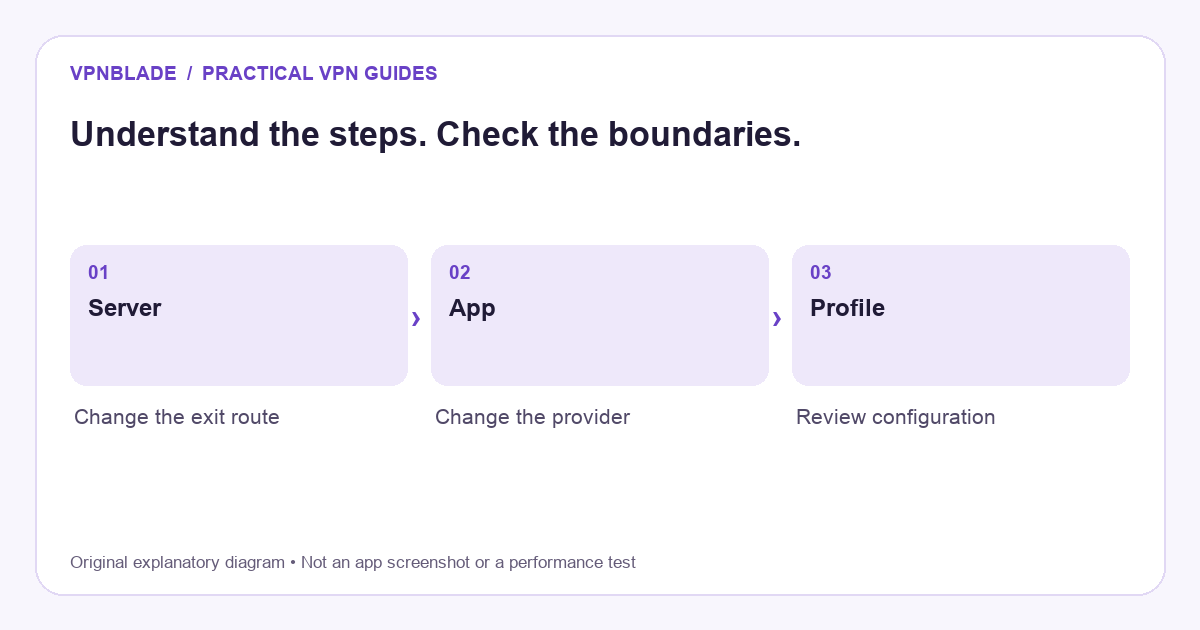
Quick steps
- Decide whether you are changing a server, app or profile.
- Use the provider app for a supported location change.
- Disconnect the old app before evaluating another provider.
- Check the route without confusing it with GPS or account region.
Choose the right kind of change
There are three common situations. You like the current service but need another gateway; use its location selector. You are moving to another company; switch apps and verify the new connection. You have a manually configured or organisation-managed profile; use the supplied instructions or contact its administrator. A single tutorial button cannot safely cover every case.
Write down the reason for the change before you begin. A nearby gateway may help with an unreliable route, while a particular workplace application may require the company’s designated connection. A personal VPN does not grant access to private business systems. If you are still choosing a service, the iOS VPN selection guide explains useful compatibility and subscription checks.
VPNBLADE · PLAN SHORTLIST
A current plan to consider
Selected plan offers, not performance rankings. We may earn a commission through affiliate links. Monthly equivalents require the full payment shown.
ExpressVPN
Check your exact device setupExpressVPN Basic — 28-month introductory offer
USD 83.72 upfront · First 28 months, paid upfront
Get ExpressVPN deal Offer details & coupon conditions →Renewal & refund conditions
USD 99.95 annually after the initial 28-month term.
30-day money-back guarantee for new users; provider terms and purchase-channel conditions apply.
Change location within the same VPN app
Open the active provider app and inspect its current status. Find the supported server or country list and choose the location you need. Some apps disconnect and reconnect automatically; others ask you to connect after making the selection. Wait until the app reports that the new tunnel is established before testing an application. A selected country and an active connection are not necessarily the same state.
Begin with a normal location rather than a specialty mode when troubleshooting. A particular country may have several cities or servers, and the provider can choose an automatic option within it. If the app offers a map, remember that it is a selection interface rather than a measurement of your phone’s position. Record the server label so you can repeat the comparison if support asks for details.
Check what the new location actually changed
Use the same browser and network to compare public-address results before and after connecting. A typical routed connection exposes the VPN exit address to the destination. It does not rewrite GPS coordinates or clear an account’s saved country. Websites may also rely on payment details, cookies, language preferences, and previous activity. A familiar location result is therefore not conclusive proof that the VPN failed.
For a clearer explanation, see does a VPN change your IP address?. Treat that check as one piece of evidence. If a particular app still behaves unexpectedly, inspect its location permissions and the provider’s compatibility documentation. Do not grant broader permissions or misrepresent billing details merely to make a location label match the one you expected.
Switch from one VPN provider to another
Disconnect the old service first. Install the new provider’s official iOS app, sign in to the correct account, and follow its setup prompts. Read the request to add a VPN configuration and confirm that it belongs to the application you intentionally installed. Avoid running through several permission dialogs without checking which app is asking for access.
Do not assume both services can operate as independent device-wide tunnels at the same time. Overlapping configurations can lead to a confusing result in which the app you opened is not the connection actually carrying traffic. Keep the old software available until you understand how to recover its configuration, but start the new evaluation with one clearly identified active personal connection.
Understand the iPhone configuration screen
Apple places installed profiles and management information under Settings, General, VPN and Device Management. The available controls depend on what is installed and whether the device is supervised or managed. A provider app may manage its configuration directly, while a manual profile may expose a different set of editable fields. Do not copy settings from an unrelated service.
Apple’s profile guidance explains that configuration profiles can contain multiple settings. Removing a profile can delete associated settings, apps, or data, so editing a personal VPN is not a reason to remove an employer’s entire management profile. If the connection is managed, ask the administrator for the approved way to change it.
Keep automatic connection in view
A VPN that reconnects unexpectedly may have an automatic rule rather than a broken switch. The provider can connect on selected networks or use an on-demand configuration. Check the app’s instructions and the relevant system entry before assuming your new choice has been ignored. Write down the old setting so that you can restore it after a test.
This matters especially when replacing a service. The previous app’s automatic behaviour can make it difficult to understand which route is active. Disconnect it deliberately and review its reconnection controls. If the iPhone is managed, do not disable required protection to make a personal app take precedence. Use a separate permitted device or ask the organisation how the setup should work.
Private Relay is a different control
iCloud Private Relay is not the same switch as a conventional provider VPN. Apple’s technical explanation describes a relay design that protects particular traffic and preserves a coarse regional location. Safari results can therefore differ from another application’s results depending on the active privacy settings and network configuration.
Do not change your Apple Account country or phone language as a substitute for selecting a VPN server. Those settings have their own effects and may influence store availability or subscriptions. If your goal is simply to move from one gateway to another, stay in the provider’s app and verify its connection. Keep unrelated device settings stable so the result is easier to interpret.
Check performance without chasing a single number
A new gateway can change latency and throughput because traffic follows a different route. Compare the same task on the same network, preferably without background downloads. One video pause or speed-test result is not enough to establish that a provider is consistently faster. A location far from both you and the destination can add distance without providing a practical benefit.
Also check the tasks that matter to you: a video call, ordinary browsing, or access to a permitted work resource. If one server is unreliable, try another supported server in the same region before changing protocols, DNS, and several other settings together. The troubleshooting guide provides an orderly process for narrowing down the cause.
Changing apps does not cancel the old subscription
If you are replacing providers, check the original purchase channel. A subscription bought through Apple normally has to be managed through Apple’s subscription controls, while a website purchase has the provider’s own billing process. Disconnecting or deleting an app does not necessarily stop recurring charges. Retain the cancellation confirmation and any relevant renewal notice.
Compare the new offer’s full first payment with its next billing amount and duration. A low introductory equivalent can hide a larger upfront commitment or a much shorter renewal period. Our plan comparison tool and provider stores help you inspect those differences. If you later decide to remove the old configuration completely, use the iPhone removal guide rather than deleting unrelated profiles.
Live plan records · Monthly equivalents require the full initial payment. Prices in different currencies are not directly comparable. Confirm tax, eligibility and renewal terms at checkout.
Proton VPN Plus — 24-month introductory offer
USD 3.49/month equivalent
USD 83.76 upfront
First 24 months, paid upfront
Next bill: USD 83.88 every 12 months after the initial 24-month term; renewal prices are subject to the provider’s terms.
Recorded code: VPNINTRO449349
Source checked 2026-10-25 · Research record; no performance endorsement.
See offer & full terms ↗ExpressVPN Basic — 28-month introductory offer
USD 2.99/month equivalent
USD 83.72 upfront
First 28 months, paid upfront
Next bill: USD 99.95 annually after the initial 28-month term.
Source checked 2026-10-25 · Research record; no performance endorsement.
See offer & full terms ↗Sources and editorial method
Written by VPNBlade Editorial from the primary documentation below, checked 25 October 2026. Practical checklists are editorial guidance, not a claim of hands-on product testing. Menus and product behaviour can change; follow the documentation for your current app and device.
- Apple: install or remove configuration profiles — VPN and device-management location and consequences of profile removal.
- Apple: iCloud Private Relay networking — Private Relay traffic scope and coarse location, distinct from a general personal VPN.
Read our editorial standards · Explore the VPNBlade Blog
Sources & verification
- Apple: install or remove configuration profiles ↗Primary technical or platform documentation · Checked 2026-10-25
VPN and device-management location and consequences of profile removal.
- Apple: iCloud Private Relay networking ↗Primary technical or platform documentation · Checked 2026-10-25
Private Relay traffic scope and coarse location, distinct from a general personal VPN.
YOUR EXPERIENCE MATTERS
Was this article useful?
Genuine reader helpfulness ratings. These do not measure VPN performance or verify a purchase. Only moderated submissions count. Ratings may reflect earlier versions of this information.
VPNBLADE · PLAN SHORTLIST
Ready to choose a plan?
Selected plan offers, not performance rankings. We may earn a commission through affiliate links. Monthly equivalents require the full payment shown.
ExpressVPN
Check your exact device setupExpressVPN Basic — 28-month introductory offer
USD 83.72 upfront · First 28 months, paid upfront
Get ExpressVPN deal Offer details & coupon conditions →Renewal & refund conditions
USD 99.95 annually after the initial 28-month term.
30-day money-back guarantee for new users; provider terms and purchase-channel conditions apply.
Proton VPN
Compare free access and paid upgradesProton VPN Plus — 24-month introductory offer
USD 83.76 upfront · First 24 months, paid upfront
Get Proton VPN deal Offer details & coupon conditions →Renewal & refund conditions
USD 83.88 every 12 months after the initial 24-month term; renewal prices are subject to the provider’s terms.
30-day money-back guarantee; purchase-channel and provider eligibility conditions apply.