
Post
Does a VPN Change Your IP Address? What Changes and What Does Not
A VPN usually changes the public address websites see, but not GPS or account identity. Learn how to check routing and interpret IPv4, IPv6 and split tunneling.
VPNBLADE · PLAN SHORTLIST
Compare current VPN plans
Selected plan offers, not performance rankings. We may earn a commission through affiliate links. Monthly equivalents require the full payment shown.

Mullvad
Published subscription offerMullvad — 10% accepted-cryptocurrency discount
EUR 4.50 upfront · One month of account time, calculated from the EUR 5 list rate
Get Mullvad deal Offer details & coupon conditions →Renewal & refund conditions
The discount depends on using an accepted cryptocurrency; future terms must be checked when topping up.
14-day refund policy applies with payment-specific conditions; cash is excluded.

Proton VPN
Compare free access and paid upgradesProton VPN Plus — 24-month introductory offer
USD 83.76 upfront · First 24 months, paid upfront
Get Proton VPN deal Offer details & coupon conditions →Renewal & refund conditions
USD 83.88 every 12 months after the initial 24-month term; renewal prices are subject to the provider’s terms.
30-day money-back guarantee; purchase-channel and provider eligibility conditions apply.
In this article

A VPN normally changes the public IP address that websites see for traffic routed through its tunnel. It does not necessarily change the address assigned to your home router by your internet provider, and it does not automatically change your phone’s GPS position. Those are different layers. A useful answer starts by identifying which address, application, and connection you are checking.
The simple version is this: a routed website request exits through the VPN gateway, so the website sees that exit infrastructure’s address. The original internet connection still carries the encrypted tunnel to the gateway. A change on an address-check page can confirm part of that route, but it does not prove complete anonymity, a no-logs policy, or protection for every application.
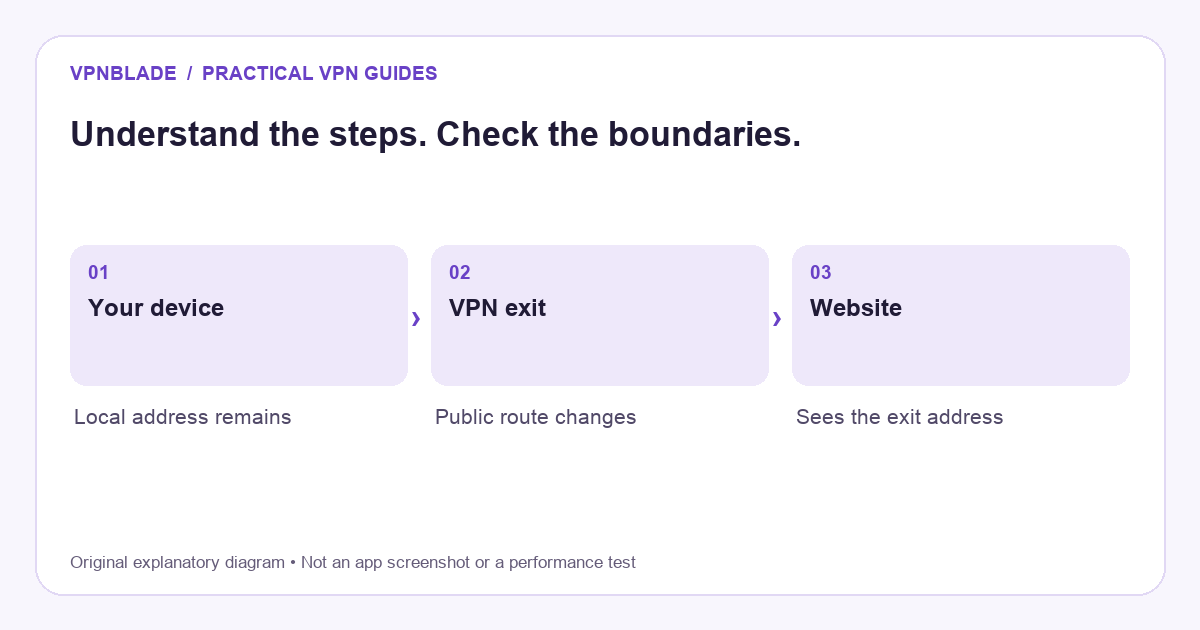
Quick steps
- Identify the application and network used for the check.
- Compare its public address before and after connecting.
- Review split tunneling, IPv6 and browser relays.
- Keep account and location-permission signals separate.
Public and private addresses are different
A laptop on a home network usually has a local address used to communicate with the router and nearby devices. The household’s internet connection also has a public-facing address, although provider architectures vary. A website generally does not use your laptop’s private home-network address as the source it sees across the internet. Confusing these values makes VPN checks difficult to interpret.
Connecting to a VPN can create an additional virtual network interface and address without replacing every address on the device. Your printer may still be reached through the local network while selected internet traffic uses the tunnel. If an address in the operating system does not change, that alone is not evidence that the VPN is inactive. Check the route and the destination’s observation instead.
VPNBLADE · PLAN SHORTLIST
A current plan to consider
Selected plan offers, not performance rankings. We may earn a commission through affiliate links. Monthly equivalents require the full payment shown.
Mullvad
Published subscription offerMullvad — 10% accepted-cryptocurrency discount
EUR 4.50 upfront · One month of account time, calculated from the EUR 5 list rate
Get Mullvad deal Offer details & coupon conditions →Renewal & refund conditions
The discount depends on using an accepted cryptocurrency; future terms must be checked when topping up.
14-day refund policy applies with payment-specific conditions; cash is excluded.
What the destination sees through a VPN
For a typical full-tunnel personal connection, the destination receives traffic from the VPN’s exit route. Many subscribers may share an exit address. Some services sell dedicated addresses, while others rotate or change addresses when you reconnect. A location name in the app therefore does not promise one fixed numerical IP unless the purchased product explicitly provides that feature.
The tunnel’s endpoint and the website’s endpoint are separate systems. WireGuard’s conceptual overview describes a VPN interface that carries IP packets between peers; a commercial provider adds its gateway and account-management design around such networking. What a destination sees depends on that routing arrangement, not simply on whether a product uses an impressive protocol name.
What remains visible to your internet provider
Your internet provider still carries the connection from your device or router to the VPN gateway. It can usually observe the gateway connection and characteristics such as timing and transferred data volume. The VPN does not make you disappear from the access network. What changes is the visibility of traffic carried inside a properly established encrypted tunnel.
This is also a trust shift. The VPN operator becomes part of the path and can have access to information that the local provider no longer sees in the same way. Provider policies, implementation, and independent evidence matter. An address change does not establish how those systems handle records. Our VPN explanation covers that trust boundary in more detail.
Why a map may still show your real location
Websites and apps do not rely only on public IP geolocation. A phone may supply precise location through permissions. A signed-in account may have a saved address or country. A browser can retain cookies and preferences, and a service may use payment or account information. A VPN does not automatically clear those signals or rewrite the facts stored in an account.
IP geolocation itself is an estimate based on databases, not a GPS measurement. A newly assigned address can be mapped incorrectly or associated with a broader region than expected. If a map does not match the selected country, compare the public address and application permissions before concluding that the tunnel failed. Do not submit false account or billing information to force a location result.
IPv4 and IPv6 need separate interpretation
Modern networks can use IPv4 and IPv6. A quick check that reports only one address family does not establish what happens to the other. VPN providers differ in how they route or restrict IPv6 on particular platforms. Read the current documentation for your app rather than assuming all protocols and operating systems behave identically.
If a checker reports inconsistent results, first confirm the client is connected and the test application is included in its routing. Then inspect any relevant provider guidance about IPv6 and DNS. Do not treat a single unfamiliar number as proof of a leak without understanding what it represents. A clear record of the test conditions is more useful than collecting several contradictory screenshots.
Split tunneling can deliberately leave an address unchanged
Split tunneling sends selected traffic outside the VPN or limits the tunnel to selected applications or destinations. If your browser is excluded, its address-check page may correctly show the ordinary connection’s public address. That is different from a tunnel unexpectedly failing to protect traffic it was configured to carry. The distinction matters when diagnosing an apparent leak.
Check the application list and routing rules in the provider’s own interface. A browser extension, a full-device app, and a router tunnel can cover different scopes. Keep only one clearly understood setup active during an initial check. The beginner setup guide explains how to establish a baseline before adding advanced exceptions or overlapping tunnels.
Browser privacy services can affect the result too
A browser proxy or relay can change what an address-check site sees independently of a device VPN. On Apple devices, Private Relay is a separate service with its own traffic scope and location design. A Safari result may therefore differ from another application’s result without either reading being fabricated.
Use the same application and network when comparing before and after states. Keep unrelated privacy settings stable, or document them explicitly. Otherwise, you may attribute a relay’s effect to a VPN or mistake a deliberate browser exception for a broken connection. For iPhone-specific controls, our VPN switching guide helps separate these layers.
A practical before-and-after check
Begin on a network you are permitted to use and choose a reputable public-address checker. Note the reported address privately. Connect the VPN using a normal default configuration, then repeat in the same browser. Confirm the client’s connection status and selected location. If the address changes to the VPN route, you have evidence that this particular request followed a different public path.
Next, check any essential application separately. If you change from Wi-Fi to cellular data, repeat the observation because the underlying connection has changed. Do not publish full addresses, account identifiers, or diagnostic logs in an open forum. If you need support, redact sensitive values and explain the sequence, platform, app version, and relevant routing settings.
What an address change cannot prove
An exit address does not stop a website recognising an account you sign into. It does not remove device fingerprinting, prevent phishing, or guarantee that a malicious file is safe. HTTPS still protects the connection to a legitimate website, and certificate warnings still matter. A VPN cannot make a dishonest destination trustworthy merely by changing the route used to reach it.
It also does not prove a provider has no logs or that a particular streaming platform will remain compatible. Those are separate claims requiring separate evidence. If your purchase decision depends on them, inspect current documentation and terms rather than turning a successful IP check into a universal endorsement. The VPN buying checklist separates these questions.
Choose features for the problem you actually have
A shared exit address, dedicated address, and multi-hop connection solve different problems. A dedicated address may help with an allowlist but can make activity more consistently associated with that address. A multi-hop route adds another VPN gateway but does not erase account or GPS signals. Read Double VPN explained before paying for additional routing complexity.
If a normal personal VPN fits your goal, compare current plans and their full billing terms rather than buying on the assumption that every changed address has equal privacy value. The live records below identify initial payments and later charges. Follow through to the provider to confirm eligibility and supported routing on your device.
Live plan records · Monthly equivalents require the full initial payment. Prices in different currencies are not directly comparable. Confirm tax, eligibility and renewal terms at checkout.
Mullvad — 10% accepted-cryptocurrency discount
EUR 4.50/month equivalent
EUR 4.50 upfront
One month of account time, calculated from the EUR 5 list rate
Next bill: The discount depends on using an accepted cryptocurrency; future terms must be checked when topping up.
Source checked 2026-10-24 · Research record; no performance endorsement.
See offer & full terms ↗Proton VPN Plus — 24-month introductory offer
USD 3.49/month equivalent
USD 83.76 upfront
First 24 months, paid upfront
Next bill: USD 83.88 every 12 months after the initial 24-month term; renewal prices are subject to the provider’s terms.
Recorded code: VPNINTRO449349
Source checked 2026-10-25 · Research record; no performance endorsement.
See offer & full terms ↗Sources and editorial method
Written by VPNBlade Editorial from the primary documentation below, checked 25 October 2026. Practical checklists are editorial guidance, not a claim of hands-on product testing. Menus and product behaviour can change; follow the documentation for your current app and device.
- WireGuard: conceptual overview — VPN interfaces, peer keys and IP-packet encapsulation; product account handling is a separate layer.
- Apple: iCloud Private Relay networking — Private Relay traffic scope and coarse location, distinct from a general personal VPN.
- Cloudflare: what is HTTPS? — HTTPS protects the browser-to-site connection using TLS, separate from a VPN tunnel.
Read our editorial standards · Explore the VPNBlade Blog
Sources & verification
- WireGuard: conceptual overview ↗Primary technical or platform documentation · Checked 2026-10-25
VPN interfaces, peer keys and IP-packet encapsulation; product account handling is a separate layer.
- Apple: iCloud Private Relay networking ↗Primary technical or platform documentation · Checked 2026-10-25
Private Relay traffic scope and coarse location, distinct from a general personal VPN.
- Cloudflare: what is HTTPS? ↗Primary technical or platform documentation · Checked 2026-10-25
HTTPS protects the browser-to-site connection using TLS, separate from a VPN tunnel.
YOUR EXPERIENCE MATTERS
Was this article useful?
Genuine reader helpfulness ratings. These do not measure VPN performance or verify a purchase. Only moderated submissions count. Ratings may reflect earlier versions of this information.
VPNBLADE · PLAN SHORTLIST
Ready to choose a plan?
Selected plan offers, not performance rankings. We may earn a commission through affiliate links. Monthly equivalents require the full payment shown.
Mullvad
Published subscription offerMullvad — 10% accepted-cryptocurrency discount
EUR 4.50 upfront · One month of account time, calculated from the EUR 5 list rate
Get Mullvad deal Offer details & coupon conditions →Renewal & refund conditions
The discount depends on using an accepted cryptocurrency; future terms must be checked when topping up.
14-day refund policy applies with payment-specific conditions; cash is excluded.
Proton VPN
Compare free access and paid upgradesProton VPN Plus — 24-month introductory offer
USD 83.76 upfront · First 24 months, paid upfront
Get Proton VPN deal Offer details & coupon conditions →Renewal & refund conditions
USD 83.88 every 12 months after the initial 24-month term; renewal prices are subject to the provider’s terms.
30-day money-back guarantee; purchase-channel and provider eligibility conditions apply.