
Post
How to check whether your VPN is working
Check VPN connection state, public IP, DNS and app coverage. Learn what each observation establishes and why one successful test cannot prove everything.
VPNBLADE · PLAN SHORTLIST
Compare current VPN plans
Selected plan offers, not performance rankings. We may earn a commission through affiliate links. Monthly equivalents require the full payment shown.

ExpressVPN
Check your exact device setupExpressVPN Basic — 28-month introductory offer
USD 83.72 upfront · First 28 months, paid upfront
Get ExpressVPN deal Offer details & coupon conditions →Renewal & refund conditions
USD 99.95 annually after the initial 28-month term.
30-day money-back guarantee for new users; provider terms and purchase-channel conditions apply.

NordVPN
Apps across major device platformsNordVPN Basic — 27-month introductory offer
USD 94.23 upfront · First 27 months, paid upfront
Get NordVPN deal Offer details & coupon conditions →Renewal & refund conditions
USD 139.08 every year after the initial 27-month term at the current renewal price.
30-day money-back guarantee; provider eligibility, payment-channel and refund terms apply.

Surfshark
Households with multiple devicesSurfshark One — 27-month introductory offer
USD 67.23 upfront · First 27 months, paid upfront
Get Surfshark deal Offer details & coupon conditions →Renewal & refund conditions
Automatic renewal after the introductory term at the then-applicable rate. Confirm the chosen bundle’s next invoice and billing interval before purchase; no numeric renewal amount was verified.
30-day money-back guarantee; purchase-channel and provider eligibility conditions apply.

PureVPN
Published subscription offerPureVPN Standard — 27-month prepaid offer
USD 58.20 upfront · First 27 months, paid upfront
Get PureVPN deal Offer details & coupon conditions →Renewal & refund conditions
Checkout displays USD 2.15/month after 27 months. This is the provider’s renewal-rate label, not a verified future invoice. The next charge amount and billing interval were not separately established; confirm both before paying.
31-day money-back guarantee advertised; provider eligibility and refund terms apply.

VeePN
Published subscription offerVeePN Basic — 28-month introductory offer
USD 55.72 upfront · First 28 months, paid upfront
Get VeePN deal Offer details & coupon conditions →Renewal & refund conditions
Card/PayPal checkout quotes automatic renewal at USD 59.76 every 12 months after the initial 28-month period. Future renewal prices can change.
Thirty-day refund window for the original purchase, subject to terms. Rebilling and previously refunded accounts are excluded; plan extensions or added licenses can waive eligibility.
In this article

Check a VPN by testing the route used by the application you care about, then compare the result with the route you intended. A connected badge is useful evidence, but it does not establish every privacy property of the service. An IP-address check, a DNS observation and a reconnection check answer different questions. Keep their conclusions separate.
This workflow is for your own device and an authorized connection. It is an editorial method, not a claim that VPNBlade tested the providers shown in our deal widgets. If your goal is access to a company resource, confirm the expected result with its administrator: a work VPN can function correctly without changing the public address used by ordinary browsing.
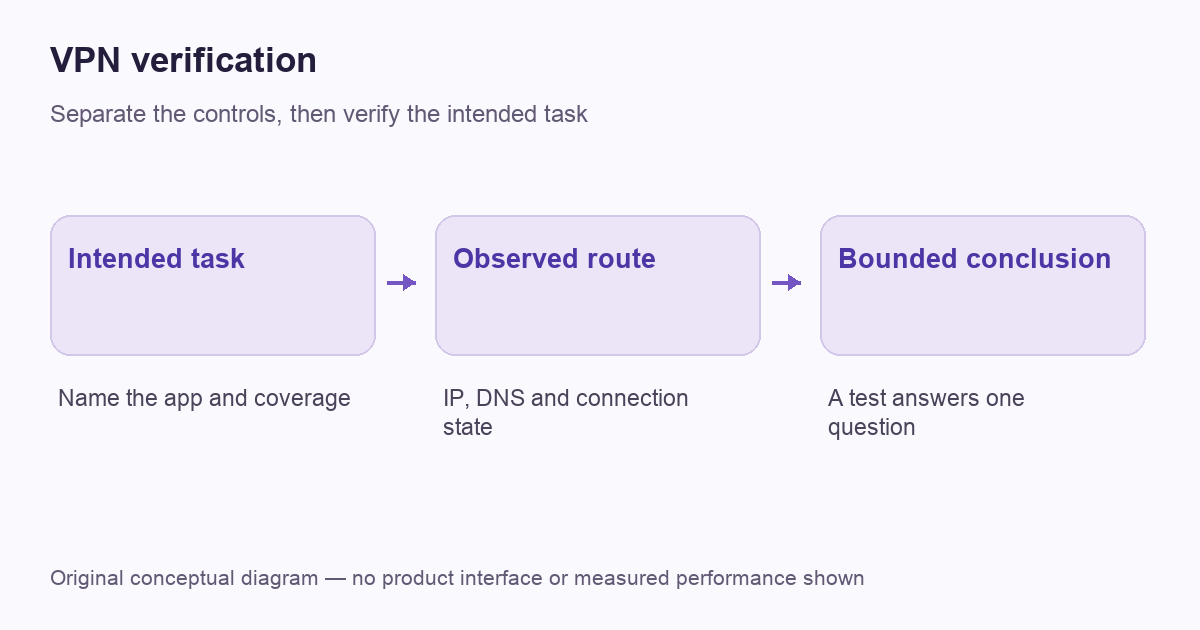
Write down what success should look like
Start with one sentence describing the required coverage. You might want a browser to use a commercial VPN exit, a work application to reach a private resource, or a selected app to remain outside an otherwise protected route. Those are three different configurations. Without an expected result, a test can produce a reassuring number while missing the task entirely.
Record the device, operating system, VPN application, selected location and any split-tunneling rule. Include the network connection: a phone on mobile data and a laptop on home Wi-Fi do not share the same starting point. Our VPN architecture guide explains why the gateway and the application boundary matter.
Check the connection state in the right place
Use the VPN application’s own connection screen and the operating system’s relevant settings. Microsoft’s Windows guide explains how a saved VPN profile reports its connection state. That state tells you about the configured connection, rather than proving that every application is routed through it.
Make sure you are looking at the intended profile. An old work configuration, another VPN application or a browser-only service can create a different boundary from the one you have in mind. Do not delete managed profiles to simplify a test. Identify the responsible application or administrator first and preserve the configuration details needed to reconnect.
VPNBLADE · PLAN SHORTLIST
A current plan to consider
Selected plan offers, not performance rankings. We may earn a commission through affiliate links. Monthly equivalents require the full payment shown.
ExpressVPN
Check your exact device setupExpressVPN Basic — 28-month introductory offer
USD 83.72 upfront · First 28 months, paid upfront
Get ExpressVPN deal Offer details & coupon conditions →Renewal & refund conditions
USD 99.95 annually after the initial 28-month term.
30-day money-back guarantee for new users; provider terms and purchase-channel conditions apply.
NordVPN
Apps across major device platformsNordVPN Basic — 27-month introductory offer
USD 94.23 upfront · First 27 months, paid upfront
Get NordVPN deal Offer details & coupon conditions →Renewal & refund conditions
USD 139.08 every year after the initial 27-month term at the current renewal price.
30-day money-back guarantee; provider eligibility, payment-channel and refund terms apply.
Surfshark
Households with multiple devicesSurfshark One — 27-month introductory offer
USD 67.23 upfront · First 27 months, paid upfront
Get Surfshark deal Offer details & coupon conditions →Renewal & refund conditions
Automatic renewal after the introductory term at the then-applicable rate. Confirm the chosen bundle’s next invoice and billing interval before purchase; no numeric renewal amount was verified.
30-day money-back guarantee; purchase-channel and provider eligibility conditions apply.
PureVPN
Published subscription offerPureVPN Standard — 27-month prepaid offer
USD 58.20 upfront · First 27 months, paid upfront
Get PureVPN deal Offer details & coupon conditions →Renewal & refund conditions
Checkout displays USD 2.15/month after 27 months. This is the provider’s renewal-rate label, not a verified future invoice. The next charge amount and billing interval were not separately established; confirm both before paying.
31-day money-back guarantee advertised; provider eligibility and refund terms apply.
VeePN
Published subscription offerVeePN Basic — 28-month introductory offer
USD 55.72 upfront · First 28 months, paid upfront
Get VeePN deal Offer details & coupon conditions →Renewal & refund conditions
Card/PayPal checkout quotes automatic renewal at USD 59.76 every 12 months after the initial 28-month period. Future renewal prices can change.
Thirty-day refund window for the original purchase, subject to terms. Rebilling and previously refunded accounts are excluded; plan extensions or added licenses can waive eligibility.
Compare the public IP address from the intended app
For a personal internet-exit VPN, compare the public address observed by the same browser before and after an authorized connection change. Keep other conditions stable. A different exit address is consistent with the browser using a different route, but it does not verify encryption algorithms, account privacy or whether unrelated apps follow that route.
Proton’s verification explanation describes public-address checks as one part of VPN assessment. Treat the provider’s guidance as a procedure, not an independent certification. If you use a browser extension, a successful browser check says little about a separate game client or desktop application. Read what an IP change does and does not establish for the interpretation limits.
Interpret DNS results without demanding identical numbers
A DNS test reports information about the resolver observed by that test. It is not a second copy of the public-IP test. A resolver can have a different address from the VPN exit, and a displayed country or organization label can be incomplete. Compare the observation with the documented DNS arrangement rather than declaring every different address a leak.
Proton’s DNS documentation distinguishes the resolver from the VPN server and explains how custom DNS settings can change expected behavior. Browser encrypted-DNS settings can add another variable. Our DNS testing guide develops that narrower diagnostic task; keep a note of deliberate resolver choices before changing them.
Check exclusions and remote-access routes separately
A split-tunneling exception intentionally changes coverage. If you excluded an application, seeing its ordinary public address may be the expected result. Conversely, a protected browser result does not prove that an included-only rule covers a newly installed app. Review the actual rule rather than assuming the word connected means everything.
For a work connection, test the approved internal resource and ask which traffic is supposed to enter the tunnel. A private network can use split routing so public browsing keeps its normal exit. Do not use a public-IP mismatch as a reason to alter corporate routing. Our split-tunneling explanation helps describe the intended exception clearly.
Observe ordinary network transitions
On your own equipment, note what happens during routine events such as leaving Wi-Fi, waking the device or reopening the app. Does the connection recover, does traffic pause, or does the application report a failure? Record the event and the visible state. Avoid creating an artificial outage while an important upload, call or payment is in progress.
A reconnection observation is not a universal kill-switch test. The operating system, app version and selected blocking mode can matter. Use the provider’s documented procedure for your specific build, and keep connection blocking separate from simple automatic reconnect. One successful transition does not prove that every failure mode is covered.
Keep a small evidence record
| Observation | Useful conclusion | Conclusion it cannot support |
|---|---|---|
| Profile reports connected | The selected connection is active according to the client | Every application is included |
| Browser public address changes | The browser’s observed exit changed | The provider keeps no account records |
| Expected resolver appears | The tested DNS path fits the configuration | Every background request uses that path |
| Connection returns after a transition | That transition recovered in this observation | All future outages will recover identically |
A worked example: the browser passes but work access does not
Consider a hypothetical laptop with an ordinary personal VPN and a separately managed work connection. A browser reports the personal service’s exit address, but the company portal does not open. Buying another personal plan would not establish the missing corporate route or permission. The useful next step is to identify which approved connection the portal requires and report the exact failure through its normal support channel.
Now consider a different case: the work portal opens, but the browser keeps the normal public address. If the administrator intended a split route, those observations can both be correct. The comparison should be the authorized portal task and the documented route, not an assumption that every VPN must replace all public browsing. These examples are decision exercises, not results from a VPNBlade device test. Keep their scope in the record so a later change can be evaluated against the same requirement.
Resolve a mismatch before shopping again
If an observation disagrees with your plan, change one relevant variable and repeat the same task. Identify the exact app, selected route, network and error. Our troubleshooting pillar helps separate a tunnel failure from DNS trouble or one unavailable destination. A second subscription is rarely the best first diagnostic tool.
If you genuinely need a different personal service, compare supported controls and the full initial payment, not a promise that one test proves complete anonymity. The following are optional paid-plan comparisons. Their prices do not measure test results, and a provider’s presence does not establish that it meets every configuration discussed here.
VPNBLADE · PLAN SHORTLIST
Featured VPN deals
Selected plan offers, not performance rankings. We may earn a commission through affiliate links. Monthly equivalents require the full payment shown.
ExpressVPN
Check your exact device setupExpressVPN Basic — 28-month introductory offer
USD 83.72 upfront · First 28 months, paid upfront
Get ExpressVPN deal Offer details & coupon conditions →Renewal & refund conditions
USD 99.95 annually after the initial 28-month term.
30-day money-back guarantee for new users; provider terms and purchase-channel conditions apply.
NordVPN
Apps across major device platformsNordVPN Basic — 27-month introductory offer
USD 94.23 upfront · First 27 months, paid upfront
Get NordVPN deal Offer details & coupon conditions →Renewal & refund conditions
USD 139.08 every year after the initial 27-month term at the current renewal price.
30-day money-back guarantee; provider eligibility, payment-channel and refund terms apply.
Surfshark
Households with multiple devicesSurfshark One — 27-month introductory offer
USD 67.23 upfront · First 27 months, paid upfront
Get Surfshark deal Offer details & coupon conditions →Renewal & refund conditions
Automatic renewal after the introductory term at the then-applicable rate. Confirm the chosen bundle’s next invoice and billing interval before purchase; no numeric renewal amount was verified.
30-day money-back guarantee; purchase-channel and provider eligibility conditions apply.
PureVPN
Published subscription offerPureVPN Standard — 27-month prepaid offer
USD 58.20 upfront · First 27 months, paid upfront
Get PureVPN deal Offer details & coupon conditions →Renewal & refund conditions
Checkout displays USD 2.15/month after 27 months. This is the provider’s renewal-rate label, not a verified future invoice. The next charge amount and billing interval were not separately established; confirm both before paying.
31-day money-back guarantee advertised; provider eligibility and refund terms apply.
VeePN
Published subscription offerVeePN Basic — 28-month introductory offer
USD 55.72 upfront · First 28 months, paid upfront
Get VeePN deal Offer details & coupon conditions →Renewal & refund conditions
Card/PayPal checkout quotes automatic renewal at USD 59.76 every 12 months after the initial 28-month period. Future renewal prices can change.
Thirty-day refund window for the original purchase, subject to terms. Rebilling and previously refunded accounts are excluded; plan extensions or added licenses can waive eligibility.
Cover: AI-generated editorial illustration, not a product screenshot or evidence of testing. The inline diagram is original conceptual guidance.
YOUR EXPERIENCE MATTERS
Was this article useful?
Genuine reader helpfulness ratings. These do not measure VPN performance or verify a purchase. Only moderated submissions count. Ratings may reflect earlier versions of this information.
VPNBLADE · PLAN SHORTLIST
Ready to choose a plan?
Selected plan offers, not performance rankings. We may earn a commission through affiliate links. Monthly equivalents require the full payment shown.
ExpressVPN
Check your exact device setupExpressVPN Basic — 28-month introductory offer
USD 83.72 upfront · First 28 months, paid upfront
Get ExpressVPN deal Offer details & coupon conditions →Renewal & refund conditions
USD 99.95 annually after the initial 28-month term.
30-day money-back guarantee for new users; provider terms and purchase-channel conditions apply.
NordVPN
Apps across major device platformsNordVPN Basic — 27-month introductory offer
USD 94.23 upfront · First 27 months, paid upfront
Get NordVPN deal Offer details & coupon conditions →Renewal & refund conditions
USD 139.08 every year after the initial 27-month term at the current renewal price.
30-day money-back guarantee; provider eligibility, payment-channel and refund terms apply.
Surfshark
Households with multiple devicesSurfshark One — 27-month introductory offer
USD 67.23 upfront · First 27 months, paid upfront
Get Surfshark deal Offer details & coupon conditions →Renewal & refund conditions
Automatic renewal after the introductory term at the then-applicable rate. Confirm the chosen bundle’s next invoice and billing interval before purchase; no numeric renewal amount was verified.
30-day money-back guarantee; purchase-channel and provider eligibility conditions apply.
PureVPN
Published subscription offerPureVPN Standard — 27-month prepaid offer
USD 58.20 upfront · First 27 months, paid upfront
Get PureVPN deal Offer details & coupon conditions →Renewal & refund conditions
Checkout displays USD 2.15/month after 27 months. This is the provider’s renewal-rate label, not a verified future invoice. The next charge amount and billing interval were not separately established; confirm both before paying.
31-day money-back guarantee advertised; provider eligibility and refund terms apply.
VeePN
Published subscription offerVeePN Basic — 28-month introductory offer
USD 55.72 upfront · First 28 months, paid upfront
Get VeePN deal Offer details & coupon conditions →Renewal & refund conditions
Card/PayPal checkout quotes automatic renewal at USD 59.76 every 12 months after the initial 28-month period. Future renewal prices can change.
Thirty-day refund window for the original purchase, subject to terms. Rebilling and previously refunded accounts are excluded; plan extensions or added licenses can waive eligibility.