
Post
Company VPN: what can your employer see? Routes, devices and accounts
Company VPN: what can your employer see? Routes, devices and accounts. Source-based analysis of current documented access, limitations, app controls and payment conditions, without invented tests or ratings.
VPNBLADE · PLAN SHORTLIST
Compare current VPN plans
Selected plan offers, not performance rankings. We may earn a commission through affiliate links. Monthly equivalents require the full payment shown.

ExpressVPN
Check your exact device setupExpressVPN Basic — 28-month introductory offer
USD 83.72 upfront · First 28 months, paid upfront
Get ExpressVPN deal Offer details & coupon conditions →Renewal & refund conditions
USD 99.95 annually after the initial 28-month term.
30-day money-back guarantee for new users; provider terms and purchase-channel conditions apply.

NordVPN
Apps across major device platformsNordVPN Basic — 27-month introductory offer
USD 94.23 upfront · First 27 months, paid upfront
Get NordVPN deal Offer details & coupon conditions →Renewal & refund conditions
USD 139.08 every year after the initial 27-month term at the current renewal price.
30-day money-back guarantee; provider eligibility, payment-channel and refund terms apply.

Surfshark
Households with multiple devicesSurfshark One — 27-month introductory offer
USD 67.23 upfront · First 27 months, paid upfront
Get Surfshark deal Offer details & coupon conditions →Renewal & refund conditions
Automatic renewal after the introductory term at the then-applicable rate. Confirm the chosen bundle’s next invoice and billing interval before purchase; no numeric renewal amount was verified.
30-day money-back guarantee; purchase-channel and provider eligibility conditions apply.

PureVPN
Published subscription offerPureVPN Standard — 27-month prepaid offer
USD 58.20 upfront · First 27 months, paid upfront
Get PureVPN deal Offer details & coupon conditions →Renewal & refund conditions
Checkout displays USD 2.15/month after 27 months. This is the provider’s renewal-rate label, not a verified future invoice. The next charge amount and billing interval were not separately established; confirm both before paying.
31-day money-back guarantee advertised; provider eligibility and refund terms apply.

VeePN
Published subscription offerVeePN Basic — 28-month introductory offer
USD 55.72 upfront · First 28 months, paid upfront
Get VeePN deal Offer details & coupon conditions →Renewal & refund conditions
Card/PayPal checkout quotes automatic renewal at USD 59.76 every 12 months after the initial 28-month period. Future renewal prices can change.
Thirty-day refund window for the original purchase, subject to terms. Rebilling and previously refunded accounts are excluded; plan extensions or added licenses can waive eligibility.
In this article

A company VPN can give the organization visibility into traffic routed through its infrastructure, but the VPN connection alone does not describe everything an employer can collect. Device management, endpoint software, workplace accounts, browser configuration and network inspection can operate at different layers. Disconnecting a VPN is therefore not a reliable way to establish that a work computer has stopped reporting information.
This guide separates those layers so you can ask useful questions about an actual workplace setup. It is based on current Microsoft, Apple and Cloudflare documentation reviewed on 31 October 2026. We have not inspected your employer’s configuration, and we do not make a finding about its monitoring, retention or legal obligations. The practical next step is a clear policy and a precise technical explanation from the organization.
Start with the route, not the VPN icon
Microsoft’s Windows VPN routing documentation distinguishes split tunneling, where specified routes use the tunnel and other traffic uses the physical interface, from force tunneling, where default routes send traffic through the VPN subject to more specific route exceptions. It also describes application-controlled routing. The actual configuration determines which path a connection takes.
This is why two colleagues can have different answers even when their laptops show the same product logo. One connection might be intended for private business resources, while another sends ordinary web access through organizational infrastructure too. An icon does not reveal all routing rules, application exceptions or related security services.
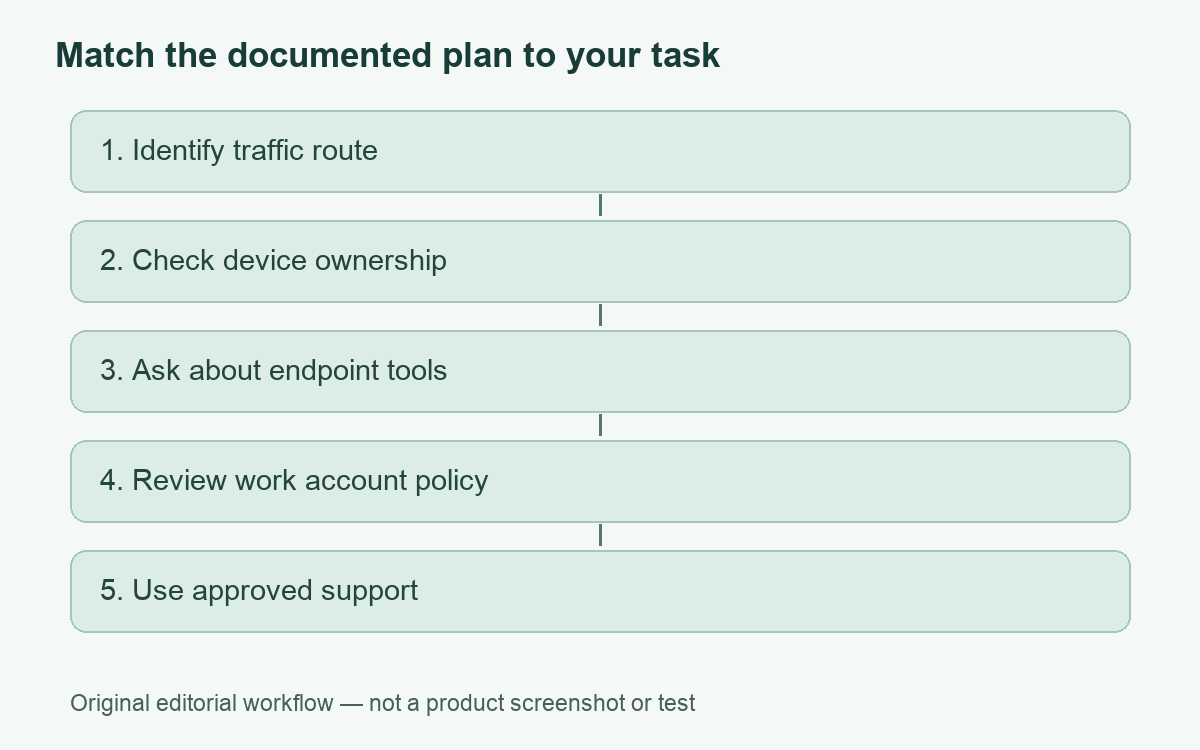
| Layer | Question to ask | What not to assume |
|---|---|---|
| VPN routing | Which applications or destinations use the tunnel? | That every connection follows the same route |
| Device management | What ownership and enrollment type applies? | That enrollment equals unrestricted access to all personal content |
| Endpoint tools | What software reports activity or security events? | That disconnecting the tunnel disables those tools |
| Workplace account | What activity does the business service retain? | That a personal VPN changes an account’s records |
| Inspection gateway | Is traffic decrypted under an approved configuration? | That encryption at one layer answers every visibility question |
Network observations and page contents are different
Traffic passing through a gateway can provide operational information without every page’s contents becoming readable there. Connection destinations, times and volume are different kinds of information from message text or an uploaded document. The exact details available depend on the protocols, services, configuration and logging in use. Do not turn a general explanation into a claim that a particular company records all of them.
Likewise, encrypted web traffic does not by itself prove that a managed endpoint is private from its administrator. The endpoint is where a user opens the document and signs into the application. An organization may have separate approved tools or business-service records relevant to that activity. To understand the situation, ask about those systems explicitly rather than focusing only on the network tunnel.
VPNBLADE · PLAN SHORTLIST
A current plan to consider
Selected plan offers, not performance rankings. We may earn a commission through affiliate links. Monthly equivalents require the full payment shown.
ExpressVPN
Check your exact device setupExpressVPN Basic — 28-month introductory offer
USD 83.72 upfront · First 28 months, paid upfront
Get ExpressVPN deal Offer details & coupon conditions →Renewal & refund conditions
USD 99.95 annually after the initial 28-month term.
30-day money-back guarantee for new users; provider terms and purchase-channel conditions apply.
NordVPN
Apps across major device platformsNordVPN Basic — 27-month introductory offer
USD 94.23 upfront · First 27 months, paid upfront
Get NordVPN deal Offer details & coupon conditions →Renewal & refund conditions
USD 139.08 every year after the initial 27-month term at the current renewal price.
30-day money-back guarantee; provider eligibility, payment-channel and refund terms apply.
Surfshark
Households with multiple devicesSurfshark One — 27-month introductory offer
USD 67.23 upfront · First 27 months, paid upfront
Get Surfshark deal Offer details & coupon conditions →Renewal & refund conditions
Automatic renewal after the introductory term at the then-applicable rate. Confirm the chosen bundle’s next invoice and billing interval before purchase; no numeric renewal amount was verified.
30-day money-back guarantee; purchase-channel and provider eligibility conditions apply.
PureVPN
Published subscription offerPureVPN Standard — 27-month prepaid offer
USD 58.20 upfront · First 27 months, paid upfront
Get PureVPN deal Offer details & coupon conditions →Renewal & refund conditions
Checkout displays USD 2.15/month after 27 months. This is the provider’s renewal-rate label, not a verified future invoice. The next charge amount and billing interval were not separately established; confirm both before paying.
31-day money-back guarantee advertised; provider eligibility and refund terms apply.
VeePN
Published subscription offerVeePN Basic — 28-month introductory offer
USD 55.72 upfront · First 28 months, paid upfront
Get VeePN deal Offer details & coupon conditions →Renewal & refund conditions
Card/PayPal checkout quotes automatic renewal at USD 59.76 every 12 months after the initial 28-month period. Future renewal prices can change.
Thirty-day refund window for the original purchase, subject to terms. Rebilling and previously refunded accounts are excluded; plan extensions or added licenses can waive eligibility.
Enrollment has product-specific boundaries
Microsoft’s Intune user guidance distinguishes personal content from device and management information. It lists items such as device identity and operating-system details as visible, while stating that Intune enrollment does not reveal personal messages, browsing history, passwords or personal-document contents. App inventory and additional information vary with ownership and configuration. Corporate Windows device queries can expose further technical details.
Keep the scope of that statement intact: it describes Intune’s documented enrollment visibility. It is not a promise about every other application, proxy, account or tool an employer may operate. Conversely, the existence of management software is not evidence that someone has read your personal messages. Both exaggeration and reassurance can be misleading when they ignore the named product and configuration.
Check the ownership classification shown in the organization’s management portal and ask IT to explain any uncertainty. A personally owned phone with a work profile should not be casually treated as identical to a company-issued workstation. If a required configuration is unclear, resolve it before placing personal material on the device.
Per-app routing makes broad answers unreliable
Apple’s Network Extension documentation describes routing rules for specific managed applications and exclusions for certain domains. In an MDM configuration, per-app VPN behavior can be tied to managed applications. That is a reason to ask which application is involved in a question about visibility, rather than treating every connection on an Apple device as interchangeable.
For example, “Can the company see the activity in this work app?” is a better starting question than “Can it see my phone?” Name the app, whether it uses a work account, and whether the device is managed. The answer may involve application-server records as well as network routing. Do not alter or remove an approved profile to test a theory about monitoring.
Understand inspection without changing trust settings
Cloudflare’s enterprise certificate documentation explains that a trusted certificate may be required for TLS decryption, and that some applications use separate certificate stores or cannot accept that configuration. This establishes a documented enterprise capability, not proof that your employer uses it or decrypts every connection. Inspection scope and exclusions are configuration questions.
Apple also distinguishes manually installed certificate profiles from certificates deployed through management tools in its trust guidance. Trust settings are consequential. Ask an administrator to explain the issuer, purpose and applicable policy if a certificate is unfamiliar. Do not add trust because an anonymous message asks you to, and do not delete organizational certificates as a privacy experiment.
A useful conversation with IT
Ask for the acceptable-use notice, the relevant privacy notice and the support explanation for your exact device. Useful questions include which traffic is tunneled, which endpoint agents are required, whether personal use is permitted, what categories of events are retained and who can access them. Request a clear distinction between a tool’s technical ability and the organization’s actual collection policy.
Keep a written answer for your own understanding, without exporting confidential configuration or other employees’ information. If the policy is unclear, use the organization’s normal privacy or employment-support process. This article does not interpret a contract or determine what monitoring is lawful in your jurisdiction.
Separate personal activity without bypassing work controls
Use an appropriate personal device and personal accounts for personal tasks where practical and permitted. That reduces confusion between work and personal contexts; it is not a guarantee of anonymity. A commercial VPN on a work laptop does not erase endpoint records, workplace account activity or organizational policy. We do not recommend purchasing one as a method to hide from an employer.
Our working-from-home guide explains access planning, while the split-tunneling guide develops routing distinctions. For personal devices outside organizational management, the Proton VPN assessment discusses a separate consumer use case. Any optional commercial offer below applies to that personal context, not to evading workplace controls.
Live plan records · Monthly equivalents require the full initial payment. Prices in different currencies are not directly comparable. Confirm tax, eligibility and renewal terms at checkout.
 Proton VPN
Proton VPN Plus — 24-month introductory offer
USD 3.49/month equivalent
USD 83.76 upfront
First 24 months, paid upfront
Next bill: USD 83.88 every 12 months after the initial 24-month term; renewal prices are subject to the provider’s terms.
Recorded code: VPNINTRO449349
Source checked 2026-10-25 · Research record; no performance endorsement.
See offer & full terms ↗The accurate answer comes from identifying the route, device management, endpoint tools and account separately. A connection indicator is only one piece of that record.
Cover: AI-generated editorial illustration, not a customer, product screenshot or evidence of testing.
YOUR EXPERIENCE MATTERS
Was this article useful?
Genuine reader helpfulness ratings. These do not measure VPN performance or verify a purchase. Only moderated submissions count. Ratings may reflect earlier versions of this information.
VPNBLADE · PLAN SHORTLIST
Ready to choose a plan?
Selected plan offers, not performance rankings. We may earn a commission through affiliate links. Monthly equivalents require the full payment shown.
ExpressVPN
Check your exact device setupExpressVPN Basic — 28-month introductory offer
USD 83.72 upfront · First 28 months, paid upfront
Get ExpressVPN deal Offer details & coupon conditions →Renewal & refund conditions
USD 99.95 annually after the initial 28-month term.
30-day money-back guarantee for new users; provider terms and purchase-channel conditions apply.
NordVPN
Apps across major device platformsNordVPN Basic — 27-month introductory offer
USD 94.23 upfront · First 27 months, paid upfront
Get NordVPN deal Offer details & coupon conditions →Renewal & refund conditions
USD 139.08 every year after the initial 27-month term at the current renewal price.
30-day money-back guarantee; provider eligibility, payment-channel and refund terms apply.
Surfshark
Households with multiple devicesSurfshark One — 27-month introductory offer
USD 67.23 upfront · First 27 months, paid upfront
Get Surfshark deal Offer details & coupon conditions →Renewal & refund conditions
Automatic renewal after the introductory term at the then-applicable rate. Confirm the chosen bundle’s next invoice and billing interval before purchase; no numeric renewal amount was verified.
30-day money-back guarantee; purchase-channel and provider eligibility conditions apply.
PureVPN
Published subscription offerPureVPN Standard — 27-month prepaid offer
USD 58.20 upfront · First 27 months, paid upfront
Get PureVPN deal Offer details & coupon conditions →Renewal & refund conditions
Checkout displays USD 2.15/month after 27 months. This is the provider’s renewal-rate label, not a verified future invoice. The next charge amount and billing interval were not separately established; confirm both before paying.
31-day money-back guarantee advertised; provider eligibility and refund terms apply.
VeePN
Published subscription offerVeePN Basic — 28-month introductory offer
USD 55.72 upfront · First 28 months, paid upfront
Get VeePN deal Offer details & coupon conditions →Renewal & refund conditions
Card/PayPal checkout quotes automatic renewal at USD 59.76 every 12 months after the initial 28-month period. Future renewal prices can change.
Thirty-day refund window for the original purchase, subject to terms. Rebilling and previously refunded accounts are excluded; plan extensions or added licenses can waive eligibility.