
Post
Can a VPN be tracked? Accounts, cookies and identifiable sessions
Can a VPN be tracked? Accounts, cookies and identifiable sessions. Source-based analysis of current documented access, limitations, app controls and payment conditions, without invented tests or ratings.
In this article

Using a VPN does not make an internet session impossible to track or connect to a person. A website can receive a VPN exit address while still recognizing an account, browser session or other identifying information. A network can recognize that a tunnel is in use without necessarily reading the content inside it. These are different meanings of “tracked,” and they require different questions.
This guide focuses on recognizing a session and attributing activity, rather than repeating the basic tunnel explanation. It was researched on 31 October 2026 using EFF, Mozilla and Google documentation. We have not tested your browser, inspected a device or verified a provider’s internal logging. No product named here is presented as untraceable.
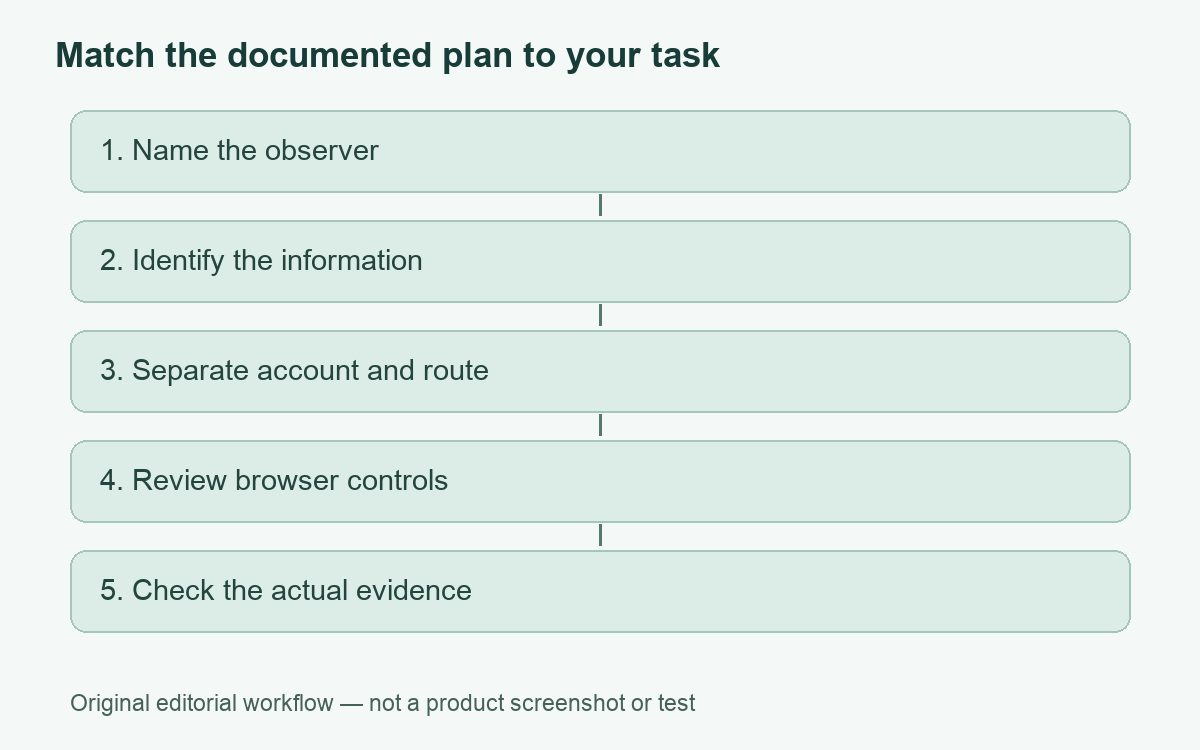
Define the observation you are concerned about
Start with a sentence containing an observer and an event: a website recognizing an existing login, an advertiser linking visits, a local network noticing a VPN connection, or someone finding history stored on a device. That sentence is more actionable than asking whether a VPN is “100% safe.” It identifies the information and system that need attention.
| Concern | Information that can matter | Separate control to examine |
|---|---|---|
| A site recognizes your account | Sign-in and account activity | Account and session settings |
| Visits are associated in a browser | Cookies, storage and browser characteristics | Browser privacy controls |
| An application knows location | Location permission and other device signals | Application permissions |
| A network notices a tunnel | Connection destination and protocol characteristics | Actual network requirements and provider scope |
| Someone can access the device | Local files, sessions and saved history | Device and account security |
The table identifies categories to investigate, not a finding that a particular company collected every item. Technical capability, actual collection and how long information is retained are separate questions. A useful privacy review records what the current documentation supports and where it remains silent.
An exit address is only one identifier
EFF’s current VPN guidance says a VPN is not an anonymity tool and identifies cookies, GPS, tracking pixels and fingerprinting as other tracking mechanisms. It also emphasizes that routing through a provider changes the party you must trust. We use that guidance to reject blanket anonymity promises, not to claim every observer can always identify every user.
Consider an ordinary example: you connect through a VPN and then sign into the same shopping account. The seller still has an account relationship with you. Changing the visible network address does not request deletion of previous orders or turn that account into a new identity. This conclusion follows from the account relationship, not from a secret capability attributed to the VPN.
Cookies and browser storage have their own job
EFF describes cookies as information websites store in a browser and can use to recognize it. A VPN connection does not itself instruct the browser to remove that stored information. That is why network routing and browser-session management should appear as separate items in a privacy checklist.
Mozilla’s desktop Firefox help documents Enhanced Tracking Protection against categories including cross-site tracking cookies and known fingerprinting scripts. It describes Total Cookie Protection in Standard mode and stronger options with different effects. These are browser-specific controls, not features automatically inherited by every app when you switch on a VPN.
Choose settings with their consequences in mind. More restrictive browser behavior may affect sign-ins or embedded content. Review what a setting does and any exception you create. Do not treat a long list of installed extensions or an unfamiliar configuration copied from a forum as proof of better privacy. We have not run a fingerprint test or assigned an anonymity score to any configuration.
Account activity is not erased by a new route
Google’s activity help documents reviewing, pausing and deleting certain saved account activity, and warns that settings for Search services are being updated. It distinguishes optional Chrome-history inclusion and related conditions. Follow the current controls for the account and service involved rather than assuming an old screenshot applies universally.
First decide whether the goal concerns future saving, an existing record, a signed-in session or access to the account. Those are different actions. A VPN does not substitute for any of them. We have not changed an account setting or deleted information for this guide, and we do not suggest deleting records simply because a generic privacy checklist says to do so.
On a shared device, be particularly clear about whose account is active. A privacy setting examined in one account may not govern another person’s session. Keep recovery access and legitimate shared-use requirements in mind before making changes. Account security and privacy preferences should be understood together.
Application permissions and managed devices are another layer
A location-enabled app and a website seeing an exit IP are not necessarily using the same location signal. Review the permission for the application whose behavior concerns you. Our VPN and app-location guide explains this distinction through a specific app use case, without promising that changing an IP rewrites device location.
For a work device, examine the organization’s policy and management setup. A personal VPN is not a way to erase workplace-account records or stop approved endpoint tools. Our company VPN visibility guide separates routing, enrollment, endpoint software and inspection. It is more precise than assuming either total invisibility or universal monitoring.
Read provider promises as statements with a scope
Ask what a provider says it collects, which service the policy covers, what its exceptions are and whether an independent report actually evaluates the claim you care about. An audit title alone does not show that every component, time period or future release is covered. Avoid translating a provider’s marketing phrase into a broader guarantee.
Likewise, the fact that a website recognizes you does not prove the VPN leaked your original address. It may be using an existing account or browser state. Use the connection-verification guide to investigate routing separately. Record the specific evidence before assigning a cause.
Choose the next action for the actual concern
If your goal is a supported alternative route for personal traffic, assess a VPN’s platform behavior and terms. If your goal concerns browser tracking, inspect browser controls. If it concerns account history, inspect that account. If someone can use an unlocked device, address device access. Combining appropriate controls can be useful, but no single toggle answers all these questions.
The optional inherited Proton plan below concerns ordinary personal VPN service. It is not an anonymity guarantee or a claim that paying prevents all tracking. The provider assessment explains its documented scope.
A precise observer, a specific event and a documented control make a stronger privacy plan than an absolute promise that nobody can trace anything.
Cover: AI-generated editorial illustration, not a customer, product screenshot or evidence of testing.
YOUR EXPERIENCE MATTERS
Was this article useful?
Genuine reader helpfulness ratings. These do not measure VPN performance or verify a purchase. Only moderated submissions count. Ratings may reflect earlier versions of this information.