
Post
VPN by Google review: eligible Pixels, traffic coverage and privacy limits
VPN by Google review: eligible Pixels, traffic coverage and privacy limits. Source-based analysis of current documented access, limitations, app controls and payment conditions, without invented tests or ratings.
In this article

VPN by Google is most relevant when you already have an eligible Pixel device and want the included network-privacy service rather than a paid subscription chosen for country selection. The first question is eligibility, followed by traffic coverage and the distinction between VPN processing and other Google-account activity. Those questions are more useful than a broad verdict that every product carrying Google’s name is either safe or unsafe.
This source-based assessment was checked on 31 October 2026. We have not performed a new installation, packet inspection, speed benchmark or infrastructure audit. We assess current Pixel help and Google’s supporting documentation. This is a review of the currently documented device service, not an offer to buy a Google One VPN subscription or a claim that an old product name establishes today’s entitlement.
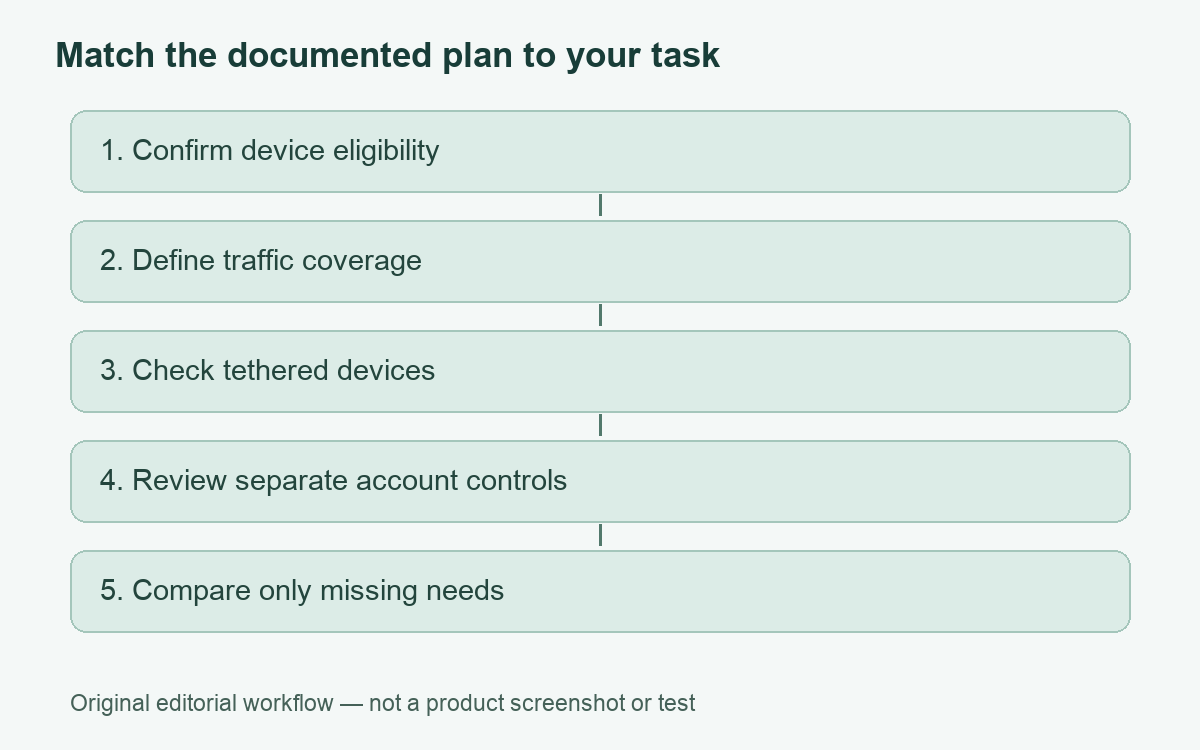
Establish whether the included service fits
Google’s Android documentation identifies VPN by Google as included at no extra cost on Pixel 7 and later phones and the Pixel Tablet where available. Its Pixel help adds account, region and device-state conditions. It also says the service is not intended to change IP location for access to content unavailable in the user’s region. A buyer seeking selectable destination countries therefore has a different requirement from the one this included service is designed to meet.
Write down the exact device model, system version, account type and intended country of use. Do this before buying additional storage or changing a subscription in the hope that the VPN will appear. The entitlement question concerns the actual service and device. A generic screenshot of an older Google-branded VPN is not proof that your account receives the same product now.
Coverage includes important exceptions
The Pixel support page lists traffic outside its VPN protection, including tethering, push notifications, Wi-Fi calling and other IMS services, work-profile apps and applications routing directly over Wi-Fi or cellular. It also says anonymous usage data can be sent and distinguishes the VPN’s data handling from other Google products. Those qualifications matter more than treating a key icon as evidence that every activity on every connected device has the same route.
For example, do not assume a laptop tethered through the phone inherits the phone’s VPN. Assess the laptop’s connection separately. Likewise, a managed work profile can have its own access requirements. Ask the administrator which approved service applies rather than replacing it with a personal setting. Our mobile-hotspot VPN guide develops the tethering distinction.
A fit checklist for an existing Pixel owner
| Requirement | What to establish | Decision |
|---|---|---|
| Included personal access | Device, account and region eligibility | Investigate the included option before paying elsewhere |
| A chosen foreign destination | Whether the service offers the selection needed | Do not infer it from a generic VPN label |
| Protection for a tethered computer | The computer’s own route | Do not rely only on the phone’s icon |
| A workplace application | The organization’s work-profile policy | Use approved access and support |
| Less saved account activity | Relevant account and browser controls | Treat this separately from the network tunnel |
What Google’s technical explanation describes
The whitepaper linked from current Pixel help explains an architecture that separates authentication from tunnel setup using blinded tokens. It describes aggregate service metrics while stating that individual network traffic, connecting addresses, per-user bandwidth and per-user connection timestamps are not logged by the VPN. The document retains Google One naming, so we use it as linked architectural background, not evidence of a currently purchasable Google One VPN benefit.
That distinction matters when reading any source-based review. A technical design explains what the provider says it built. It is not a measurement that we performed, proof that every deployed component matches the design or a guarantee against every future failure. We have not independently reproduced the architecture or its cryptographic claims, and we do not assign a safety score from its existence.
Manage account activity as a different layer
Google’s Web & App Activity help describes controls for saving, reviewing and deleting certain account activity. It also warns that Search-service settings are being updated and may differ from the instructions shown. The practical response is to inspect the current account controls for the service involved rather than assume a historical menu path is universal. Browser history and account activity deserve their own review.
Choose the desired outcome before changing anything: avoiding an ordinary-network route for personal browsing is one goal; reducing saved history in an account is another. Deleting activity can have different consequences from pausing future collection, and neither is achieved merely by seeing a VPN connection indicator. We have not changed any account setting for this review.
If a concern is specific, name it precisely. “I want this account to stop saving this kind of activity” leads to a different control from “I need this application to connect through the tunnel.” A clear question makes both support requests and your own checks more useful. It also reduces the temptation to treat a privacy-branded feature as a substitute for understanding the service.
How this differs from an administrator-provided VPN
Android’s general VPN help explains that a saved work or third-party connection can require information from an administrator or an application. It distinguishes connecting, disconnecting, forgetting a saved configuration and changing settings. These are different actions. Removing a profile can erase information needed for an approved connection, while temporarily disconnecting addresses only the current session.
If a device is managed, ask before modifying its network configuration. On a personal device, keep the provider or administrator instructions available so that an accidental deletion does not become a guessing exercise. Our connection-verification guide helps examine the intended route without presenting a connected icon as a full privacy assessment.
Pros and limitations
- Pro: Eligible owners can investigate an included service before committing to an additional subscription.
- Pro: The support page explicitly identifies traffic exceptions.
- Pro: Google publishes technical background and separate activity controls.
- Limitation: Device, account, region and software conditions can determine eligibility.
- Limitation: It does not fit a requirement for choosing another country to obtain unavailable content.
- Limitation: VPN processing does not replace reviewing other Google-service settings or workplace policies.
When to consider a separate service
Consider another service only after identifying a missing requirement, such as a different supported device or documented location selection. Compare that provider’s own limitations and terms. The Proton VPN review is one example of a separate free-versus-paid assessment; its commercial options below are not Google offers or a claim that paying is necessary.
For an eligible Pixel owner whose requirement matches the included service, start by understanding its scope. Reconsider when the essential task falls outside that scope. A device-specific, evidence-based decision is more useful than treating every Google-branded privacy feature as interchangeable.
Cover: AI-generated editorial illustration, not a customer, product screenshot or evidence of testing.
YOUR EXPERIENCE MATTERS
Was this article useful?
Genuine reader helpfulness ratings. These do not measure VPN performance or verify a purchase. Only moderated submissions count. Ratings may reflect earlier versions of this information.