
Post
How to connect to SonicWall SSL VPN: NetExtender profiles and access checks
Connect to an authorized SonicWall SSL VPN using the right NetExtender profile, authentication method and permitted-resource checks. Current app naming and deployment limits explained.
In this article

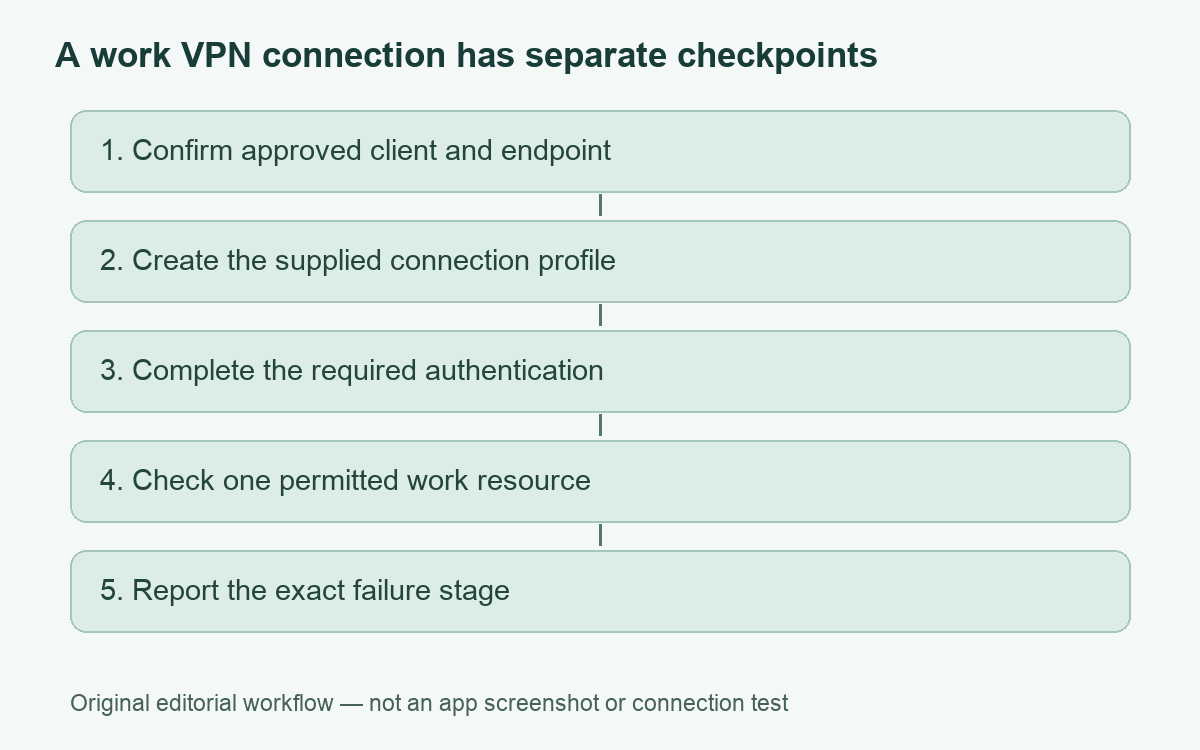
To connect to a SonicWall SSL VPN, use the client and connection details supplied by the organization that operates the gateway. For a Windows NetExtender connection, that normally means an approved installer, the exact server address and any required port, an authentication domain, and your authorized sign-in method. Create or select the connection profile, complete the required authentication, then check the particular work resource you need.
A consumer VPN subscription does not provide an account on your employer’s SonicWall gateway. Equally, a successful VPN connection does not establish permission to every internal application. This guide separates those stages so that a wrong address, a sign-in problem and a resource-access problem do not turn into the same unhelpful complaint. It is based on SonicWall documentation reviewed on 1 November 2026; we have not connected to your organization’s network or tested its configuration.
Start with the right SonicWall client
Ask IT which appliance and client your organization supports. SonicOS firewall SSL VPN instructions and SMA deployment instructions are not interchangeable installation recipes. A portal may offer a managed download, while another organization distributes the approved installer through its software management system. Follow that route rather than downloading an executable from a search advertisement or a third-party driver site.
SonicWall’s NetExtender 10.3.x feature guide lists Windows 10/11 and specified processor architectures, alongside a separate Linux support list. A compatibility listing is not a promise that every old operating-system installation remains suitable for work. Ask about the exact client build, processor architecture, operating-system support and gateway firmware together. Do not install an old version simply because its screenshots match a tutorial.
There is also a current naming transition. SonicWall’s 14 October 2026 notice says Mobile Connect on iOS, macOS and Android is entering an informational phase, with the name-change phase targeted for April 2027. This is a phased branding change, not evidence that every app has already been renamed. The notice separately retains Connect Tunnel for SMA 1000 desktop use. Your administrator’s product-specific instructions take precedence over an assumption that every SonicWall VPN uses the same app.
Collect a complete connection handoff
Before installation, ask for a short connection sheet through your normal support channel. It should identify the gateway, client and expected destination. Do not ask a colleague to send a password in a shared document. A useful handoff makes it possible to report a specific failure without exposing a secret.
| Detail to obtain | Why it matters | What to avoid guessing |
|---|---|---|
| Approved client and build | Installation and authentication screens depend on the deployment. | That the first NetExtender download found online is suitable. |
| Server and required port | The connection must reach the organization’s actual gateway. | A universal port, a familiar company website, or an address copied from an old email. |
| Authentication domain and sign-in method | The gateway must select the intended identity system. | That this field always means your email suffix or Windows computer domain. |
| Expected internal application | A named destination gives you a meaningful access check. | That every network drive or internal subnet should be available. |
| Support contact and device requirements | Some decisions require administrator action. | That you should change certificates, routing or endpoint protection yourself. |
Keep the server details in the organization’s approved location. When comparing a saved profile with new instructions, check each field rather than changing several settings at once. That preserves a clear record of what changed. For the broader distinction between a gateway, a client and an internal resource, see our remote-access VPN setup guide.
Create the Windows NetExtender connection profile
After the approved installation is complete, open NetExtender. In the feature guide’s connection-profile workflow, choose Add Connection in the Connection field and enter a recognizable profile name and the supplied server. Your version or managed deployment may prepopulate these details; use the corresponding organization instructions if they differ.
Check the endpoint before providing credentials. If a certificate warning appears, stop and ask IT to verify the certificate and hostname through an established support channel. The SonicWall guide documents a certificate-review and trust step, but that is not a reason to trust an unfamiliar certificate automatically. Do not treat a warning as a routine obstacle to click past.
Provide the corporate credentials when your selected authentication method requests them. The profile guide distinguishes this from SAML and certificate-based authentication, where the client does not present the same username/password prompt. Select the supplied authentication domain, or choose it during login if that is how the profile is configured. A missing password box can therefore be a different authentication workflow rather than a broken installation.
Connect and complete the required authentication
Select the correct profile and click Connect. NetExtender can request the username, password and domain at this point when they were not saved or the domain is chosen at login. Complete only the expected authentication flow. SonicWall documents several additional authentication methods, including one-time codes and client certificates, but availability depends on the administrator’s configuration.
If an approval arrives when you have not initiated a connection, do not approve it just to clear the notification. If a code fails, report the stage and displayed error instead of repeatedly submitting guesses. Avoid including passwords, one-time codes, recovery codes or private keys in screenshots or support tickets. The support team needs the error context, not your authentication secret.
Wait for the client to report the connection state before testing the work application. Record whether the failure happened before authentication, during authentication or after the tunnel connected. These are useful troubleshooting categories even when the interface uses slightly different labels.
Verify the intended resource, not just the connection badge
Open one resource that IT specifically expects your account to reach, such as the supplied internal application address. A VPN connection and an application login are separate checkpoints. If the application opens but refuses your account, preserve that distinction when contacting support.
SonicWall’s client-route documentation describes administrator-controlled routes at user, group and global levels, and states that tunnel destinations outside allowed routes are blocked. That explains why a connected client can still lack access to a particular network resource. It does not establish which rule applies to your organization. Ask IT to check the route and permission for the exact destination rather than trying random internal addresses.
| Observed stage | Useful detail to record | Next reasonable check |
|---|---|---|
| Gateway cannot be reached | Time, network used, profile server and error wording. | Confirm ordinary internet access and the administrator-supplied endpoint. |
| Authentication fails | Selected domain and whether password, browser sign-in or additional verification was requested. | Ask support to check the intended identity method and account status. |
| Tunnel connects; one resource fails | Exact approved destination and application error. | Have IT distinguish name resolution, routing, access policy and application authorization. |
| Session disconnects unexpectedly | Client build, approximate duration and whether the device slept or changed networks. | Ask about session policy and known issues for that deployment. |
For more general diagnostic organization, use our VPN troubleshooting checklist. Do not disable endpoint protection, change gateway rules or remove trusted certificates as a universal fix. Those changes can introduce a second problem and are rarely something an end user can assess from a generic article.
Finish the session and separate personal VPN shopping
When work is finished, use the client’s Disconnect control where your organization permits manual disconnection. SonicWall’s feature guide describes this under Status and Connection. An always-on or managed deployment may have different controls; follow its policy rather than assuming that closing a window ends every managed connection.
A work VPN also has a different purpose from a personal subscription. Our explanation of company VPN visibility covers why work access and device monitoring should be considered separately. Buying another VPN does not grant SonicWall access or remove employer controls.
If you independently need a consumer service for an approved personal device, our NordVPN source-based review and inherited plan records provide separate buying context. The optional offers below are consumer subscriptions, not SonicWall licenses, corporate credentials or a remedy for a failed work connection. Confirm your workplace policy before considering concurrent VPN software.
The most useful outcome is a reproducible connection: the approved client reaches the correct gateway, your identity completes its required checks, and the intended application opens with the correct permissions. If one stage fails, report that stage precisely. This keeps troubleshooting focused while leaving administrative decisions with the people responsible for the network.
Cover: AI-generated editorial illustration, not a customer, product screenshot or evidence of testing.
YOUR EXPERIENCE MATTERS
Was this article useful?
Genuine reader helpfulness ratings. These do not measure VPN performance or verify a purchase. Only moderated submissions count. Ratings may reflect earlier versions of this information.