
Post
Norton VPN review: plans, device coverage and app controls
Norton VPN review: plans, device coverage and app controls. Current documented platform controls, separate pros and limitations, buying conditions and practical fit; no invented performance tests.
In this article

Norton VPN deserves consideration if you want a personal VPN whose documented controls fit your devices, particularly when you already understand Norton’s subscription products. Before buying, separate the standalone Norton VPN plans from a VPN component included in another Norton bundle. Similar branding does not establish the same device entitlement, menus or payment conditions.
This review uses primary Norton documentation checked on 31 October 2026. It evaluates documented fit rather than new hands-on speed tests, an operational security audit or a completed purchase. It does not assess LifeLock identity services as though they were a VPN. The separate Norton VPN versus NordVPN comparison addresses buyers choosing between those two providers.
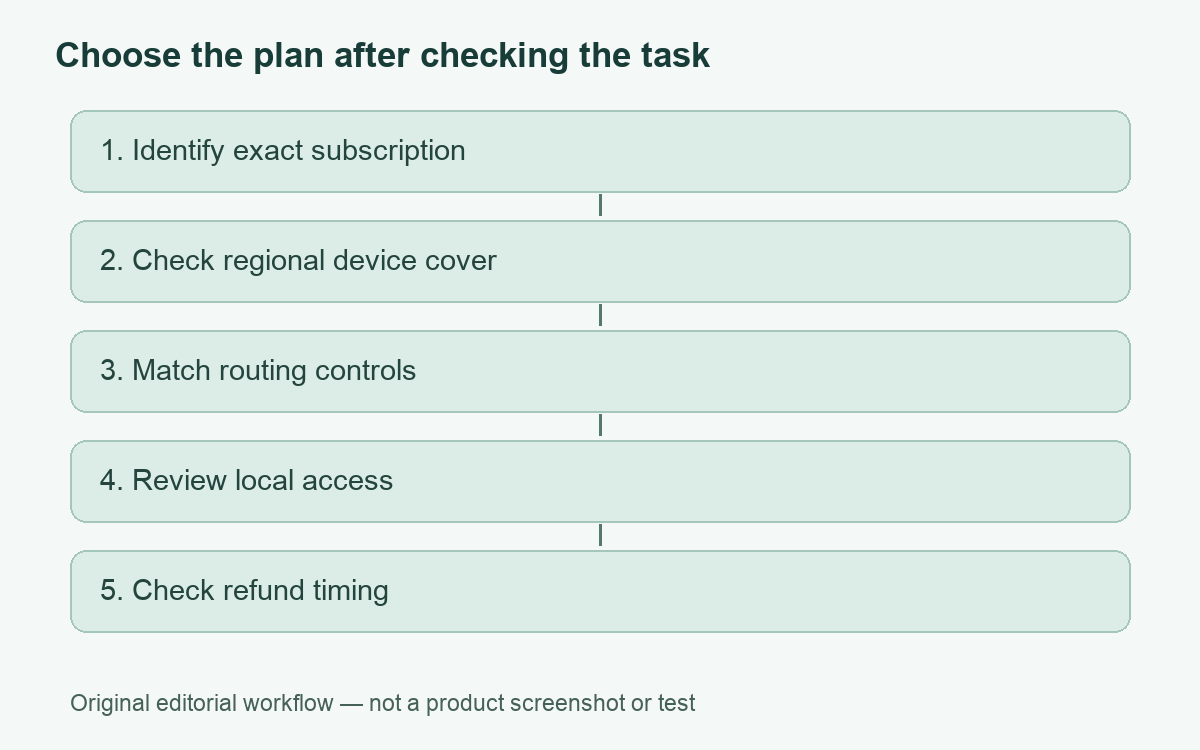
Choose the exact product before comparing features
The current US standalone page lists Norton VPN Standard and Plus for ten devices and Ultimate for twenty. These are advertised plan device entitlements, not a claim here about an independently tested concurrent-connection ceiling. Do not carry these numbers over to an older Norton 360 bundle or a different country’s offer. Read the product name and device coverage on your own order.
That is especially useful when evaluating an upgrade. Start with the subscription you already have, if any, and identify whether it includes the VPN access you need. Paying for an additional standalone plan may be unnecessary if an existing entitlement already solves the task. Conversely, an antivirus-only purchase should not be assumed to provide every VPN feature shown on a different product page.
Documented controls that matter to ordinary use
| Decision | What Norton documents | What to verify |
|---|---|---|
| Personal device coverage | US standalone Standard and Plus list ten devices; Ultimate lists twenty | The coverage and region on your actual subscription |
| Application exceptions | Split tunneling instructions for Windows, Mac and Android | Your installed product version and supported exception |
| Mac routing | Released Mac split-tunneling support, announced June 2026 | Current app and website exception settings |
| Windows connection loss | A Kill Switch setting intended to block internet access | The selected behavior in your app |
| Local devices | A Windows local-device access option | Whether the specific printer or shared device needs it |
Mac split tunneling is a current feature, not a roadmap
Norton’s 26 June 2026 announcement describes split tunneling for Mac as released, including application and website exceptions. Its support instructions also list Mac alongside Windows and Android. Advice that simply says Norton has no Mac split tunneling is therefore an unreliable starting point for a current purchase. Still, check that the instructions correspond to your installed app and entitlement.
A useful requirement is specific: for example, one approved app needs the ordinary route while the rest of your personal browsing stays inside the tunnel. That is more precise than asking for a VPN with every advanced feature. It lets you check whether the available exception takes the form of an app, a website or another rule, and whether the task behaves as intended after reconnecting.
Norton’s Windows support page distinguishes menu locations in standalone Standard, Plus and Ultimate from those in Norton 360. Android instructions likewise distinguish product versions. If an option appears missing, first confirm the product name and version rather than following a menu path from an unrelated screenshot. Our split-tunneling guide explains why excluded traffic uses the ordinary route.
Keep local access and failure blocking separate
The Windows settings documentation describes Kill Switch, access to local devices and automatic reconnection as separate controls. A Kill Switch is intended to interrupt internet access if the VPN disconnects. Local-device access concerns devices such as printers on a private network. One does not establish the correct configuration of the other, and this Windows documentation should not be treated as a universal mobile feature matrix.
For an ordinary home user, write down which failure would be more disruptive: continuing outside the intended route or losing connectivity until reconnection. Then inspect the app’s setting with that requirement in mind. Save work before checking behavior. A live conference call, managed workplace device or time-sensitive upload is a poor place to experiment with a network interruption.
If printing is the only issue, investigate the documented local-device setting instead of excluding an entire browser or turning the tunnel off for every task. Keep a note of each change and why it was necessary. After replacing a router or printer, review that note rather than inheriting an old exception forever.
Separate a useful VPN from a complete-safety promise
The meaningful role of a personal VPN is a network route. It does not decide whether an account message is genuine, prevent every harmful download or make a signed-in service forget who you are. Assess additional security products by their own requirements, rather than assuming the VPN name incorporates all functions of every Norton bundle.
We have not measured Norton VPN throughput or reproduced its privacy assurances. A brand’s long history, an attractive introductory price and a successful connection indicator are different kinds of evidence. None alone proves a particular app is suitable for your requirements. Our connection verification checklist helps distinguish a visible connection from the routing checks you can perform on your own device.
Pros and limitations
- Pro: Standalone plans have clearly advertised device coverage for a US buyer to compare.
- Pro: Current split-tunneling documentation includes Mac, Windows and Android rather than only one desktop platform.
- Pro: Windows settings distinguish failure blocking, local access and automatic reconnection.
- Limitation: Similar Norton names and older bundle instructions make product identification important.
- Limitation: One platform’s settings do not prove feature parity on another.
- Limitation: Device entitlement and payment terms must be checked for your region and purchase channel.
Refund timing depends on the subscription
Norton’s direct-purchase refund policy distinguishes annual subscriptions from monthly ones. The general annual policy provides sixty days from purchase and subsequent annual charges, while the general monthly policy provides fourteen days for an initial purchase and excludes subsequent monthly charges. The page also has regional provisions and says third-party purchases may have different conditions. Use the section applicable to your order rather than assuming one headline covers all subscriptions.
Before paying, compare the complete initial charge, renewal amount, billing period and cancellation route. Keep the receipt and selected plan description. If a trial appears in your checkout, read its conversion and payment conditions instead of assuming it requires no payment authorization. We have not signed up, completed checkout or tested a refund.
Our documented-fit conclusion
Shortlist Norton VPN when the exact plan covers your devices, the documented routing controls match your tasks and the subscription terms are acceptable. Reconsider if the purchase relies on an old bundle’s feature assumptions or an unqualified promise of protection. Confirming what you already own and what the new plan adds is the most useful first step.
Cover: AI-generated editorial illustration, not a customer, product screenshot or evidence of testing.
YOUR EXPERIENCE MATTERS
Was this article useful?
Genuine reader helpfulness ratings. These do not measure VPN performance or verify a purchase. Only moderated submissions count. Ratings may reflect earlier versions of this information.