
Post
How to set up a VPN on Mac: apps, settings and profiles
Set up a VPN on Mac using a supported app, supplied connection details or a configuration profile. Check permissions, routing and the task you need afterwards.
VPNBLADE · PLAN SHORTLIST
Compare current VPN plans
Selected plan offers, not performance rankings. We may earn a commission through affiliate links. Monthly equivalents require the full payment shown.

ExpressVPN
Check your exact device setupExpressVPN Basic — 28-month introductory offer
USD 83.72 upfront · First 28 months, paid upfront
Get ExpressVPN deal Offer details & coupon conditions →Renewal & refund conditions
USD 99.95 annually after the initial 28-month term.
30-day money-back guarantee for new users; provider terms and purchase-channel conditions apply.

NordVPN
Apps across major device platformsNordVPN Basic — 27-month introductory offer
USD 94.23 upfront · First 27 months, paid upfront
Get NordVPN deal Offer details & coupon conditions →Renewal & refund conditions
USD 139.08 every year after the initial 27-month term at the current renewal price.
30-day money-back guarantee; provider eligibility, payment-channel and refund terms apply.

Surfshark
Households with multiple devicesSurfshark One — 27-month introductory offer
USD 67.23 upfront · First 27 months, paid upfront
Get Surfshark deal Offer details & coupon conditions →Renewal & refund conditions
Automatic renewal after the introductory term at the then-applicable rate. Confirm the chosen bundle’s next invoice and billing interval before purchase; no numeric renewal amount was verified.
30-day money-back guarantee; purchase-channel and provider eligibility conditions apply.

PureVPN
Published subscription offerPureVPN Standard — 27-month prepaid offer
USD 58.20 upfront · First 27 months, paid upfront
Get PureVPN deal Offer details & coupon conditions →Renewal & refund conditions
Checkout displays USD 2.15/month after 27 months. This is the provider’s renewal-rate label, not a verified future invoice. The next charge amount and billing interval were not separately established; confirm both before paying.
31-day money-back guarantee advertised; provider eligibility and refund terms apply.

VeePN
Published subscription offerVeePN Basic — 28-month introductory offer
USD 55.72 upfront · First 28 months, paid upfront
Get VeePN deal Offer details & coupon conditions →Renewal & refund conditions
Card/PayPal checkout quotes automatic renewal at USD 59.76 every 12 months after the initial 28-month period. Future renewal prices can change.
Thirty-day refund window for the original purchase, subject to terms. Rebilling and previously refunded accounts are excluded; plan extensions or added licenses can waive eligibility.
In this article

To set up a VPN on a Mac, first decide whether you are installing a consumer VPN app, entering supplied connection settings or accepting an organization’s configuration profile. These are different workflows. Your Mac’s VPN settings provide connection controls; they do not include a free commercial VPN subscription or automatically supply a server to connect to.
This guide walks through the setup decision and the checks that make it useful afterwards. VPNBlade Editorial has not tested every Mac, provider or operating-system version. Menu wording can change, so use the instructions matching your installed macOS version. For choosing a service, see our Mac VPN comparison; this article focuses on putting an appropriate connection into use.
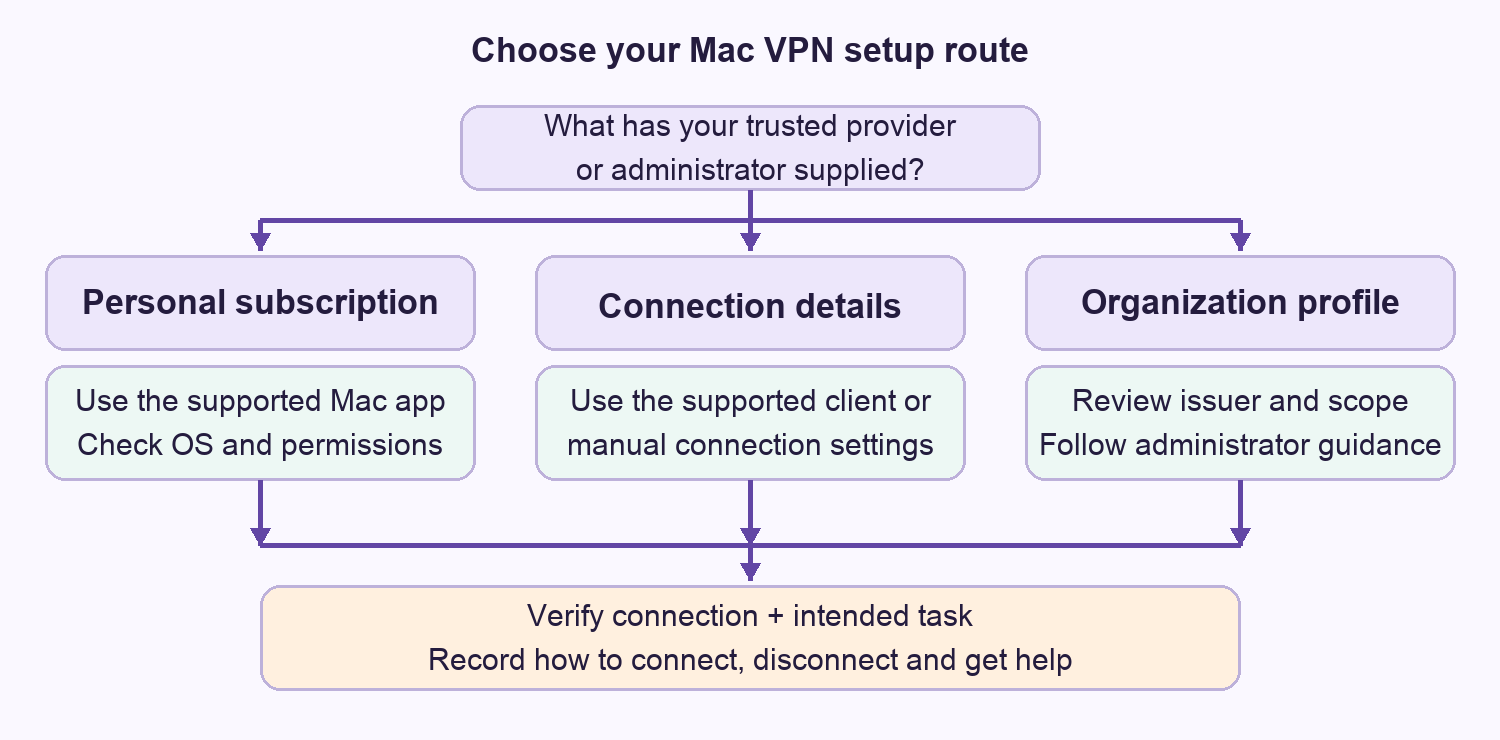
Choose the setup route before downloading anything
| What you have | Appropriate starting point | What you still need |
|---|---|---|
| A personal VPN subscription | The provider’s supported Mac application | A compatible OS, genuine installer and your account |
| Server details from an administrator or provider | Supported manual configuration | The exact connection type and authentication requirements |
| A work or school configuration profile | The organization’s approved profile workflow | Confirmation of the issuer and any management requirements |
Do not combine instructions from these routes merely because each contains the word VPN. For example, a consumer app’s account password is not necessarily the credential for a manually configured gateway. A connection name such as “Office” is only a label; it does not prove that the server address or credentials are correct.
Prepare a small setup record
Before making changes, note the Mac model, macOS version, intended provider and reason for the connection. Keep the installer version and the date of the instructions alongside them. Do not put passwords, recovery codes or private keys into this record. If support is needed later, the non-secret details let you describe the environment without sending your entire account history.
Also write down one task that should work after setup. It might be an ordinary browser session through a personal VPN or an approved internal application through a workplace gateway. Those are different acceptance criteria. A workplace connection may be designed to reach organizational resources rather than send every internet application through a consumer exit location.
VPNBLADE · PLAN SHORTLIST
A current plan to consider
Selected plan offers, not performance rankings. We may earn a commission through affiliate links. Monthly equivalents require the full payment shown.
ExpressVPN
Check your exact device setupExpressVPN Basic — 28-month introductory offer
USD 83.72 upfront · First 28 months, paid upfront
Get ExpressVPN deal Offer details & coupon conditions →Renewal & refund conditions
USD 99.95 annually after the initial 28-month term.
30-day money-back guarantee for new users; provider terms and purchase-channel conditions apply.
NordVPN
Apps across major device platformsNordVPN Basic — 27-month introductory offer
USD 94.23 upfront · First 27 months, paid upfront
Get NordVPN deal Offer details & coupon conditions →Renewal & refund conditions
USD 139.08 every year after the initial 27-month term at the current renewal price.
30-day money-back guarantee; provider eligibility, payment-channel and refund terms apply.
Surfshark
Households with multiple devicesSurfshark One — 27-month introductory offer
USD 67.23 upfront · First 27 months, paid upfront
Get Surfshark deal Offer details & coupon conditions →Renewal & refund conditions
Automatic renewal after the introductory term at the then-applicable rate. Confirm the chosen bundle’s next invoice and billing interval before purchase; no numeric renewal amount was verified.
30-day money-back guarantee; purchase-channel and provider eligibility conditions apply.
PureVPN
Published subscription offerPureVPN Standard — 27-month prepaid offer
USD 58.20 upfront · First 27 months, paid upfront
Get PureVPN deal Offer details & coupon conditions →Renewal & refund conditions
Checkout displays USD 2.15/month after 27 months. This is the provider’s renewal-rate label, not a verified future invoice. The next charge amount and billing interval were not separately established; confirm both before paying.
31-day money-back guarantee advertised; provider eligibility and refund terms apply.
VeePN
Published subscription offerVeePN Basic — 28-month introductory offer
USD 55.72 upfront · First 28 months, paid upfront
Get VeePN deal Offer details & coupon conditions →Renewal & refund conditions
Card/PayPal checkout quotes automatic renewal at USD 59.76 every 12 months after the initial 28-month period. Future renewal prices can change.
Thirty-day refund window for the original purchase, subject to terms. Rebilling and previously refunded accounts are excluded; plan extensions or added licenses can waive eligibility.
Option one: install the provider’s Mac app
Start from the provider’s genuine website or its verified App Store listing. Check the current macOS requirement before buying a long subscription. An old installer remaining available does not establish that it receives the same maintenance or features as the current application.
Follow that provider’s installation and permission instructions for your macOS version. A connection configuration approval and a network extension approval may appear at different stages. Read the application name in each prompt and confirm that it matches what you intentionally installed. If an unexpected request appears, stop and check the official instructions rather than approving everything to clear the screen.
As a documented example, Proton VPN’s Mac guide distinguishes installation, enabling its network extension and allowing the initial VPN configuration. Its current guide describes the main app for macOS 14 and later, with older versions offered separately. This illustrates why an article written for another Mac release can show different screens; it is not a recommendation to install outdated software.
Sign in, choose the provider’s ordinary connection option and wait for its reported connected state. Leave advanced routing, custom DNS and multi-hop settings alone during this first check unless they are required for your task. Establishing a simple working configuration gives you something useful to return to when evaluating optional features.
NordVPN vs NordVPN IKE: read old app labels carefully
If an older article led you here through “NordVPN vs NordVPN IKE,” do not read that wording as a contest between two VPN providers. It mixes a service name, a protocol label and Mac application choices. The useful setup question is which current application and instructions match your Mac. An old reference to IKE is not sufficient reason to expect an identically named option in today’s app.
NordVPN currently documents both a direct-download Mac app and an App Store app. Its comparison lists NordLynx, OpenVPN and NordWhisper for both, while some advanced controls differ. Current installation guidance specifies macOS 14 or later. Check the installed app, operating system and required control together rather than choosing from an old protocol ranking.
| Current documented distinction | Direct download | App Store |
|---|---|---|
| App Kill Switch | Available as a per-app control | Not listed as available |
| Custom DNS | Available | Not listed as available |
| VPN bypass prevention | Not listed as available | Available |
| Updates | Provider updater | App Store updates |
These are provider-documented distinctions, not VPNBlade test results. An App Kill Switch and VPN bypass prevention have different scopes; do not use their names interchangeably. If one is essential to your setup, follow the current instructions for that distribution and check the intended behavior after reconnecting. Also avoid keeping two competing installation workflows in your notes: record which version you chose and where its updates come from.
NordVPN separately lists older downloads for earlier macOS releases. Their availability does not establish equal current features or maintenance. Before purchasing for an older Mac, confirm the exact supported version and limitations with the provider. If your task specifically requires a manual IKEv2 connection, use the IKEv2 explanation and the provider’s matching current setup guidance; do not substitute generic app-installation steps for supplied connection details.
Option two: enter supplied VPN settings manually
Apple’s setup instructions begin with information from the network administrator or VPN provider. Obtain the connection type, server address, account details and authentication method through that trusted channel. Do not guess a server hostname from the provider’s marketing domain or copy a public example certificate.
In Apple’s current instructions, open System Settings, choose Network, open its action menu and select Add VPN Configuration. Choose the supplied connection type, give the service a recognizable display name, enter the required details and create the connection. Required fields depend on the type. Consult the version selector in Apple’s documentation if your screens differ.
This workflow is not a generic importer for every VPN protocol. If a provider supplies a configuration for a separate supported client, use its corresponding instructions. Our VPN protocol guide explains the terminology, while the IKEv2 guide covers that particular connection family.
Option three: review a work or school profile
Apple explains that configuration profiles can contain VPN, Wi-Fi, mail and other settings. Review both the issuer and the contents before installation. Current Mac instructions place profile review under System Settings, General, Device Management. A profile is not merely another name for a VPN app: its scope may include settings beyond the connection you wanted.
For an organization-managed Mac, ask the administrator which installation method is expected. Do not remove a profile as a general troubleshooting shortcut. Apple notes that removing a profile deletes the settings it supplied, and some profiles require help from their issuer to remove. Record the issue and request the appropriate change through the organization’s support process.
Check the connection and the task separately
Apple’s connection guide describes turning on an existing service from the VPN section of System Settings. That confirms the control used for the configured service. It does not tell you, by itself, whether every application has the route you intended. Provider apps may also offer their own connection controls and routing exceptions.
For a personal consumer connection, compare your ordinary public IP observation with the connected result using the same browser and test destination. Then try the actual application you need. For an organizational connection, use the administrator’s approved resource and test procedure instead of treating a public IP change as the definition of success. Our VPN verification checklist explains what each observation establishes.
Apple’s VPN privacy notice also says essential system-service traffic can take place outside an active VPN. Avoid describing one visible connection indicator as a promise that every packet follows an identical path. Route coverage, DNS behavior, account sign-ins and browser tracking remain separate questions.
A practical handover example
Imagine setting up a personal Mac for use on hotel Wi-Fi. The app connects and ordinary browsing works, but a local printer is unavailable. That is a different result from an authentication failure. Write down whether the printer is on a reachable local network and whether the app has a documented local-network control before changing server addresses or reinstalling software. This is a planning example, not a VPNBlade product test.
A useful handover record says which route was installed, how to connect, which task passed and how to disconnect. It also notes any intentionally excluded application. Someone returning to the Mac a week later should be able to recognize the working arrangement without rediscovering every setting.
If setup fails, preserve the evidence
Separate installer failure, a permission prompt, rejected authentication and a connection that works except for one application. Save the exact error message without publishing account identifiers. Change one setting at a time, keep its previous value and use the matching provider or administrator instructions. The troubleshooting guide provides a wider decision process.
Disconnecting a service, removing its configuration, uninstalling an app and cancelling its subscription are distinct actions. If your goal is to stop billing, use the subscription cancellation checklist. Deleting a Mac application should not be treated as confirmation that recurring payments have stopped.
Compare offers after confirming compatibility
If you still need a personal subscription, compare the actual Mac features you require, the complete initial invoice and the renewal terms. The offers below are optional commercial choices. They are not required for an employer’s existing VPN and do not establish that a provider fits an unsupported Mac.
VPNBLADE · PLAN SHORTLIST
Featured VPN deals
Selected plan offers, not performance rankings. We may earn a commission through affiliate links. Monthly equivalents require the full payment shown.
ExpressVPN
Check your exact device setupExpressVPN Basic — 28-month introductory offer
USD 83.72 upfront · First 28 months, paid upfront
Get ExpressVPN deal Offer details & coupon conditions →Renewal & refund conditions
USD 99.95 annually after the initial 28-month term.
30-day money-back guarantee for new users; provider terms and purchase-channel conditions apply.
NordVPN
Apps across major device platformsNordVPN Basic — 27-month introductory offer
USD 94.23 upfront · First 27 months, paid upfront
Get NordVPN deal Offer details & coupon conditions →Renewal & refund conditions
USD 139.08 every year after the initial 27-month term at the current renewal price.
30-day money-back guarantee; provider eligibility, payment-channel and refund terms apply.
Surfshark
Households with multiple devicesSurfshark One — 27-month introductory offer
USD 67.23 upfront · First 27 months, paid upfront
Get Surfshark deal Offer details & coupon conditions →Renewal & refund conditions
Automatic renewal after the introductory term at the then-applicable rate. Confirm the chosen bundle’s next invoice and billing interval before purchase; no numeric renewal amount was verified.
30-day money-back guarantee; purchase-channel and provider eligibility conditions apply.
PureVPN
Published subscription offerPureVPN Standard — 27-month prepaid offer
USD 58.20 upfront · First 27 months, paid upfront
Get PureVPN deal Offer details & coupon conditions →Renewal & refund conditions
Checkout displays USD 2.15/month after 27 months. This is the provider’s renewal-rate label, not a verified future invoice. The next charge amount and billing interval were not separately established; confirm both before paying.
31-day money-back guarantee advertised; provider eligibility and refund terms apply.
VeePN
Published subscription offerVeePN Basic — 28-month introductory offer
USD 55.72 upfront · First 28 months, paid upfront
Get VeePN deal Offer details & coupon conditions →Renewal & refund conditions
Card/PayPal checkout quotes automatic renewal at USD 59.76 every 12 months after the initial 28-month period. Future renewal prices can change.
Thirty-day refund window for the original purchase, subject to terms. Rebilling and previously refunded accounts are excluded; plan extensions or added licenses can waive eligibility.
Cover: AI-generated editorial illustration, not a product screenshot or evidence of testing. The inline decision diagram is original conceptual guidance.
YOUR EXPERIENCE MATTERS
Was this article useful?
Genuine reader helpfulness ratings. These do not measure VPN performance or verify a purchase. Only moderated submissions count. Ratings may reflect earlier versions of this information.
VPNBLADE · PLAN SHORTLIST
Ready to choose a plan?
Selected plan offers, not performance rankings. We may earn a commission through affiliate links. Monthly equivalents require the full payment shown.
ExpressVPN
Check your exact device setupExpressVPN Basic — 28-month introductory offer
USD 83.72 upfront · First 28 months, paid upfront
Get ExpressVPN deal Offer details & coupon conditions →Renewal & refund conditions
USD 99.95 annually after the initial 28-month term.
30-day money-back guarantee for new users; provider terms and purchase-channel conditions apply.
NordVPN
Apps across major device platformsNordVPN Basic — 27-month introductory offer
USD 94.23 upfront · First 27 months, paid upfront
Get NordVPN deal Offer details & coupon conditions →Renewal & refund conditions
USD 139.08 every year after the initial 27-month term at the current renewal price.
30-day money-back guarantee; provider eligibility, payment-channel and refund terms apply.
Surfshark
Households with multiple devicesSurfshark One — 27-month introductory offer
USD 67.23 upfront · First 27 months, paid upfront
Get Surfshark deal Offer details & coupon conditions →Renewal & refund conditions
Automatic renewal after the introductory term at the then-applicable rate. Confirm the chosen bundle’s next invoice and billing interval before purchase; no numeric renewal amount was verified.
30-day money-back guarantee; purchase-channel and provider eligibility conditions apply.
PureVPN
Published subscription offerPureVPN Standard — 27-month prepaid offer
USD 58.20 upfront · First 27 months, paid upfront
Get PureVPN deal Offer details & coupon conditions →Renewal & refund conditions
Checkout displays USD 2.15/month after 27 months. This is the provider’s renewal-rate label, not a verified future invoice. The next charge amount and billing interval were not separately established; confirm both before paying.
31-day money-back guarantee advertised; provider eligibility and refund terms apply.
VeePN
Published subscription offerVeePN Basic — 28-month introductory offer
USD 55.72 upfront · First 28 months, paid upfront
Get VeePN deal Offer details & coupon conditions →Renewal & refund conditions
Card/PayPal checkout quotes automatic renewal at USD 59.76 every 12 months after the initial 28-month period. Future renewal prices can change.
Thirty-day refund window for the original purchase, subject to terms. Rebilling and previously refunded accounts are excluded; plan extensions or added licenses can waive eligibility.