
Post
Does a VPN change Snapchat location? IP, GPS and permissions
A VPN changes a network route, not every location signal. Review Snapchat permissions, Ghost Mode, live sharing and the limits of an IP-address test.
VPNBLADE · PLAN SHORTLIST
Compare current VPN plans
Selected plan offers, not performance rankings. We may earn a commission through affiliate links. Monthly equivalents require the full payment shown.

ExpressVPN
Check your exact device setupExpressVPN Basic — 28-month introductory offer
USD 83.72 upfront · First 28 months, paid upfront
Get ExpressVPN deal Offer details & coupon conditions →Renewal & refund conditions
USD 99.95 annually after the initial 28-month term.
30-day money-back guarantee for new users; provider terms and purchase-channel conditions apply.

NordVPN
Apps across major device platformsNordVPN Basic — 27-month introductory offer
USD 94.23 upfront · First 27 months, paid upfront
Get NordVPN deal Offer details & coupon conditions →Renewal & refund conditions
USD 139.08 every year after the initial 27-month term at the current renewal price.
30-day money-back guarantee; provider eligibility, payment-channel and refund terms apply.

Surfshark
Households with multiple devicesSurfshark One — 27-month introductory offer
USD 67.23 upfront · First 27 months, paid upfront
Get Surfshark deal Offer details & coupon conditions →Renewal & refund conditions
Automatic renewal after the introductory term at the then-applicable rate. Confirm the chosen bundle’s next invoice and billing interval before purchase; no numeric renewal amount was verified.
30-day money-back guarantee; purchase-channel and provider eligibility conditions apply.

PureVPN
Published subscription offerPureVPN Standard — 27-month prepaid offer
USD 58.20 upfront · First 27 months, paid upfront
Get PureVPN deal Offer details & coupon conditions →Renewal & refund conditions
Checkout displays USD 2.15/month after 27 months. This is the provider’s renewal-rate label, not a verified future invoice. The next charge amount and billing interval were not separately established; confirm both before paying.
31-day money-back guarantee advertised; provider eligibility and refund terms apply.

VeePN
Published subscription offerVeePN Basic — 28-month introductory offer
USD 55.72 upfront · First 28 months, paid upfront
Get VeePN deal Offer details & coupon conditions →Renewal & refund conditions
Card/PayPal checkout quotes automatic renewal at USD 59.76 every 12 months after the initial 28-month period. Future renewal prices can change.
Thirty-day refund window for the original purchase, subject to terms. Rebilling and previously refunded accounts are excluded; plan extensions or added licenses can waive eligibility.
In this article

A VPN can change the public IP address used by routed traffic, but it does not automatically change the GPS or other location information that Snapchat is permitted to use. If Snap Map still shows a familiar location after you connect, that alone does not prove that the VPN tunnel failed. You may be looking at a different signal.
This guide concerns your own device, permissions and sharing choices. It does not offer a way to falsify a location or monitor another person. VPNBlade has not tested every Snapchat and phone combination. The practical goal is to understand which control affects the information you want to manage.
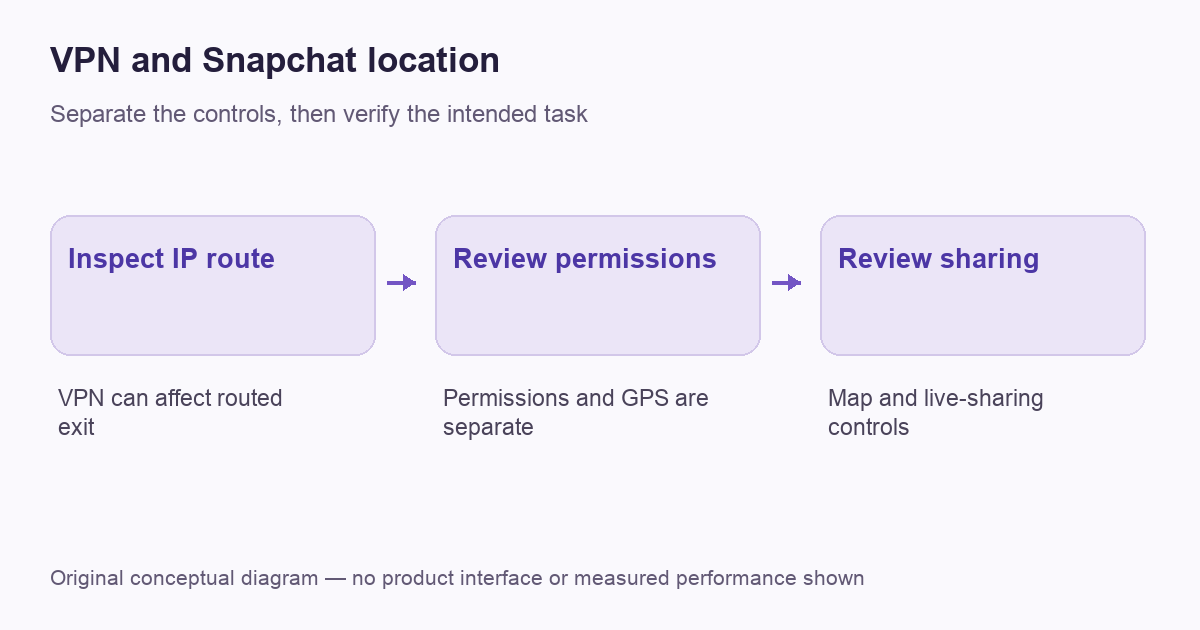
Separate network location from device location
Snap’s data-use explanation distinguishes general location estimated from an IP address from precise location collected with permission through methods such as GPS. Those are separate inputs. Changing one network route does not establish that the application loses access to every other permitted signal.
Our IP-address guide explains the broader difference. A browser location checker, a map inside an app and a signed-in account can produce different observations without being contradictory. Start by naming the screen and the information you want to control rather than assuming every place name comes from the public IP.
Identify your actual privacy goal
You might want fewer people to see your position on Snap Map, less background location access, or a different network route on unfamiliar Wi-Fi. Those are different tasks. A VPN may serve the third purpose while doing little to change the first two.
Write down the desired outcome in plain language. For example, you may want to review who receives your location or stop a particular permission when it is unnecessary. That description points to the relevant app or operating-system control more directly than searching for a new VPN provider.
VPNBLADE · PLAN SHORTLIST
A current plan to consider
Selected plan offers, not performance rankings. We may earn a commission through affiliate links. Monthly equivalents require the full payment shown.
ExpressVPN
Check your exact device setupExpressVPN Basic — 28-month introductory offer
USD 83.72 upfront · First 28 months, paid upfront
Get ExpressVPN deal Offer details & coupon conditions →Renewal & refund conditions
USD 99.95 annually after the initial 28-month term.
30-day money-back guarantee for new users; provider terms and purchase-channel conditions apply.
NordVPN
Apps across major device platformsNordVPN Basic — 27-month introductory offer
USD 94.23 upfront · First 27 months, paid upfront
Get NordVPN deal Offer details & coupon conditions →Renewal & refund conditions
USD 139.08 every year after the initial 27-month term at the current renewal price.
30-day money-back guarantee; provider eligibility, payment-channel and refund terms apply.
Surfshark
Households with multiple devicesSurfshark One — 27-month introductory offer
USD 67.23 upfront · First 27 months, paid upfront
Get Surfshark deal Offer details & coupon conditions →Renewal & refund conditions
Automatic renewal after the introductory term at the then-applicable rate. Confirm the chosen bundle’s next invoice and billing interval before purchase; no numeric renewal amount was verified.
30-day money-back guarantee; purchase-channel and provider eligibility conditions apply.
PureVPN
Published subscription offerPureVPN Standard — 27-month prepaid offer
USD 58.20 upfront · First 27 months, paid upfront
Get PureVPN deal Offer details & coupon conditions →Renewal & refund conditions
Checkout displays USD 2.15/month after 27 months. This is the provider’s renewal-rate label, not a verified future invoice. The next charge amount and billing interval were not separately established; confirm both before paying.
31-day money-back guarantee advertised; provider eligibility and refund terms apply.
VeePN
Published subscription offerVeePN Basic — 28-month introductory offer
USD 55.72 upfront · First 28 months, paid upfront
Get VeePN deal Offer details & coupon conditions →Renewal & refund conditions
Card/PayPal checkout quotes automatic renewal at USD 59.76 every 12 months after the initial 28-month period. Future renewal prices can change.
Thirty-day refund window for the original purchase, subject to terms. Rebilling and previously refunded accounts are excluded; plan extensions or added licenses can waive eligibility.
Review Snapchat’s own permission information
Snapchat’s Android permissions guide describes where to review permissions and why precise location is used for certain features. Use the current instructions for the actual application version. On another platform, use its corresponding app and device documentation instead of copying Android menus.
Review the operating-system permission as well as the in-app explanation. The two views answer related questions: what access the device grants, and what the application says the feature uses. A VPN’s connection screen does not replace either view. Do not infer permission changes from a successful tunnel connection.
Understand Ghost Mode at its stated scope
Snapchat’s Ghost Mode guide describes hiding regular Map visibility while location can still be shared with Snap. It also notes separate circumstances involving live location and Snaps submitted to the Map. Do not expand one visibility setting into a promise that every form of location sharing or collection has stopped.
Review any active live-sharing arrangement and the content you have chosen to submit. Check the current help for the relevant feature rather than relying only on the name Ghost Mode. A privacy setting is most useful when you understand its audience, duration and exceptions.
Consider background access separately
Snap’s location-sharing reminder distinguishes Map sharing from device-level background location choices. That is another reason to inspect more than the VPN status. A network route and an app’s permission to obtain location information operate at different layers.
Use the phone’s supported controls to review the permission appropriate to your goal. Expect some location-dependent features to behave differently if their access changes. Do not assume that a feature losing precision is a VPN malfunction, or that allowing location is required for every unrelated application task.
Interpret a test without overclaiming
If you want to verify a personal VPN, check the expected route in the relevant application using an appropriate method. A public-IP observation can establish a changed exit for the tested request. It cannot establish that the phone’s location services changed or that a social application discarded previously known information.
Our VPN verification workflow keeps those conclusions bounded. Keep the account, app, network and permission state with the observation. Avoid repeatedly changing location servers to solve a problem that belongs to the app’s sharing settings.
Do not mistake a VPN for account control
A signed-in account remains an account even when the network exit changes. The VPN does not automatically remove contacts, alter who can view a story or secure a compromised password. If your concern is account access, use the platform’s recovery and security process rather than relying on the tunnel.
Likewise, an IP change does not delete a previously submitted Snap or control what someone else has already seen. Review the actual content and sharing options in the service. The useful separation is between network routing, permission to collect information and the audience you choose to receive it.
A decision table for the right control
| Your question | Start here | What a VPN alone does not establish |
|---|---|---|
| Who sees my Map position? | Current Map and live-sharing settings | That the audience has changed |
| Can the app use precise location? | Device permissions and app documentation | That GPS access has been removed |
| Which public exit does this traffic use? | The relevant VPN route and a bounded check | That every other location signal changed |
| Who can access my account? | Account security and recovery controls | That a new network route secures the password |
A worked example: a new IP and the same map position
Imagine that a phone’s tested browser exit changes after a VPN connects, but a social map continues to show a location consistent with the phone’s permitted device signals. Those observations can coexist. The browser test concerns a network request; the map may use other information according to the account, feature and permissions.
If your goal is to change who can see your own location, inspect the relevant Map and live-sharing controls. If the goal is to limit collection, review the device permission and the service’s explanation. Neither task should be replaced by repeatedly buying VPNs or changing exit countries. This hypothetical example is about interpreting controls, not falsifying a location or investigating another person. It also shows why a sharing feature’s exceptions and duration belong in the same review as its main on/off setting.
When is a VPN still useful?
A personal VPN can still fit a separate routing requirement, such as using a supported connection on an access network you do not control. Evaluate that need through our public Wi-Fi guide and decision checklist. Keep its purpose distinct from managing Snapchat location visibility.
If you compare paid plans, inspect the supported phone app, connection controls, full initial invoice and renewal. The offers below are optional services for an independently identified VPN need. They are not tools that automatically move a Snap Map position, override permissions or make social-account activity anonymous.
VPNBLADE · PLAN SHORTLIST
Featured VPN deals
Selected plan offers, not performance rankings. We may earn a commission through affiliate links. Monthly equivalents require the full payment shown.
ExpressVPN
Check your exact device setupExpressVPN Basic — 28-month introductory offer
USD 83.72 upfront · First 28 months, paid upfront
Get ExpressVPN deal Offer details & coupon conditions →Renewal & refund conditions
USD 99.95 annually after the initial 28-month term.
30-day money-back guarantee for new users; provider terms and purchase-channel conditions apply.
NordVPN
Apps across major device platformsNordVPN Basic — 27-month introductory offer
USD 94.23 upfront · First 27 months, paid upfront
Get NordVPN deal Offer details & coupon conditions →Renewal & refund conditions
USD 139.08 every year after the initial 27-month term at the current renewal price.
30-day money-back guarantee; provider eligibility, payment-channel and refund terms apply.
Surfshark
Households with multiple devicesSurfshark One — 27-month introductory offer
USD 67.23 upfront · First 27 months, paid upfront
Get Surfshark deal Offer details & coupon conditions →Renewal & refund conditions
Automatic renewal after the introductory term at the then-applicable rate. Confirm the chosen bundle’s next invoice and billing interval before purchase; no numeric renewal amount was verified.
30-day money-back guarantee; purchase-channel and provider eligibility conditions apply.
PureVPN
Published subscription offerPureVPN Standard — 27-month prepaid offer
USD 58.20 upfront · First 27 months, paid upfront
Get PureVPN deal Offer details & coupon conditions →Renewal & refund conditions
Checkout displays USD 2.15/month after 27 months. This is the provider’s renewal-rate label, not a verified future invoice. The next charge amount and billing interval were not separately established; confirm both before paying.
31-day money-back guarantee advertised; provider eligibility and refund terms apply.
VeePN
Published subscription offerVeePN Basic — 28-month introductory offer
USD 55.72 upfront · First 28 months, paid upfront
Get VeePN deal Offer details & coupon conditions →Renewal & refund conditions
Card/PayPal checkout quotes automatic renewal at USD 59.76 every 12 months after the initial 28-month period. Future renewal prices can change.
Thirty-day refund window for the original purchase, subject to terms. Rebilling and previously refunded accounts are excluded; plan extensions or added licenses can waive eligibility.
Cover: AI-generated editorial illustration, not a product screenshot or evidence of testing. The inline diagram is original conceptual guidance.
YOUR EXPERIENCE MATTERS
Was this article useful?
Genuine reader helpfulness ratings. These do not measure VPN performance or verify a purchase. Only moderated submissions count. Ratings may reflect earlier versions of this information.
VPNBLADE · PLAN SHORTLIST
Ready to choose a plan?
Selected plan offers, not performance rankings. We may earn a commission through affiliate links. Monthly equivalents require the full payment shown.
ExpressVPN
Check your exact device setupExpressVPN Basic — 28-month introductory offer
USD 83.72 upfront · First 28 months, paid upfront
Get ExpressVPN deal Offer details & coupon conditions →Renewal & refund conditions
USD 99.95 annually after the initial 28-month term.
30-day money-back guarantee for new users; provider terms and purchase-channel conditions apply.
NordVPN
Apps across major device platformsNordVPN Basic — 27-month introductory offer
USD 94.23 upfront · First 27 months, paid upfront
Get NordVPN deal Offer details & coupon conditions →Renewal & refund conditions
USD 139.08 every year after the initial 27-month term at the current renewal price.
30-day money-back guarantee; provider eligibility, payment-channel and refund terms apply.
Surfshark
Households with multiple devicesSurfshark One — 27-month introductory offer
USD 67.23 upfront · First 27 months, paid upfront
Get Surfshark deal Offer details & coupon conditions →Renewal & refund conditions
Automatic renewal after the introductory term at the then-applicable rate. Confirm the chosen bundle’s next invoice and billing interval before purchase; no numeric renewal amount was verified.
30-day money-back guarantee; purchase-channel and provider eligibility conditions apply.
PureVPN
Published subscription offerPureVPN Standard — 27-month prepaid offer
USD 58.20 upfront · First 27 months, paid upfront
Get PureVPN deal Offer details & coupon conditions →Renewal & refund conditions
Checkout displays USD 2.15/month after 27 months. This is the provider’s renewal-rate label, not a verified future invoice. The next charge amount and billing interval were not separately established; confirm both before paying.
31-day money-back guarantee advertised; provider eligibility and refund terms apply.
VeePN
Published subscription offerVeePN Basic — 28-month introductory offer
USD 55.72 upfront · First 28 months, paid upfront
Get VeePN deal Offer details & coupon conditions →Renewal & refund conditions
Card/PayPal checkout quotes automatic renewal at USD 59.76 every 12 months after the initial 28-month period. Future renewal prices can change.
Thirty-day refund window for the original purchase, subject to terms. Rebilling and previously refunded accounts are excluded; plan extensions or added licenses can waive eligibility.